


Dear all
This is my first post in the forum. As I believe that the issue I have hasn’t been dealt with before, I allow myself to open a new thread.
I work with Macs and sometimes have a job as DJ. The desktop is an older Mac Pro (Mid-2012) running on Mojave (not updateable anymore) and iTunes (V 12.9.5.5).
I am used to primarily work on my desktop computer and curate my iTunes library and my playlists there. I then simply copy the necessary files into the folders of iTunes on may laptop.
I have now recently updated my laptop, a MacBook Pro (2017) running on Maverick (not updatebable anymore as well).
After updating this laptop from Mojave to Maverick, iTunes was replaced with Apple Music as expected. As importing the iTunes library (about 9’500 songs) didn’t work, I reinstalled iTunes using the app Retroactivate. iTunes works fine again.
The problem now is, that djay Pro doesn’t link to iTunes and all my playlists anymore. How can I fix this? It remains linked to the empty Apple Music library.
Thanks in advance for any possible hints.
Hi @ditaup, welcome to the Community! This is a pretty unique issue so I’m not 100% sure on the potential fix. However, you could try the following:
Make the Music app use your real library, then let djay read it.
A) Convert/attach your old iTunes library into the Music app
- Quit Music (⌘Q).
- On the laptop, make sure you have your actual iTunes library files available (from the desktop or backup), specifically:
- iTunes Library.itl (the database)
- ideally the whole ~/Music/iTunes/ folder (or wherever your desktop stores it).
- Hold Option (⌥) and launch Music.
- In the “Choose Library” dialog, click Choose Library… and select your iTunes Library.itl.
- Music will convert it into a Music Library.musiclibrary at a location you choose. 
Now confirm in Music that your playlists/folders show up correctly.
If your audio files live on an external drive or in a different path than on the desktop, you may need to:
- set Music’s Media folder location (Music Settings/Preferences → Files), and/or
- use Music’s consolidate/relocate options (depends on your setup).
B) Give djay permission to read the Music media library
On the laptop:
- Go to System Settings/Preferences → Privacy & Security → Media & Apple Music (or Media Library on some macOS versions)
- Enable djay Pro. 
- Then quit and relaunch djay Pro.
C) In djay, choose the correct source
- In djay’s library sidebar, make sure you’re looking at Local Music / Music (library), not the Apple Music streaming source (these are separate in newer djay versions).
- If there’s a Refresh/Reload Music library action in djay, run it after granting permissions.
Thx a lot for your extensive help. The issue is actually already the problem of linking the Apple Music App to the former iTunes library. I’ve ben given this tip from others already and have tried multiple times but even after more than 48h of trying to import all the files and playlists from iTunes (around 9’500 songs) it simply won’t do it.
And from what I have heard from some users there are some reasons to stick to iTunes, even using OS Monterey.
So my initial question remains the same: how can link djay with iTunes?
You’re welcome @ditaup. Sorry that didn’t help. One thing worth checking would be the Files Source within the Music app, as well as seeing if turning off “Show Apple Music” forces djay to only see the “old” library.
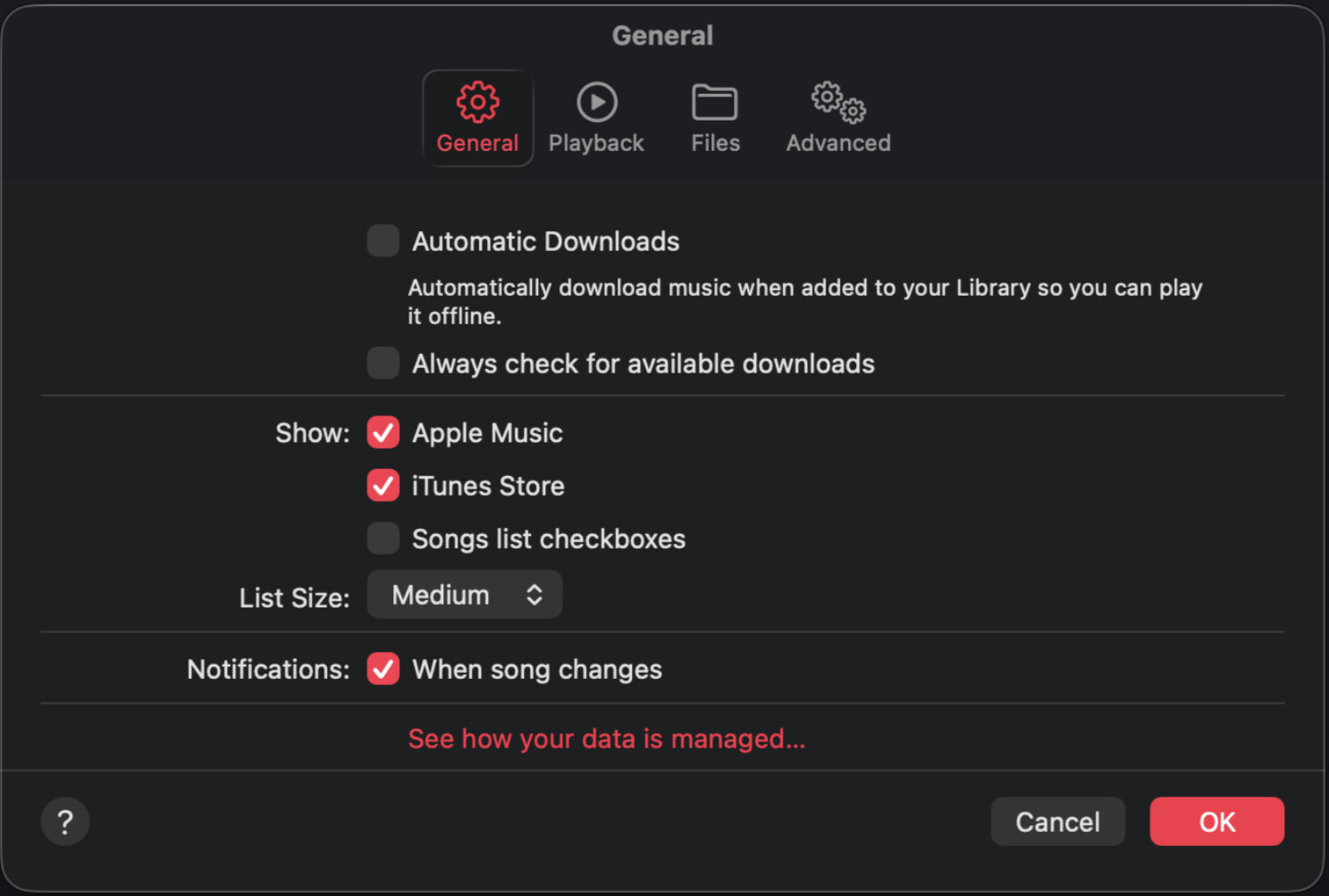
Thank you anyway @Slak_Jaw.
I tried these things but without success. What I don’t know but wonder is how djay knows or decides which library to work with. I can’t see anything within the preferences menu that refers to this linking. With “Apple Music” and “iTunes” being present at the same time, there must be some sort of automatic linking process made. Sounds to me like the programmers at algoriddim might try to add a preference box where the user could choose.
You’re welcome @ditaup. I’ll check with the engineering team next week when they return from holidays.
That would be really great. Thx a lot in advance.
You’re welcome @ditaup
This is good information. Is there any way, that you could make a “complete” Apple Music library article with all these goodies? I am on new Mac and iPad, but I am sure there are many small things I did not pick up. Like this one. I sometimes accidentally add Apple Music versions to my playlists. This will fix that.
Thanks for the feedback @RobustaDK. I have shared this with our help center team for consideration. I’ll share more news on this when I have it.
-
What about exporting playlists from iTunes, then importing to Apple Music?
- iTunes: File > Library > Export Playlist
- .m3u for regular playlists
- .xml for smart playlists
- iTunes: File > Library > Export Playlist
-
You may also be able to directly drag & drop playlists between iTunes → Apple Music.
Thanks for the suggestions @Michael_Wisniewski
The best way to fix this is to import your iTunes library into the music app so that djay can see it. Alternatively, you can use djay’s Add Library Folder option to directly specify the folders where your music and playlists are stored.
Thanks a lot @cooper.olivia
As mentioned for some unknown reason, my music app (V 1.2.5.7 on OS Monterey) doesn’t seem to be able to import the iTunes library. I’ve tried multiple times but even after more than uninterrupted 48h nothing turns out.
So I would like to try this Add Liberary Folder option. But where can I find it? I’ve qgot two versions of djay installed: V DJAY Pro 2 2.2.8 and V DJAY Pro V 5.6.1). Thanks for more precise instructions.
Hi again @ditaup, I checked with our engineering team and this is what they had to say.
On macOS versions that have the Music app instead of iTunes, you have no choice but to use Music. Retro installing iTunes will not allow djay to access the iTunes library because our library access is controlled at the macOS system level.
We’re not sure why the Music app won’t import your legacy iTunes application. We suggest you contact Apple support to see if they can help. Once you have your library in the Music app, djay 5.6.1 should be able to access it without any issues. I hope that helps!
Hello! It’s been a week since my last reply. I’m going to consider this topic completed for now so I can focus on others. However, please feel free to respond and we can definitely revisit this. Thanks!


