Hi all
Got a little issue with my Reloop Elite connecting to a Ipad pro.
Specs:
iPad Pro (12,9 Zoll, 6. Generation)
MaciOs: 26.5
DjayPro Version 5.6.6
Hardware: Reloop Elite
Firmware: v.1.07
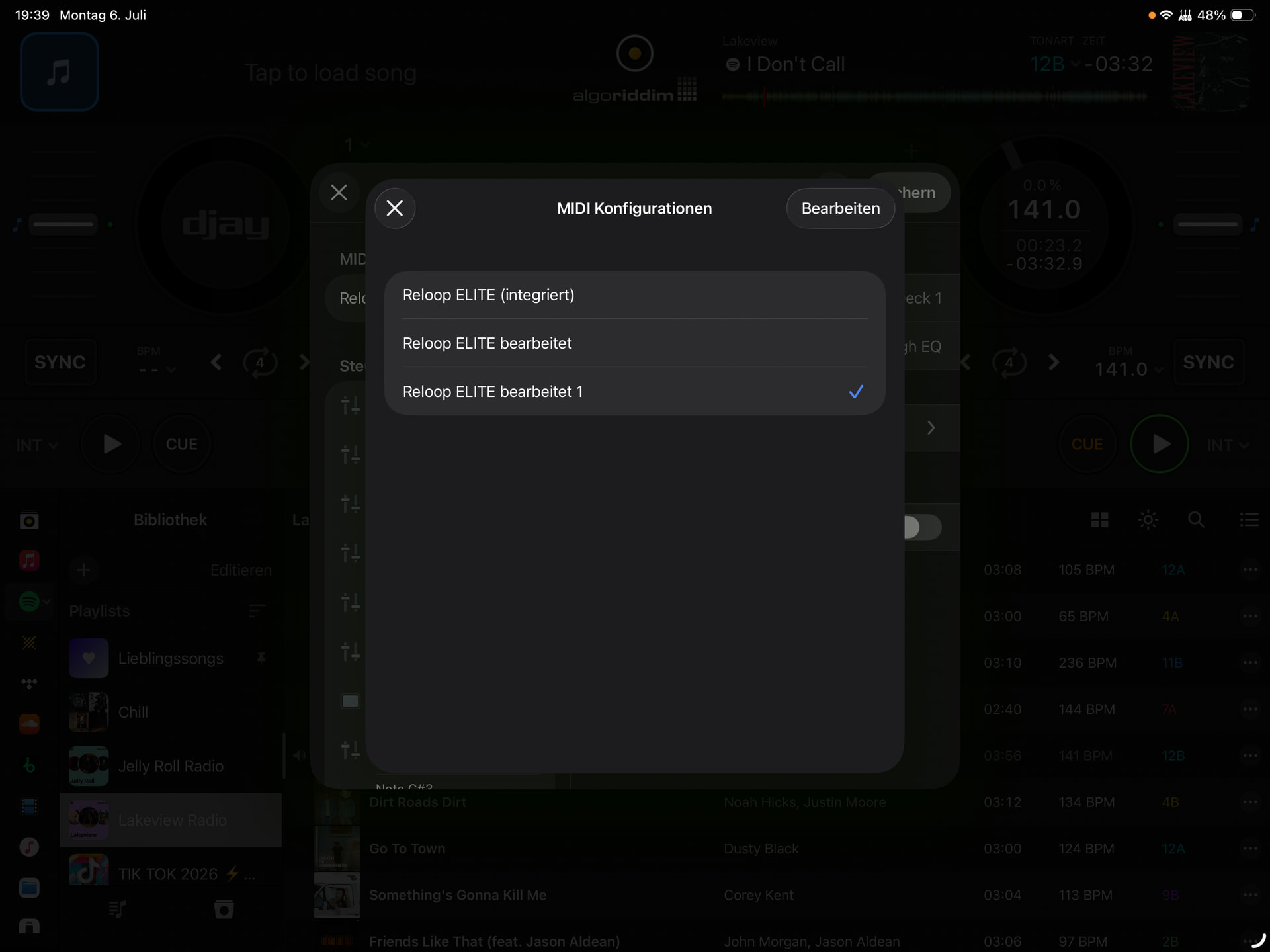
Issue: Everytime I connect my Reloop Elite Djay Pro automatically generates a new Midi Map.
Workaround: everytime I connect the Elite and open djay pro, I need to go into settings Midi-Devices, click on Reloop Elite, and change Midi-Mapping to Reloop Elite (integrated) and delete Reloop Elite edited 1, Reloop Elite edited 2, etc.
If I don‘t, the effect „ON“ Button on my Reloop Elite will Mute the system, and pressing the button to switch off will unmute everything.
Anyone else facing this little issue? I can work with it, would just be nice not to do the extra steps of deleting the new generated midi files every time a start djaying.
Thanks for the help.
Hi @freddyK_MC, welcome to the Community! The Reloop Elite is natively supported by djay on iOS so you do not need to create or edit the MIDI mapping.
- Please try disconnecting your Reloop Elite from the iPad, close djay and all other apps, the follow the linked procedure linked to perform a Forced Restart of your iPad: Force restart iPad - Apple Support (IE)
- After rebooting please test and confirm if the issue persists.
- If the issue persists, can you please capture a short screen recording or video when you connect the Reloop Elite to clarify what is happening?
- How exactly are you connecting your iPad to the Reloop Elite (any USB adapters or Hubs)?
- Can you please download a MIDI monitor app to your iPad like MIDI Scope to see if it is registering any unusual MIDI messages when your Reloop Elite is connected?
- Was this issue occurring on previous versions of djay or did it just start with 5.6.6?
- Did this issue occur with the previous v1.06 Reloop Elite Firmware?
- Are you running any other apps in the background?
- Do you have another macOS or Windows device running djay that you could test on?
Thanks for the quick reply. Will test it tomorrow and record a short video..
Information so far:
It happened with the old ELITE firmware as well.
Never used the ELITE with an older version of dajy pro (only got the mixer coulpe of weeks ago).
No apps in the background, just Djay pro…
Tried it directly connecting to the ipad and through a Belkin and UGREEN USB Hub as well as with the reloop pro hub… everywhere the same issue.
Do not use djay pro on an other device, but could test it on a Macbook Pro and a Windwos Notebook… will try all three of then (incl. Iphone if needed).
Keep you updated.
1 Like
You’re welcome @freddyK_MC. Thanks for the additional info. Sounds good, I’ll wait for your update tomorrow.
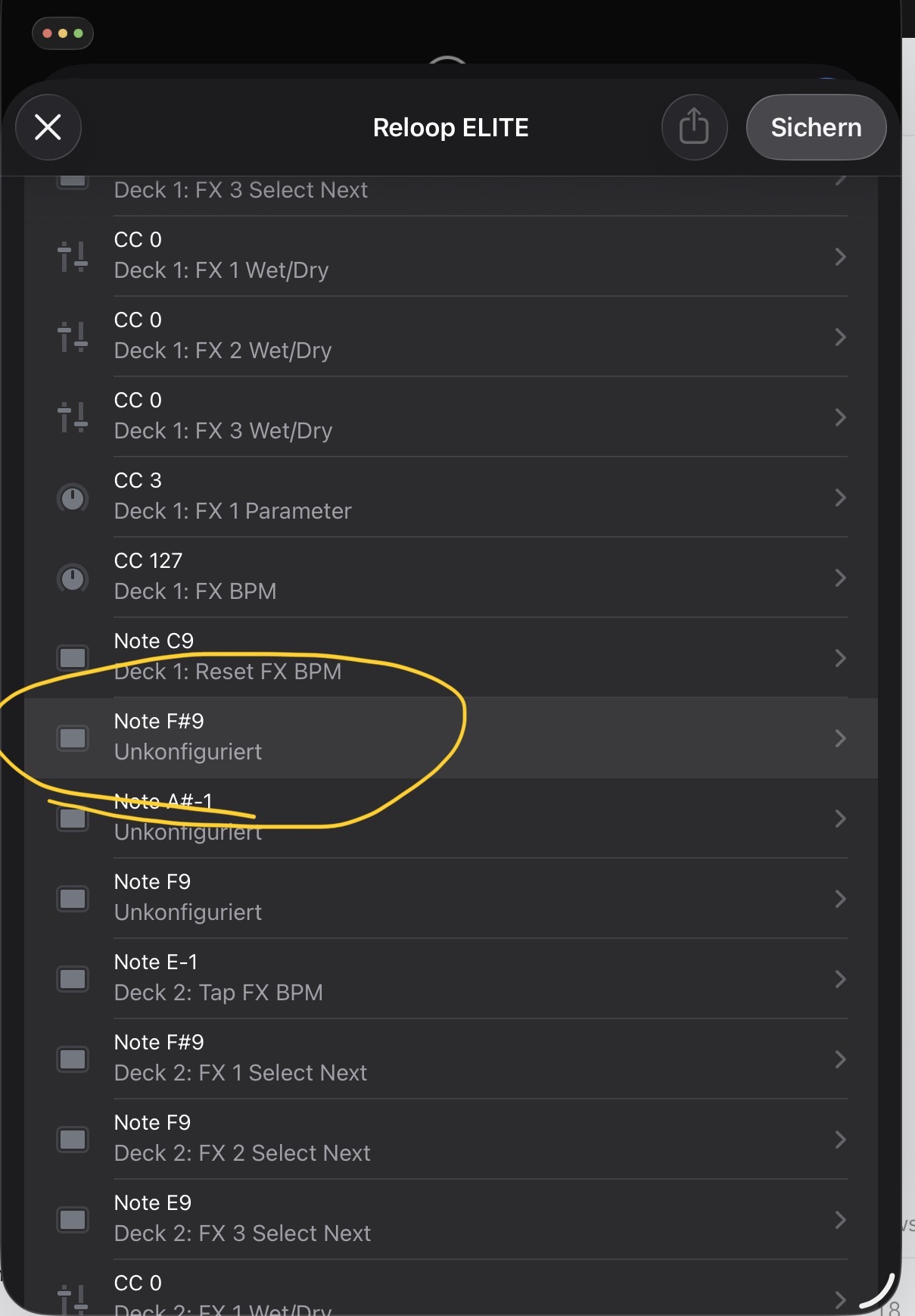
I Did try it with my ipad and my iphone… what I realised, in the original midimap file the ON button (Midimap Not F#9) for activating the fx is not configurated.
so i did configurate it, and it worked. It created a new edited Reloop Elite file. Closing djay and reopening djay, it loaded the edited file. Pressing the ON button for fx activate on the ELITE - full mute again. Changed midimap to the original (where the button is not configurated) and it worked again. Closing the app reopening, original midimap did not work, switching to the edited, worked again.
will download the djay app for windows and macbook and try it tomorrow…
The actual work around is, open djay, click “change” midi map to a different one, and it works (looks like it does not matter which one I choose and if Note F#9 is configurated or not. As soon as I change midi map, button activates fx… 
Great troubleshooting work @freddyK_MC. This is helpful information. Before I pass this onto our hardware team to see if they can reproduce it, would you be up for trying a fresh installation of djay? If so, please follow the steps below:
I suggest that you backup your djay Media Library database and any custom MIDI mappings, then uninstall djay, reboot your device, and reinstall the latest version of djay from the official App Store.
You can find the files above in the following location:
Copy the files to a new location or external drive before uninstalling djay. After reinstallation, you can simply copy these files back to their original locations to maintain your Hot Cues, Saved Loops, My Collection Playlists, History and Queue.
No Problem, can do that… might be monday…. should i post everything in here or via pm?
What I will test
- Midi monitoring ipad
- Macbook test
- Windows test
Reinstall djay on ipad
Could send you full screenrecording on all devices, would than be a link to dropbox.
Sounds good. Please post everything here @freddyK_MC. Thanks!
I deinstalled DJAY on Ipad, restarted Ipad and reinstalled it without copying the user data into the new folder. After connecting it did not work and it started again creating midi mapping files after each connection. I deleted the 2 new ones and than it worked..
Tried djay on my macbook pro 2017 and it worked from scratch.
Tried it on my Iphone 16 max pro and did the same funny thing like on my ipad… guess there is an issue with ELITE and the ios…
Will deinstall djay on my ipad again and reinstall it with midi scope in the background… keep you updated
Deinstalled it again and reinstalled it… now it works, without using RANE Twelve…
Tried it with the RANE Twelve connected to the USB hub of the ELITE (as before) and it worked with the Twelve as well….
It is really wierd, can‘t say what it is, but sometimes it automatically creates a new midi map.
It works now even with NoteF9 not configurated
What i found out tough, after installibg djay on ipad, the first time the dvs configure pop did not showed up.
Second time installing it, it poped up…
Very strange. Thanks for the detailed additional troubleshooting @freddyK_MC. I’m going to share all of this with our hardware engineering team to see if they can reproduce the issue on their end and offer any suggestions. I’ll report back when I have more news. Thanks!
Hi again @freddyK_MC, just a few follow up items that will help our hardware engineering team:
- A MIDI monitor capture (e.g. MIDI Scope) recorded during connection and while pressing FX “ON” in both the faulty state and the working state, to show what the Elite actually sends.
- One continuous screen recording covering: connect, auto-generation of a new map, press FX “ON” (output mutes), switch mapping, press FX “ON” again (FX engages) — with the main mixer/meters visible.
- Confirmation of Mixer Mode (Internal vs External) and the Audio Device/Configuration settings on iOS.
- Exact iPadOS/iOS build number.
gonna do a new recording incl. sound etc. which file do you want the Midiscope? or should i just screen record it going through the midi list in midi scope? tried to upload the exported file but did not work.
Thanks @freddyK_MC. You can upload the exported file to your Google Drive/Dropbox, enable sharing permissions, then share a link to the file here.
Hi again @freddyK_MC, our hardware engineering team tested this on multiple iOS26 iPads and I couldn’t reproduce the duplicated MIDI mappings issue. However, the issue with the affected channel signal being muted when FX ON button was reproducible. The workaround is to deactivate FX first, then move the crossfader to the other side and then back - I realize this is not ideal mid-set. A new djay session also recovers from the issue, but it re-appears as soon as the FX button is pressed again. The team is looking into a permanent fix and I’ll share more news here when I have it. Thanks!
Hi @freddyK_MC, djay 5.6.8 was released today and should address the FX ON button issue. Please update and report back when you get a chance. Thanks!
Hi @Slak_Jaw I had 2 bookings and some rehearsals… the duplicated MIDI map, never happened again. Even the FX On button issue did not come up at the shows I played…. will update djay and test it out… if there are any issues, will keep you update, unfortunatelly it will be in about two weeks sind I am away this and next week..
1 Like
Sounds good. Thanks @freddyK_MC