NOTE: Please use the search function above before posting to avoid creating duplicate topics.
- Device model (e.g. 2020 iPad Air 4th Gen):
- Version of operating system (e.g. macOS 14.4.1):
- Version of djay (e.g. 5.1.2):
- Hardware/controllers used (e.g. Reloop Mixon 8 Pro):
- Hardware firmware version (e.g. 1.0.1):
- Please consider sharing a short video or screenshots to help clarify your question/suggestion/feedback
YOUR QUESTION / SUGGESTION / FEEDBACK:
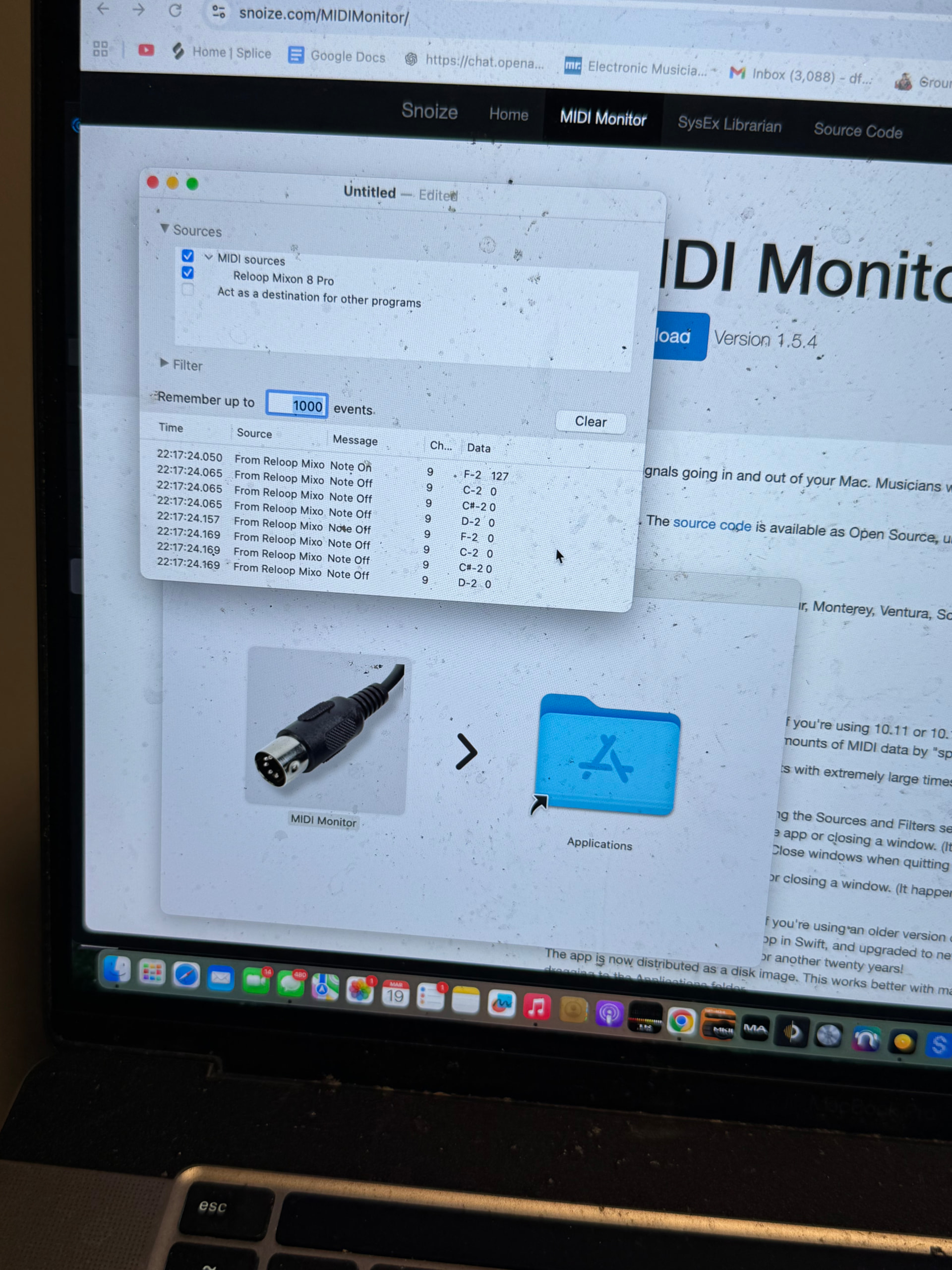
I just got my mixon 8 pro used from GC and have done my checks to ensure it’s all working as they said. Took some time but I’ve made sure the inputs and outputs and what not worked before checking the midi mapping with djay to see if it was all working as it said it should in the manual. Definitely wasn’t. I see the instant fx not working and fx knobs and buttons having duplicate mappings etc.. all that I can figure out cause djay sees it’s midi messages. But the fx toggles aren’t being seen at all.. I downloaded a midi monitor to see if my computer was getting again and it is. 4 notes per toggle flip, on midi channel 9, but djay sees none of it.
And then it seems extra iffy with my phone when using djay. I have had to do a sequence of events to get it to pick up the controller, and even then that only has worked half of the times I’ve tested it.
Hi @miles_holt, please make sure that you download and install the latest Mixon 8 Pro firmware from Reloop: Reloop Mixon 8 Pro - Reloop. There were several know issues with the older firmware.
Also, note that some MIDI functions for the Mixon 8 Pro have been programmed “under the hood” and are not accessible within djay’s MIDI Learn Tool. If you’re familiar with XML files you can see these by viewing the XML file.
Firmware is updated. Do the toggles work for everyone else?
Thanks for the follow up @miles_holt. Can you please share a short video to clarify the issue you’re experiencing?
Hi @miles_holt, thanks for the video. Please note that on the Mixon 8, you need to press one of the FX1, FX2 or FX3 buttons in addition to the FX Paddles to enable the FX in djay. As mentioned above, the MIDI command for the FX Paddles is handled “under the hood” and is not visible in the MIDI Learn Tool of djay. Remapping of the paddles is not possible in the MIDI Learn Tool. So, what you are observing is expected behaviour.
Please confirm that the djay FX work when you use the FX on/off buttons in conjunction with the paddles.
I’ll test that when I’m home. I didn’t observe them working, but then again. I haven’t custom mapped all of the fx buttons yet. The knobs were attached to wet/dry, and beat parameter knob selected the division of the effects, but the fx buttons weren’t even mapped at all. I saw your post from a long while ago about mapping them and them sharing the same midi note and being inseparable, so I made the buttons fx on/off.(shift + fx buttons worked as neural mix selection for the effects out of the box). The issue I run into with that is the knob also shares on/off as a result so if I fully turn clockwise and then turn it again it can turn the effect off, then I have to draw it back and push back fully clockwise to reactivate the effect, making the lights of the buttons not even correspond. How did they market this as djay compatible out of the box??
Also.. are the fx paddles supposed to toggle the instant effects or the three manual ones? It doesn’t explain if it controls on/off for all 3 manual effects or just one
The FX paddles are only for the 3 Manual FX. The Instant FX should be mapped to the performance pads.
I highly recommend you get familiar with the (built-in) MIDI mapping before attempting to customize anything on the Mixon 8.
Instant fx wasn’t mapped at all. Not sure if pitch play or saved loops are as well(going off memory). I’ve gone through it for hours. So I’ll have to do those manually, but that’s no biggie. Mostly concerned about the supposed behavior of the fx paddles… not understanding how they are supposed to work if a button is meant to turn on the fx what would the point of the paddles be? Since the button is a hold/togglefunction effectively
Is there a new mapping for this current firmware? From what I saw each time one was posted, soon there was a post afterwards saying the firmware update messed up the mapping.
The FX 1-3 buttons are to select which Manual FX you want enabled. Then the Paddles are use to turn them On. The idea is that you can have your FX pre-selected then quickly turn them On/Off with the paddles.
The latest (built-in) MIDI mapping is automatically included in djay. There is no need to select or download a new one.
Hello.
I actually never experienced issues with this. The manual fx on/off buttons worked out of the box and so did the performance pad modes. What i noticed is that the mode selection buttons didn’t appear assigned to anything themselves, but i’d say that they cause the pads to send different midi messages it seems.
For the manual fx buttons, have to check my map, but i’d say that it’s the same thing. I’d personally try to delete the second map it creates, the editable one, and reconnect the mixon afterwards, so it comes back to the default out of the box one
Thanks for sharing @dave_scalambrin