


I’ve got a little side project going where I’m building MIDI Mapping Keys for hardware that I own or have access to. This is my personal edit to the (built-in)/default mapping. The main differences are:
- Added SHIFT+LOAD=STEMS SPLIT
- SEEK (MODE+BROWSE TURN) has been replaced with BEATJUMP
- Added SHIFT+BROWSE TURN=BEATJUMP SIZE +/-
- FX PARAMETERS ← → have been replaced with FX ROUTING → ACAPELLA
- FX WET/DRY Knob has been replaced with FX PARAMETER for FX1, FX2 and FX3
- AUTO LOOP has been replaced with 8 BEAT AUTO LOOP
- NEURAL MIX PADS have been reversed so 1-4 are NM SOLO and 5-8 are NM MUTE.
- CFX TEMPO (SHIFT+DECK2 HEADPHONE CUE) has been replaced with HEADPHONE SPLIT CUE.
- PITCH BEND ← (SHIFT+CUE) replaced with Jump to Start of Track
- PITCH BEND → (SHIFT+PLAY) replaced with Auto Transition to that Deck
Reloop Mixtour Pro — djay 5.6.7 MIDI mapping (Custom)
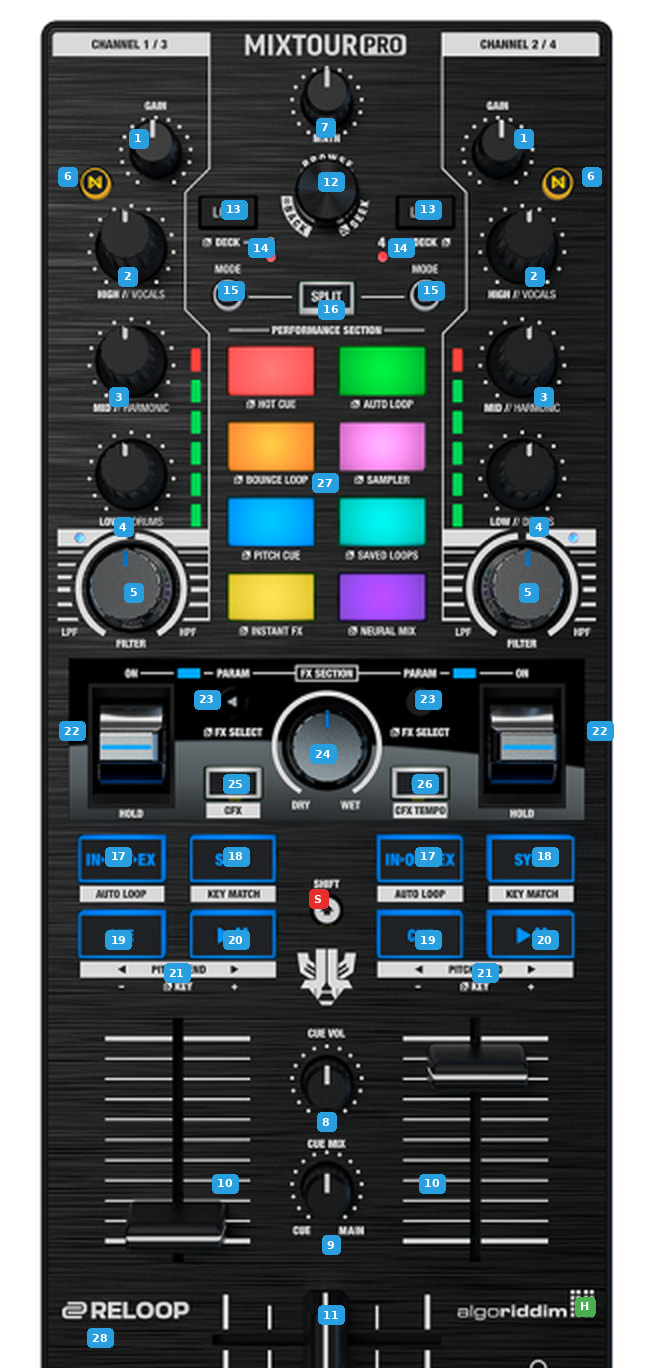
The Mixtour Pro is a 4-deck controller: the left side drives decks 1/3 and the right side decks 2/4, with MODE+LOAD (13) toggling which of the pair each side controls. Every deck control below is mirrored left/right.
| KEY | ACTION | SHIFT or MODE (SECONDARY) ACTION |
|---|---|---|
| 1 GAIN | Deck channel gain | — |
| 2 HIGH // VOCALS | High EQ. Neural EQ mode: Vocals stem level. | — |
| 3 MID // HARMONIC | Mid EQ. Neural EQ mode: Harmonics stem level. | — |
| 4 LOW // DRUMS | Low EQ. Neural EQ mode: Drums stem level. | — |
| 5 FILTER | Bipolar filter (LPF left / HPF right) | — |
| 6 NEURAL (N) | Toggles the EQ knobs (2/3/4) between 3-band EQ and Neural Mix stem levels. | — |
| 7 MAIN | Master Volume - Not mapped | — |
| 8 CUE VOL | Headphone Volume - Not mapped | — |
| 9 CUE MIX | Cue/Main headphone blend | — |
| 10 LINE FADER | Deck channel volumes | — |
| 11 CROSSFADER | — | — |
| 12 BROWSE | Browse library; turn to scroll (also seeks the track, or moves the loop-out point while looping). Push moves between sections. | SHIFT: Library Back (push). SHIFT: Beat Jump Size (turn) (Custom). MODE: Beat Jump (turn) (Custom). |
| 13 LOAD | Load track to this deck. | SHIFT: STEMs Split (Custom). MODE: Deck 3/4 Select |
| 14 DECK | MODE+LOAD=Switches the side between decks 1/3 and 2/4. | |
| 15 MODE | Selects the pad mode: Hot Cue - Auto Loop - Bounce Loop - Sampler - Pitch Cue - Saved Loops - Instant FX - Neural Mix. Also enables other Secondary Actions. | — |
| 16 SPLIT | Single/Split pads: all 8 pads to one deck, or 4 per deck. | MODE+SPLIT=Single, all 8 Pads for one deck |
| 17 IN-OUT-EX | Loop In / Out / Exit. | SHIFT: 8-Beat Auto Loop on/off (Custom) |
| 18 SYNC | Sync | SHIFT: Key Match |
| 19 CUE | Sets a temporary cue point when paused, or returns to it when playing. | SHIFT: Jump to Start of Track (Custom). MODE: Key Shift (—) |
| 20 PLAY | Play/Pause | SHIFT: Auto Transition (Custom). MODE: Key Shift (+) |
| 21 PITCH BEND ◄► | SHIFT: Restart & Auto Transition (Custom). MODE: Key shift down/up | |
| 22 FX PADDLE | Deck FX on/off. Push up (ON) latches; pull down (HOLD) is momentary. | SHIFT: Backspin |
| 23 PARAM ◄► | Routes FX to the Vocals (Custom) | MODE: FX Select prev/next |
| 24 DRY/WET | FX1, 2, 3 Parameter (Custom) | — |
| 25 DECK1 PRE-CUEING | Deck 1 Headphone Pre-Cueing | SHIFT: Crossfader FX Toggle |
| 26 DECK2 PRE-CUEING | Deck 2 Headphone Pre-Cueing | SHIFT: Headphone Split Cue (Custom) |
| 27 PADS | HOT CUE: Set/Trigger Hot Cue 1 - 8. BOUNCE LOOP: 1/32 - 1/16 - 1/8 - 1/4 - 1/2 - 1 - 2 - 4 beats. PITCH CUE: Pitch Play from the cue point, 8 steps. INSTANT FX: Instant FX 1 - 8. AUTO LOOP: 1/4 - 1/2 - 1 - 2 - 4 - 8 - 16 - 32 beats. SAMPLER: Trigger slots 1 - 8. SAVED LOOPS: Save/recall loops 1 - 8. NEURAL MIX: pads 1-4 Solo Drums - Bass - Harmonics - Vocals (Custom); pads 5-8 Mute Drums - Bass - Harmonics - Vocals (Custom). | SHIFT: HOT CUE: Clear Hot Cue 1 - 8. PITCH CUE: Set the pitch-play cue points. SAMPLER: Pause slots 1 - 8. SAVED LOOPS: Reloop 1 - 8. Other modes repeat the primary layer. |
| 28 MONO/STEREO | Switch between Mono and Stereo Audio Output. Not mapped | — |
| S SHIFT | Hold for secondary actions in the SHIFT column. | — |
| H HEADPHONES | Headphone output (3.5 mm) | — |
Pad modes in full (8 modes × 8 pads, base / SHIFT)
Pad mode is chosen with MODE (15); SPLIT (16) decides whether all 8 pads drive one deck or split 4-per-deck.
- HOT CUE — Pads: Set/Trigger Hot Cue 1 - 2 - 3 - 4 - 5 - 6 - 7 - 8. SHIFT: Clear Hot Cue 1 - 8.
- AUTO LOOP — Pads: 1/4 - 1/2 - 1 - 2 - 4 - 8 - 16 - 32 beat loops. SHIFT: same intervals.
- BOUNCE LOOP — Pads: 1/32 - 1/16 - 1/8 - 1/4 - 1/2 - 1 - 2 - 4 beat momentary (bounce) loops. SHIFT: same intervals.
- SAMPLER — Pads: Trigger sampler slots 1 - 8. SHIFT: Pause slots 1 - 8.
- PITCH CUE — djay Pitch Play. Pads: play the track from the cue point at 8 pitch steps. SHIFT: set the cue points.
- SAVED LOOPS — Pads: save / activate stored loops 1 - 8. SHIFT: reloop 1 - 8.
- INSTANT FX — Pads: Instant FX 1 - 8. SHIFT: same (Instant FX 1 - 8).
- NEURAL MIX (Custom) — Pads 1-4: Solo Drums - Bass - Harmonics - Vocals. Pads 5-8: Mute the same stems. SHIFT: same layout.
Hidden modifier combos
Beyond SHIFT, the MODE button doubles as a modifier. These per-deck functions have no dedicated button:
- Tempo − — SHIFT + MODE + CUE
- Tempo + — SHIFT + MODE + PLAY
- Loop Halve — MODE + IN-OUT-EX
- Loop Double — MODE + SYNC
- Loop In (move point) — SHIFT + MODE + IN-OUT-EX
- Loop Out (move point) — SHIFT + MODE + SYNC
Global library / view combos:
- Section back / forward — BROWSE push, Back=SHIFT+BROWSE push
- Toggle waveform view — SHIFT + Deck 1 Neural Mix pad
- Cycle view mode — SHIFT + Deck 2 Neural Mix pad
Reloop MIXTOUR PRO-SJ2.0.djayMidiMapping (276.5 KB)


