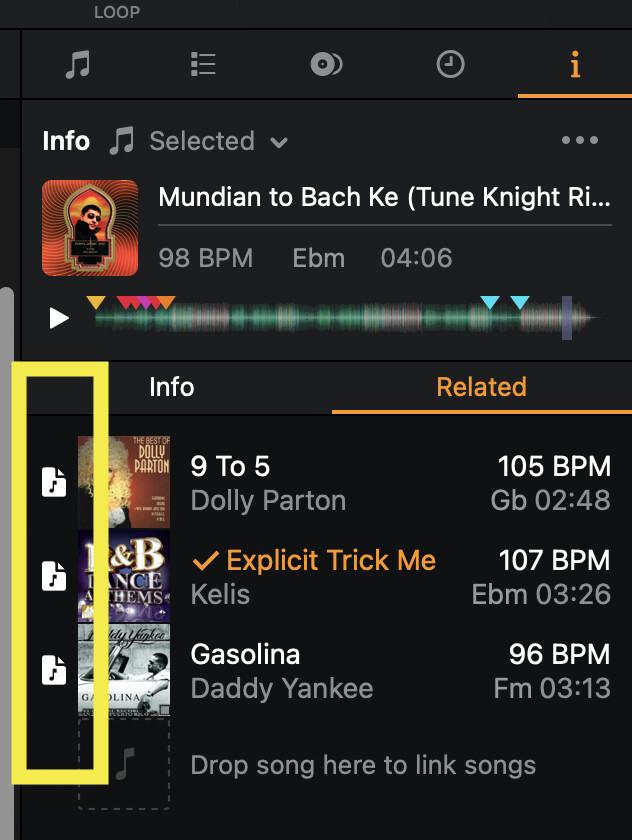
“Currently when you import iTunes tracks into My Collection they are just treated directly as files and are not linked to iTunes, so that’s why the source icon for the track is the “file” icon. We can look into changing this behaviour if people would find it useful, but ultimately it’s still just a link to a track file not to the track in iTunes.”
That’s correct. But that does count for the ones WITH the iTunes icon as well.
Again: since we already saw in my earlier video that different source icons can lead to different versions of cue points, this feels pretty unwanted to me.
Hi @DJ_Big_Blender, sorry for the delayed reply on this one. Our engineers have been extremely busy get caught up after the holidays. The mismatch of cues is most likely the “Title ID” issue again where the iTunes metadata does not match the metadata tagged in the audio file. If you could please upload some examples files that cause issues then we can confirm this. Thanks!
As shown in my previous videos, all issue with “Different Cue Points for the same track” occur in situations where same tracks are shown with different source icons.
Aditional I’ve now discovered also that all manually related tracks of a certain track (in the side panel) are displayed with the same “local file” source icon. When these tracks are loaded and played from the related tracks panel, they also appear as “local file” in the History tab.
Hi @DJ_Big_Blender, here’s the response from engineering. The cue point issue is caused by the iTunes metadata and the ID3 metadata not matching so the title/artist/duration. If you make sure that these match exactly then there should be no issue with the cue points.
I’ve had the exact same issue dragging items from Rekordbox on Windows, Explorer and and from external apps into Djay Pro – some files just aren’t detected. Seems Djay reads or calculates the file length differently, so it treats the file as a different one. I think they should prioritise matching on filename and location over title, name and length. I raised this in a separate ticket a while back but it went nowhere.
Now I’ve got another file dragged from the same source, with everything including length matching, but it won’t load the cue points or play numbers.