


Dear all,
I resolved the issue. It is related the default output of the application:
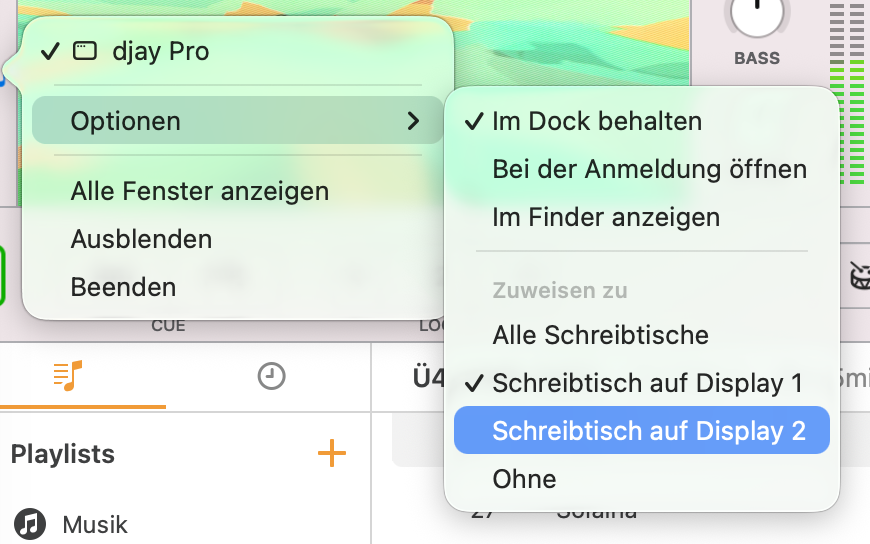
So if the default screen associated to the app is the Screen 1 (the laptop), then the VJ projection is not properly target to the expected screen.
How to reproduce:
- Use a MacBook and an external display, as extended mode.
- Add the DJay Pro to the application bar
- Edit the options of the app on the bar (as shown on the screenshot) and assign the screen 1 as target. Then share the VJ visualization to the external display monitor. You would see that it does not work properly.
- Try again closing the app, and editing the app options to target to the screen 2. Open the Djay Pro app, move it to the internal MacBook screen and share the VJ again to the external monitor. Now it works.
(Note, maybe you may play a bit to reproduce it).
Here a video showing how (1) works well, (2) fails as it used to be until found this resolution, (3) repairing it back again works.
So if anyone is having a similar issue, check that the default app option screen is targeted to the external display by default, and then share the VJ on the external monitor.
Music credits: ZETAK & Fillas de Cassandra - ANGULEELE


