Hardware/controllers used: only external display or projector, no controllers.
Summary of the issue:
With the latest 5.5 upgrade the projection on an external monitor for the visualizations (loops) does not work. I tested it already in two different environments were it used to work successfully before the upgrade (projector and external monitor) without success. Tried to re-install Djay Pro on the Macbook did not help. Tried loops and also videos, without success.
How to reproduce the issue:
Use the Video UI.
Select an existing loop or video on a deck, and start it.
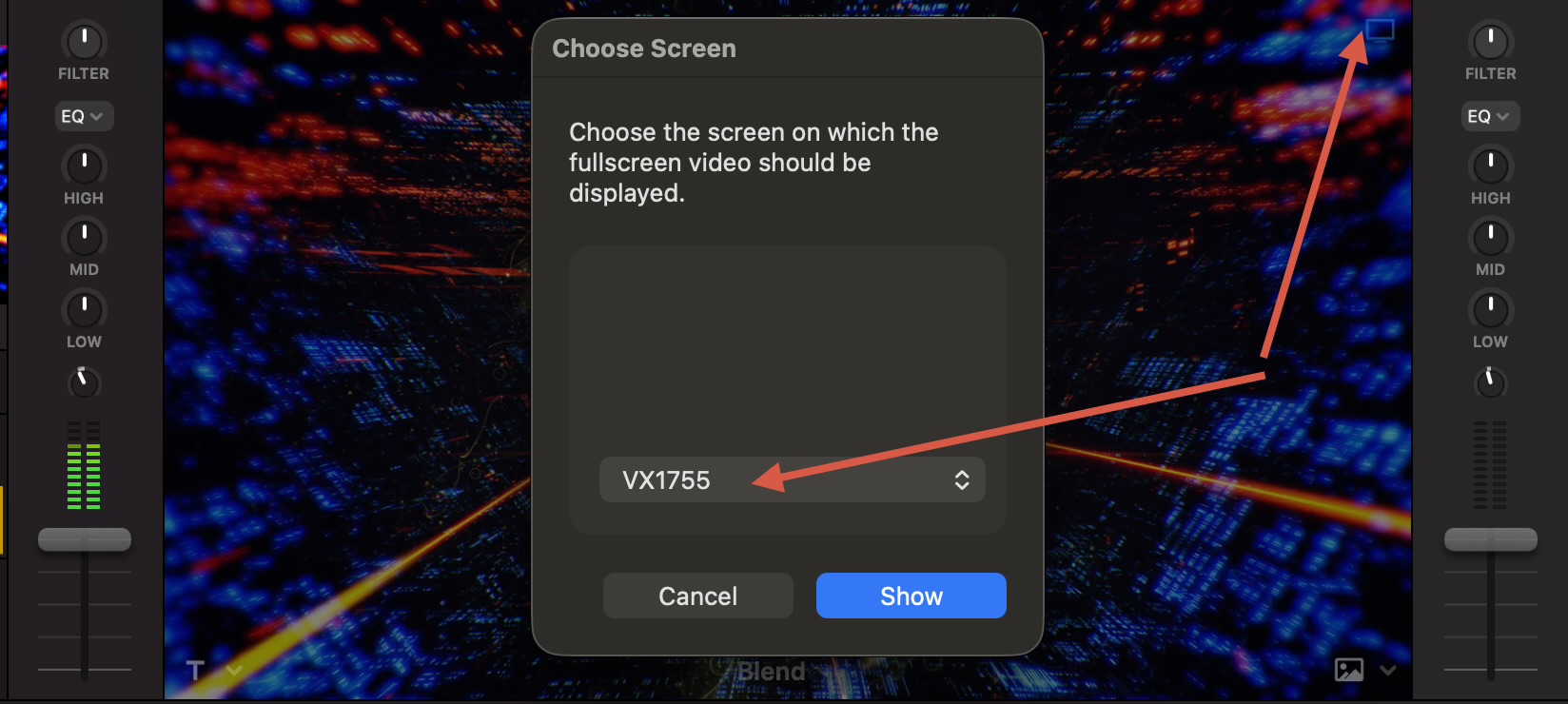
Click on the option to select screen: external display or external projector
If using an external HD monitor: it does show on the laptop screen below, as it cannot allocate the right position. If using the external monitor (HD) it open and closes the video projection on the same laptop, no showing any visualization on the external display.
I was on Tahoe for about a week on a 2019 intel mac and projection was working well.
Can you confirm right monitor settings?
Normal way:
Do the hdmi connections
Power up the monitor or projector
Power up the mac
At this point, if you are properly set, you should have 2 independent desktops: your primary desktop on your mac, and a second desktop on the monitor - no mirroring.
Then launch djay, switch to video mode and “Show on screen”
At this point the monitor screen shoild turn pitch dark awaiting a video to play on master deck.
What exactly is happening at what stage, if you followed that process?
Hi @plan-b, welcome to the Community! I just tested this on my Mac running macOS 26.0.1 and djay 5.5. Everything works as expected with the external monitor. If Armigo’s suggestion above does not solve your issue, can you please capture a short video and share it here? Thanks!
I am familiar with sharing with external displays and also using that feature of djay pro, so following your instructions Armigo does not work (the way I am doing it).
I found out something interesting on the meantime:
If I put the djay app on the external monitor and share the visualization with the integrated display of the Macbook it works as expected.
If using standard MacBook resolution setup: I put the djay app on the integrated MacBook display, then the share window opens and closes very fast on the integrated MacBook display (not on the external display).
If using very low Macbook resolution setup (so escalating the pixeling), then “sometimes” it works on the external display. I got it worked properly displaying 1 time of 20 trials with different setup of screen resolutions (many time each of them; sometimes re-starting the app).
So it seems to me:
something mess up on the latest 5.5 version with the screen resolution and showing the projections, that the target window on the destination screen does not work properly.
it seems difficult to reproduce, but maybe the tech support of Algoriddim could make the test of changing resolution. My default MacBook resolution is 1512x982 (standard), and the one of the external display I use for testing is 1920x1080 (Eizo). On the weekend I tried without success on the dance room which has a HD projector (and I used many times before and it worked without any issues with the previous version of this software).
Hi again @plan-b, our engineering team was not able to reproduce with the same setup you’ve listed above. Can you please share a video of your setup (including any settings/changes you do) and how you reproduce this exactly? Thanks!
Thanks for the feedback. I can still reproduce the issue (video attached) with latest Tahoe 26.1 and DJay Pro 5.5.1. Reproduced at home with an external monitor and in the dance floor with the projector. The visualization goes on the MacBook internal display instead to the external one in a pop-up window which is at a strange position and it is weird. I need to Esc to get back to the standard UI. So not able to an external device.
I tried to workaround it already using non-standard resolutions on Macbook internal display and with the external displays without success. Before 5.5 everything worked fine without any need to modify standard resolutions.
Thanks again for your support on that. It could be great to get it work back again, since I am not able to use it on the current state for the DJ sessions I plan ;-(
So if the default screen associated to the app is the Screen 1 (the laptop), then the VJ projection is not properly target to the expected screen.
How to reproduce:
Use a MacBook and an external display, as extended mode.
Add the DJay Pro to the application bar
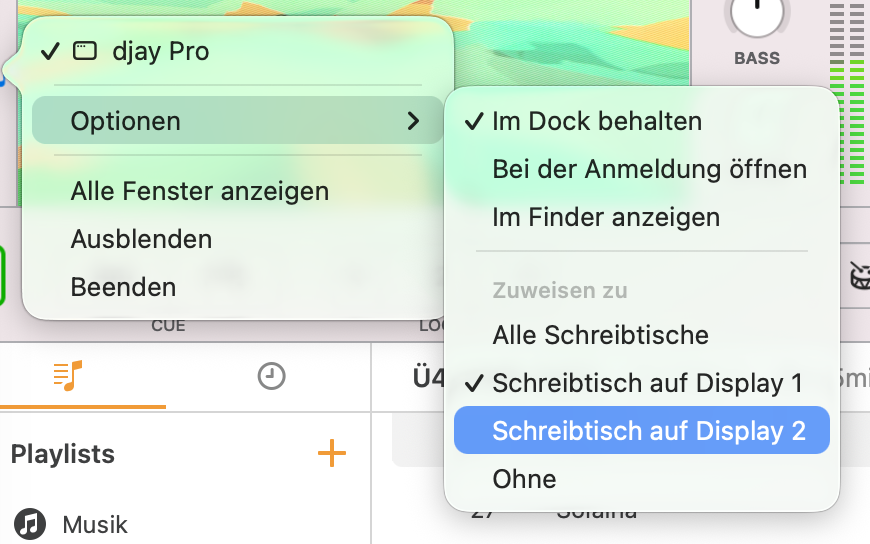
Edit the options of the app on the bar (as shown on the screenshot) and assign the screen 1 as target. Then share the VJ visualization to the external display monitor. You would see that it does not work properly.
Try again closing the app, and editing the app options to target to the screen 2. Open the Djay Pro app, move it to the internal MacBook screen and share the VJ again to the external monitor. Now it works.
(Note, maybe you may play a bit to reproduce it).
Here a video showing how (1) works well, (2) fails as it used to be until found this resolution, (3) repairing it back again works.
So if anyone is having a similar issue, check that the default app option screen is targeted to the external display by default, and then share the VJ on the external monitor.
Music credits: ZETAK & Fillas de Cassandra - ANGULEELE
plan-b Thank you so much, this is a wierd issue, your solution fixed my issue,
and I got your thread through A.I, it directed me to your fix, I tried it and it fixed it straight away,
Mac M1 Pro 2021 32gb ram,
Originally tried it on Sequoia but then decided to upgrade to Tahoe, but had the same issue.
heres what I did:
Fix for djay Pro 5.6.5 external video output on macOS:
Your external monitor is detected but djay Pro won’t output video to it:
Connect your extended display.
start Djay Pro - select video - play video
Right-click the djay Pro icon in the Dock.
Select Options → Assign To → Desktop on Display 2.
Reopen or switch back to djay Pro.
On DJay Pro choose screen - then show on extended screen and it works
This forces macOS to associate djay Pro with the second display, and the video output may start working immediately without changing your primary display settings.
It’s a clever workaround because it uses macOS’s built-in window assignment feature rather than rearranging your displays. It may help other Apple Silicon Mac users who have an external monitor recognized by macOS but can’t get djay Pro’s video output onto the extended screen.