NOTE: Please use the search function above before posting to avoid creating duplicate topics.
- Device model (e.g. 2020 iPad Air 4th Gen):
- Version of operating system (e.g. macOS 14.4.1):
- Version of djay (e.g. 5.1.2):
- Hardware/controllers used (e.g. Reloop Mixon 8 Pro):
- Hardware firmware version (e.g. 1.0.1):
- Please consider sharing a short video or screenshots to help clarify your question
YOUR QUESTION:
-
I’m experiencing inconsistent clunky slip mode behaviour which is very apparent to the ear. when I do a backspin or scratch or even stop the track via the jogwheel. it sort of slowly jumps back in to place or even goes to far past the point of where it should be. its like sync is pulling it back and forth and correcting its self. slip mode should play the track underneath and resume instantly and to play where it would have been if track hadn’t been not stopped. not sure why it has to pull it self in to place. I don’t have this on any other dj software I use. any ideas please.
-
tried with sync on/off quantise on/off changed values of sync and quantise
-
using latest version of day pro on MacBook Pro M2 Max 15.6.1
-
x2 cdj3000x djm a9 all running firmwares
Hi @Peter_Lazarenko, thanks for the details about your setup and the issue - this is very helpful! Since this sounds repeatable, can you please capture and share a short video of the issue to help clarify what’s happening? Thanks!
Hi I’ve uploaded 1 on djay pro and one on another dj software so you can see the difference.
Thanks for the videos @Peter_Lazarenko. That definitely helps to clarify things.
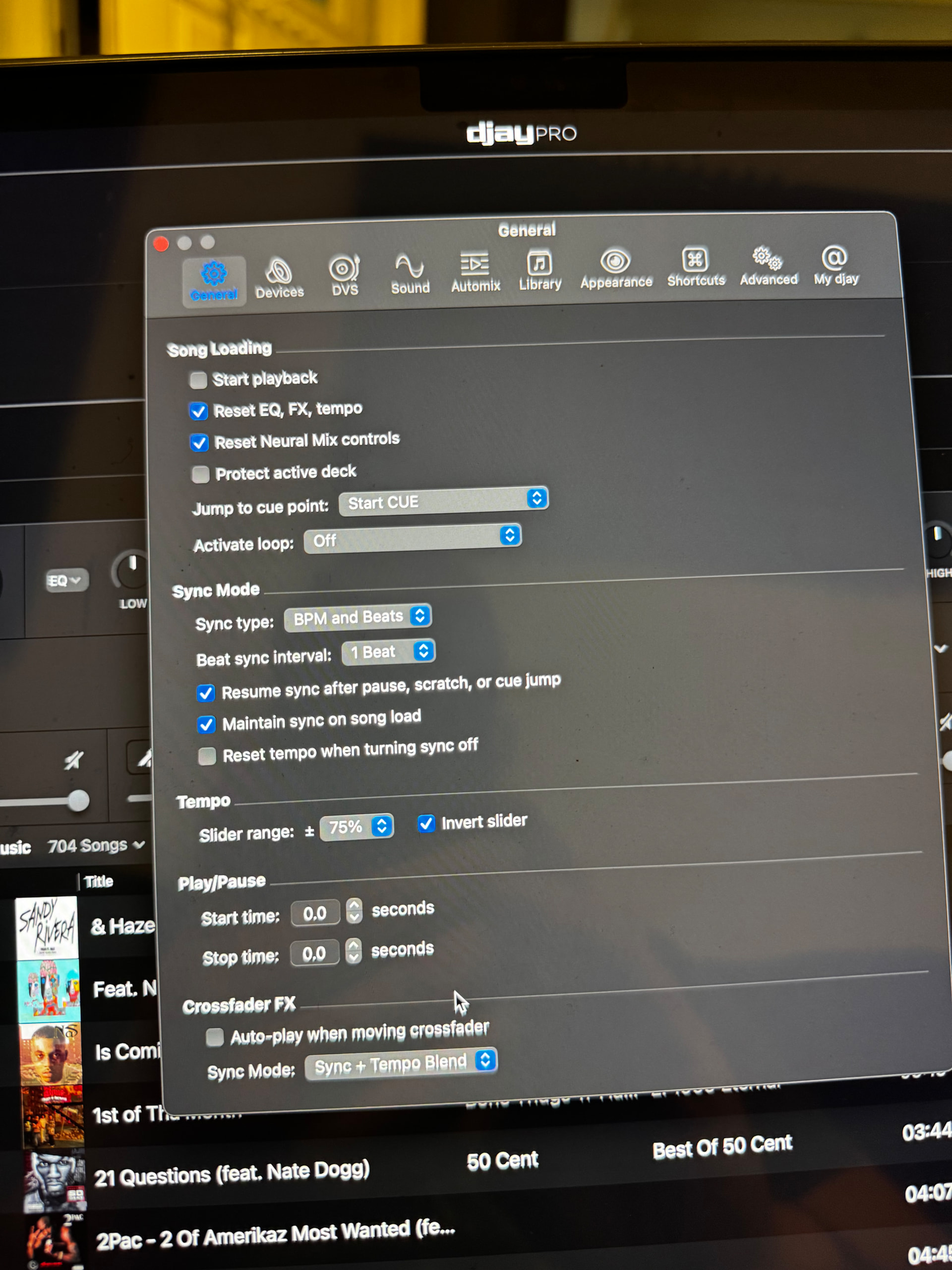
- Can you please share a screenshot of your djay Settings>General>Sync Mode?
- Also, do you have Quantize enabled? If so, what setting are you using?
I’ve tried all different variations on the sync mode settings. I’ve Changed beat sync intervals, checked and unchecked resume sync after pause scratch or cue jump. with quantise on and off, ive also tried changing quantise values. And Tried with sync on and off.
Basically any setting I can see to do with beat sync or quantise I have tried in every possible order.
I’ll take a screenshot also.
1 Like
Hi @Peter_Lazarenko, thanks for the additional info and screenshot.
- Are you using Local Music files or Streaming Music?
- Can you confirm if your songs are Dynamic BPM or Straight BPM? If Dynamic, do you experience the same issue when using Straight BPM songs?
- Does turning Key Lock OFF for both decks have any impact on this?
- Are you able to replicate this behaviour without the CDJs or A9 connected to your Mac?
All Local files. Straight bpm. I’ve also tried key lock on/off. I did try to replicate without the Cdj’s and a9 connected just running through the MacBook and using the mouse to backspin and stop track etc, it doesn’t seem to do it and snaps back to where it should be. 
Thanks for the additional info @Peter_Lazarenko. I’ve passed this onto our hardware engineering team to see if they can reproduce this.
Hi again @Peter_Lazarenko, our hardware team has still not been able to reproduce this issue on their setups. Can you please capture and share another video with All Sync Mode Options turned OFF? Thanks!
Hi so I’ve tried various different things to see what’s happening. From what I can tell is when you touch the top platter either backspin or just stopping the track it’s actually nudging the track ever so slightly and causing it to become out of sync. So when sync is on and I do a backspin upon release it has to pull it back in sync giving the sound I’m experiencing. I’ve tried to show in video by doing a slow backspin and just stopping via touch and you can see it starts to get lost on each touch.
With slip on if you touch the top platter it shouldn’t nudge the track. only touching the sides should.
Video is with all sync options off, with sync on it snaps back in and sounds clunky. I hope this makes sense 
Also a comparison on other software😬
Thanks for the additional info and videos @Peter_Lazarenko. I’ll share these with the hardware team…
Hi again @Peter_Lazarenko, our hardware engineering team was able to reproduce this and they are investigating further. I’ll share more news when I have it.
1 Like
No worries. Probably just some calibration needed for the Cdj’s. Thanks for update.
Hi just wondering if there has been an update on this issue.
Thanks for checking in @Peter_Lazarenko. We don’t have any updates to share on this one yet.
Hi any closer to a resolution. 
Hi @Peter_Lazarenko, we don’t have any updates to share yet.
Hi, Another update to this issue which I believe is related. When slip and sync is on and I momentarily trigger a hot cue upon release it doesn’t continue to play where it should be instead it’s out of sync then jumps back in sync. Not sure how you guys are getting on but there’s definitely something wrong with slip mode.
1 Like