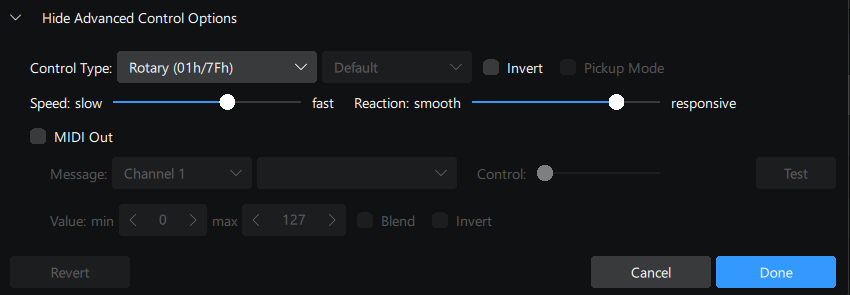
Hi There,
I’ve recently been trying to give djay pro a solid try and mapping my controller properly to I can play a few sets with it and see how it feels.
So far I’ve been able to map out what I need with the layout, the only major issue I’m still having is the feel of the jog wheel. When scratching its fine, but if I spin back on the jog wheel it barely moves at all to backspin the track. VirtualDJ and Serato both feel responsive when scratching and if I spin the jog wheel back the track will spin back since I’m doing it with more force than a normal scratch.
I’ve tried messing with the speed and responsiveness settings in the midi mapper but seems like I can make it spin back by upping the speed but that makes the scratching like normal feel way different because since its moving so much more with smaller movements.
Any insight onto trying to sort this out would be great.
Windows 11
djay 5.3.3112
Hercules Inpulse 500
Hi @somerandomdj, welcome to the Community! The Hercules DJ Control Inpulse 500 is natively supported on Windows. You should be able to simply use the (built-in) MIDI mapping with no need to MIDI map yourself.
Thank you for the reply!
The mapping I’ve done is just personal preference for some things. The controller functionality was fine from the start, Im just used to a few different things in different places.
The only issue I’ve run into with this, and this is with the default mapping as well is that the track wont really backspin if I spin back the jog wheels. In VDJ or Serato if I spin back the platter, the track will spin back a few beats. If I do it in djay it doesnt even spin back a full beat just a quick flick backwards a short amount and then resumes playing the track as usual.
I know this setting is there to be adjusted, so far in order to get the backspin from the jog wheel that Im used to this makes the normal scratching extremely over sensitive. And I prefer to not just use the backspin effect from the FX section to substitute.
Hi @somerandomdj, I spoke with our hardware team and this is a known limitation that they are already working on. When I have more news to share, I’ll post it here. Thanks!
Thanks so much for the reply. I’ll definitely keep an eye out for an update to change. Love the program otherwise, just one thing that is pretty big in my style of mixing so its important to have for me.
1 Like
You’re welcome @somerandomdj
Just wanted to quickly ask, is this limitation for this specific controller or others as well?
Hi @somerandomdj, this does affect other controllers as well.
1 Like