NOTE: Please use the search function above before posting to avoid creating duplicate topics.
Device model: 2024 Macbook Pro M4 Pro 14”
Version of operating system: macOS 26.5.2
Version of djay: 5.6.7
Hardware/controllers used: Pioneer DDJ-SR
Hardware firmware version: 1.08
YOUR QUESTION:
This has happened to me a few times over the last couple of weeks where I will have been playing for a while, maybe an hour or more, and very suddenly I’ll hear some static in my headphones. Then pretty quickly (maybe over one or two songs) it ramps up to the point where all I can hear is static and I have to restart the app. I’ve tried unplugging then plugging the headphones in but that didn’t do anything.
I’ve only been practicing using headphones, so I don’t know if the static would be heard on speakers as well.
I have a second Mac OS system setup on an external drive that I wasn’t using so I clean installed Mac OS to latest version to make sure that none of the other applications or extensions could be the culprit, but the same thing happened after a while.
I’m playing at an engagement party tomorrow night and now I’m super nervous that this is going to happen.
Hoping someone has come across this and has a fix for it.
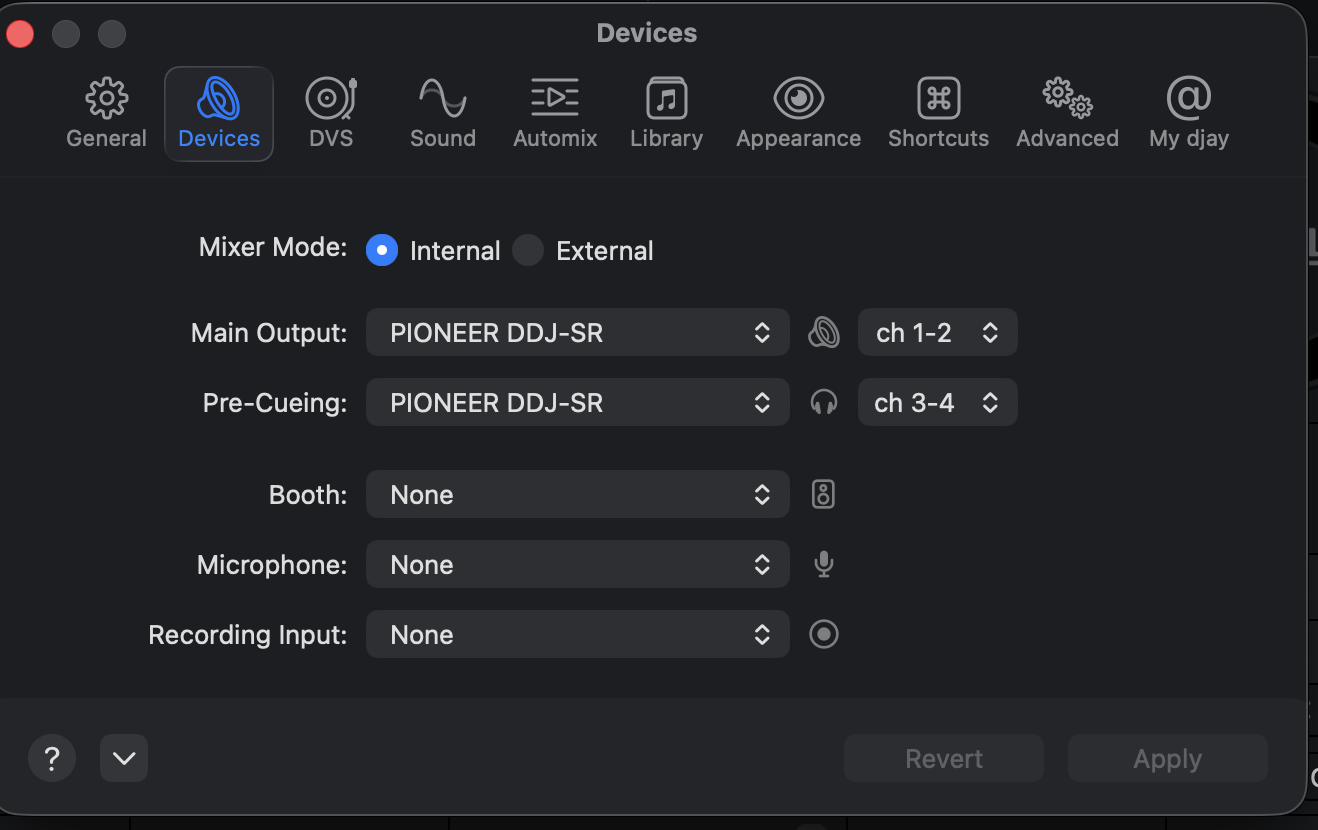
Hi @chrisso, welcome to the Community! Are you using an aggregate audio setup on macOS by chance? For example, are you running the main audio output through your DDJ-SR, but using the headphone output on your Mac. Or perhaps using the headphone output on your DDJ-SR and running the main audio output through you Mac’s built-in speakers?
Yep I’m using an Apple adapter, could that be it? It does work, it’s just that at some point it starts to develop this issue so it didn’t seem like that would be an adapter issue but I guess it is another link in the chain.
I have had the same static build up in the headphone problem with a couple pieces of gear (Hercules and Pioneer). For me, replacing the hardware is what fixed the problem.
djay Pro definitely was partially responsible, because the same controllers would work with Serato, just fine, under the same conditions, but unfortunately it is very painful to troubleshoot this sort of problem - so switching out the hardware was the most practical way to solve it.
i recall a time for some odd reason the Mac would introduce static in the audio line for some odd reason, i never could pin it down as to why…
however what i did pick up on, was in the top corner of my tray the mic icon would flash, as if it was attempting to connect, as the static was being introduced…
a suggestion if you dont require mic access for Djay pro, is to disable access in the privacy settings and see if the problem persists
Thanks for following up. Bad news unfortunately. I bought a new cable so I had the controller connected directly to my Mac. I also disabled microphone access for djay pro. But about an hour and a half into the set the dreaded static in my headphones returned, and worse it does actually come out of the speakers and it sounded awful. I had to stop playing and restart the app which obviously wasn’t great. The mystery continues I guess.
Back here to learn with you guys again after our Spotify outage… Now I have the stupid static on the cue/phone and on the main output. I’m using an IDJ Pro with a 2 years old IPad. In order to test, I changed it back for my 5 y/o IPad and the problem was gone. I want to use my newest I pad but I can’t because of the static. I noticed that when I lower bass level it’s almost gone. Any ideas? Thanks in advance
I’ve experienced similar building distortion on MacOS when there is an additional sound utility loaded that has the ability to connect to and manipulate the audio pipeline. For example, something like SoundSource or Audio Hijack by Rogue Amoeba. These types of utilities are often used to grab and record direct audio from other apps or websites. Try disabling while DJing if using one of these.
I recommend to not connect a controller directly to a pa system. I always use a small mixer in between. You could think of a ‘Behringer Xenyx X1204 USB’ or ‘Mackie ProFX12v3‘ or any other one in the same range. Then you connect your controller to the mixer. Then you could also connect another device like a mp3 player, phone to the mixer as well. When you encounter an issue with your controller or laptop, you could play a song using your backup player and reset or restart your controller and or laptop. That prevents silence when you have an issue. I also use it for volume control. I have the main volume on my controller at 0 dB. I had once that somebody accidentally touched the main volume knob on my XDJ AZ during cocktail hour, where the volume was suddenly about maxed out
Hi @chrisso, sorry for the delayed reply - I was away on vacation. Thanks for reporting back, and sorry to hear the earlier suggestions haven’t cleared things up.
Two things that would move this forward:
Update to djay 5.6.8, which rolled out on the 5th.
Run one isolation test: play through the DDJ-SR from Serato or any other app for a solid two hours, and see whether the static shows up.
Worth doing 7nz’s check while you’re at it — open Audio MIDI Setup, select the DDJ-SR, and confirm the input and output Format are set to the same sample rate.