NOTE: Please use the search function above before posting to avoid creating duplicate topics.
- MacBook Pro mid 2012 16 running os10.15.7
- Version of djay (latest 5.6):
- Hardware/controllers used not a hardware issue
- Hardware firmware version N/A:
- Please consider sharing a short video or screenshots to help clarify your issue
A) SUMMARY OF ISSUE:
- Djay not allowing sign in to tidal
B) DETAILED STEPS TO REPRODUCE:
- Tried signing in multiple times
C) EXPECTED RESULTS:
- Sign into tidal to use my library
D) ACTUAL RESULTS:
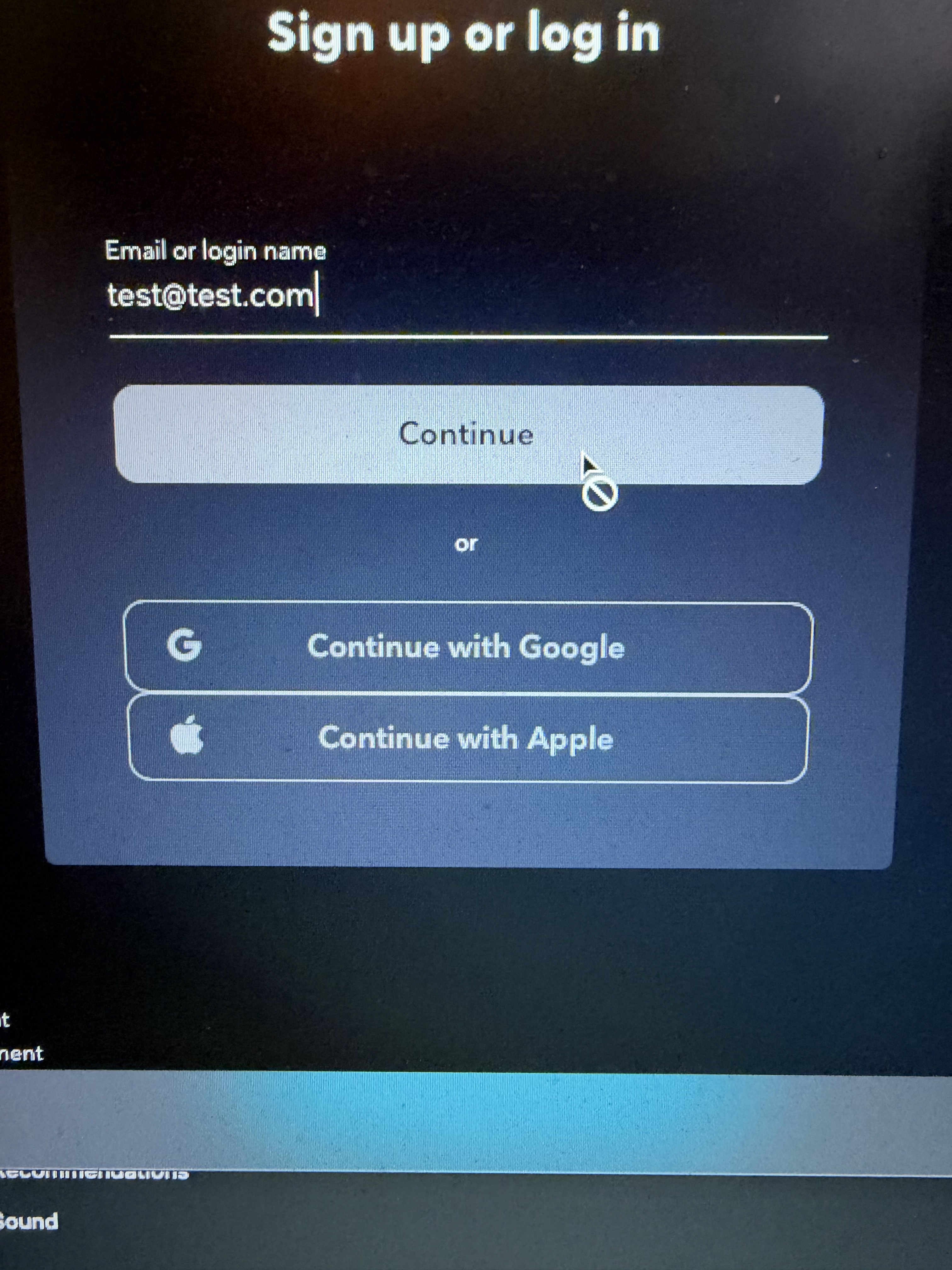
- When trying to sign in tidal continue is grayed out
Steps tried to fix issue apologies for the length of this in advance
- Open djay Pro.
- Go to Settings → Library.
- Log out of TIDAL if you’re already connected.
- Completely close djay Pro.
- Restart your device.
- Reopen djay Pro and try connecting TIDAL again.
This didn’t work as I wasn’t signed into tidal already
Not using any vpn, ad blockers, I’ve cleared browser cookies and tried again this didn’t work
Prevented cross site tracking in safari…. This didn’t work
tried managing website data in safari… This didn’t work
Tried uninstalling and reinstalling… didn’t work
Updated to latest version…. Didn’t work
Tried Library/Caches/ for anything algoriddim and djay and deleted them … didn’t work
Spotify and Apple Music work
Created a test account on my mate and tried login with that just incase it was my account.
Also another user on Reddit reporting this
Hi @Delmenice, sorry to hear you’re experiencing this issue. Thanks for listing everything you’ve already tried. That helps a lot.
Your second TIDAL account fails the same way, and Spotify and Apple Music connect fine. That points away from your account and your djay install, and toward the TIDAL sign-in page itself not loading properly on macOS 10.15.
Can you try one quick test on that same MacBook? Open Safari, go to tidal.com and log in there. Does the Continue button stay greyed out in Safari as well?
Please also reply with:
- The exact djay version number (the current Mac release is 5.6.10)
- A screenshot of the TIDAL login window with the greyed-out button
- Confirm that you have an active TIDAL subscription with the DJ Extension (aka Tidal DJ)
- https://tidal.com/djs
- https://tidal.com/pricing
In the meantime, your PRO subscription also works in djay on iPhone or iPad. If you have one, you can sign in to TIDAL there and keep mixing while we work this out. I hope that helps!
Hi, @Slak_Jaw
Current version 5.6.10 updated today
Active dj subscription in tidal
Can login from phone etc
Can also login on tidal website etc
Apple and google options also greyed out and have the circle with line through it
Hope this helps anything else you need just ask
Thanks for the additional info @Delmenice. Please close djay, then try changing your default browser to Chrome or Firefox, then reboot your Mac and try the login process again.
@Slak_Jaw sadly no change while trying both browsers both being the most upto date versions also for my OS
Hmmm… okay. Sorry that didn’t work. I can’t think of anything else to suggest that you haven’t already tried. I’ll have to pass this onto our engineering team to see if they can reproduce it internally and offer any suggestions. I’ll report back when I have news. Thanks!
@Slak_Jaw thank you for your assistance so far it bizarre as it worked fine Friday 16th and then Saturday 17th nothing
i look forward to hearing any further updates
You’re welcome @Delmenice
Same problem for me. Been happening for a few days. I can log into Tidal on my phone and my same laptop. The only place it doesn’t work is Djay. I can log into spotify but Tidal doesn’t work. I also logged into Djay Pro on my Android phone, it shows my Tidal library and loads songs.
Hi @dancewithml, welcome to the Community! Sorry to hear you’re experiencing this issue. What version number of macOS and djay are you running?
It’s been a week and the problems are getting worse. Im up to 5 events that I haven’t been able to fully use the software I’m paying for.
Any chance this will get fixed?
Hi @dancewithml, our team is aware of this and they’re in contact with TIDAL. I’ll share more news when I have it.
@dancewithml in the interim transfer your playlists to Apple Music had no issues with that myself playing and streaming etc
my only gripe is the match feature with Apple Music is throwing up some really bad matches lol
Was playing UK garage the other night and it was throwing up savage garden…. Very much not uk garage 
Thanks for sharing @Delmenice
It’s been 3 weeks.
Any hope that this will get resolved or should we just get used to not using Tidal?
@dancewithml there is a work around however I’m waiting to see if there’s fix first before implementing it.