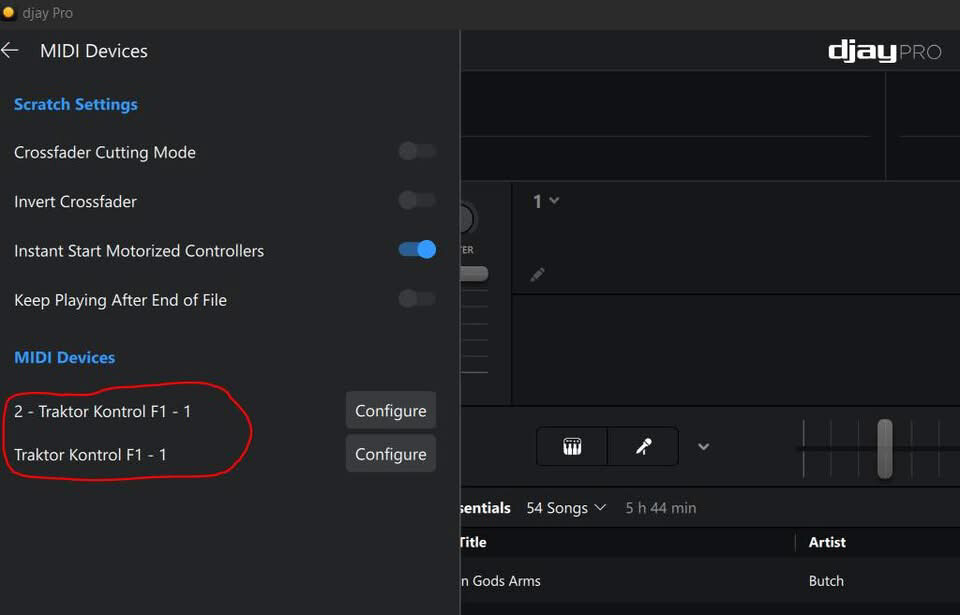
I have 2 Traktor Kontrol F1 controllers that I’m wanting to connect to Djay Pro on Windows to control stems.
One is connecting fine as “Traktor kontrol f1 - 1 and recognises mappings from other people.
The other has a prefix of 2, showing as: “2 - Traktor Kontrol F1 - 1”
The second one doesn’t accept any of the mappings. It seems like it is recognised as a completely different type of midi device than the other.
This is only on Windows, it works exactly as it should on Mac.
I have tried everything I can think of.
Connecting it on its own.
Connected to another windows device.
Reset the controller using NI controller editor.
Renamed the controller in NI controlller editor.
Connected to Traktor and reset the controller.
Uninstalled all drivers and Djay Pro then Reinstalled.
Hi @TomThePirate, are both controllers in MIDI
Mode? I’m not sure how you switch it to MIDI Mode on the F1, but linked below is our guide for doing this on the S2/S3:
Yes, both controllers are in midi mode.
It just seems that djay on windows recognises one of them differently to the other. They both have exactly the same (and latest) firmware. Djay on Mac recognises them exactly as they should.
You’re welcome @TomThePirate. I’m not sure what else to suggest here. Normally I would pass this onto our hardware engineering team for further review. However, given that this hardware is not officially supported, they won’t have any F1’s to test in house. Hopefully some other Windows community users with F1’s will be able to assist.
At they able to see each others mappings on yours?
For me it’s only the one without the prefix that is able to recognise genetic mappings for the F1 (made by other users for instance)
It seems like the software recognises the F1 with the prefix as a different type of controller.
This might be a long shot @TomThePirate, but have you tried a different USB cable for your second F1 and connecting to a different USB port on your laptop?
Both F1s are plugged into a USB hub. Haven’t tried changing anything because everything is working. I just assumed the different names for the F1s was to be able to differentiate them. I did my own mapping.