apple M1 pro
2021 MacBook pro
apple M1 pro
2021 MacBook pro
Hi @DJ_Kelvin_Entertainm, welcome to the Community! Sorry to hear you’re experiencing this issue. Please create a new Bug Report topic for this instead of posting in this general 5.6.9 release topic. This way we can properly review and track this issue. Thanks!
Hello Slack_Jaw, thank you for getting back to me. We have multiple issues
on the forum waiting for urgent attention. These are issues that you have
passed on to the software engineers that have not been attended to yet. I
do not think this new problem with the software will make any difference. I
have just installed the new update on my second computer, and it is
behaving like my first. I regret updating my second computer; I thought the
issue could be specific to my first one, but the problem is with the
software. I hope one day the issue will be resolved.
Sincerely, Kelvin.
Hi again @DJ_Kelvin_Entertainm, I have moved this issue to it’s own Bug Report topic so that it can be properly reported and tracked. Thank you very much for the video and setup details - this is very helpful. I was able to reproduce this on my MacBook Air M4, with macOS 27.0 and djay 5.6.9. I’ve passed this onto the dev team with all the details and will report back here when I have more news.
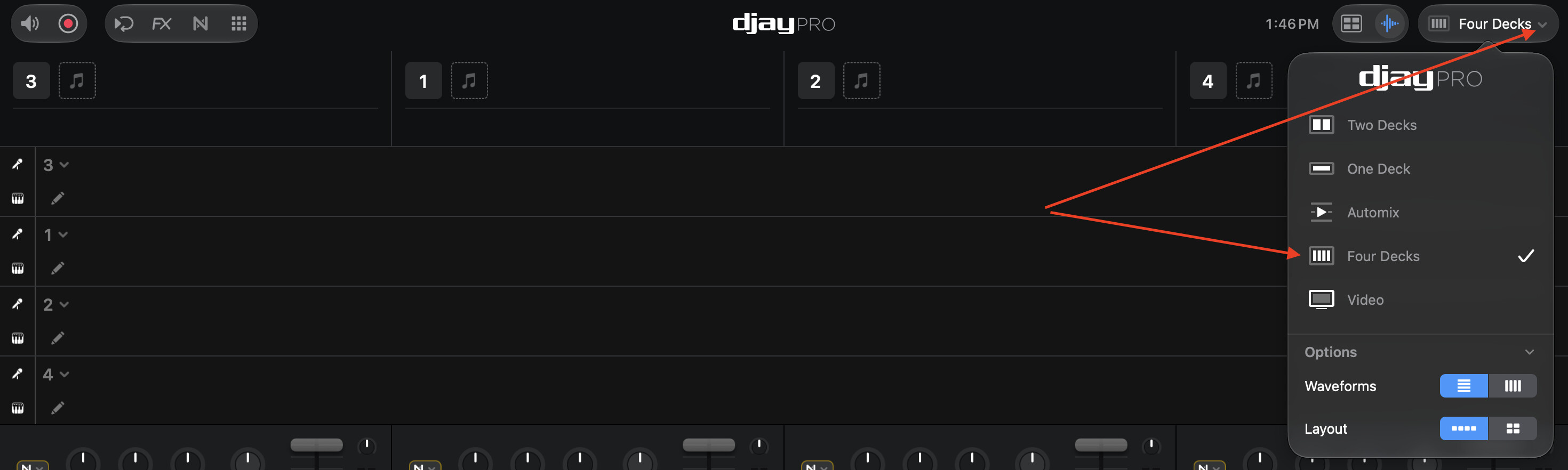
I hear you on the other open issues, and I know it’s frustrating waiting on fixes. A clear report like this one with a video genuinely helps, so thanks for taking the time. In the meantime, you can still get to 4 decks using the view dropdown in the top right corner of djay (the one that shows the current view name). Choose Four Decks there and it switches over properly.
One quick question: before you updated your second Mac to 5.6.9, was View > Four Decks working normally on it?
working perfectly well before I updated the djay on my second computer. Thank you so much
You’re welcome @DJ_Kelvin_Entertainm. Thanks for confirming that it was working as expected on 5.6.8.
It was working perfectly well before I updated djay on my second computer;
thank you so much.
Hello @DJ_Kelvin_Entertainm, djay 5.6.10 was released today and should address this issue. Thanks!