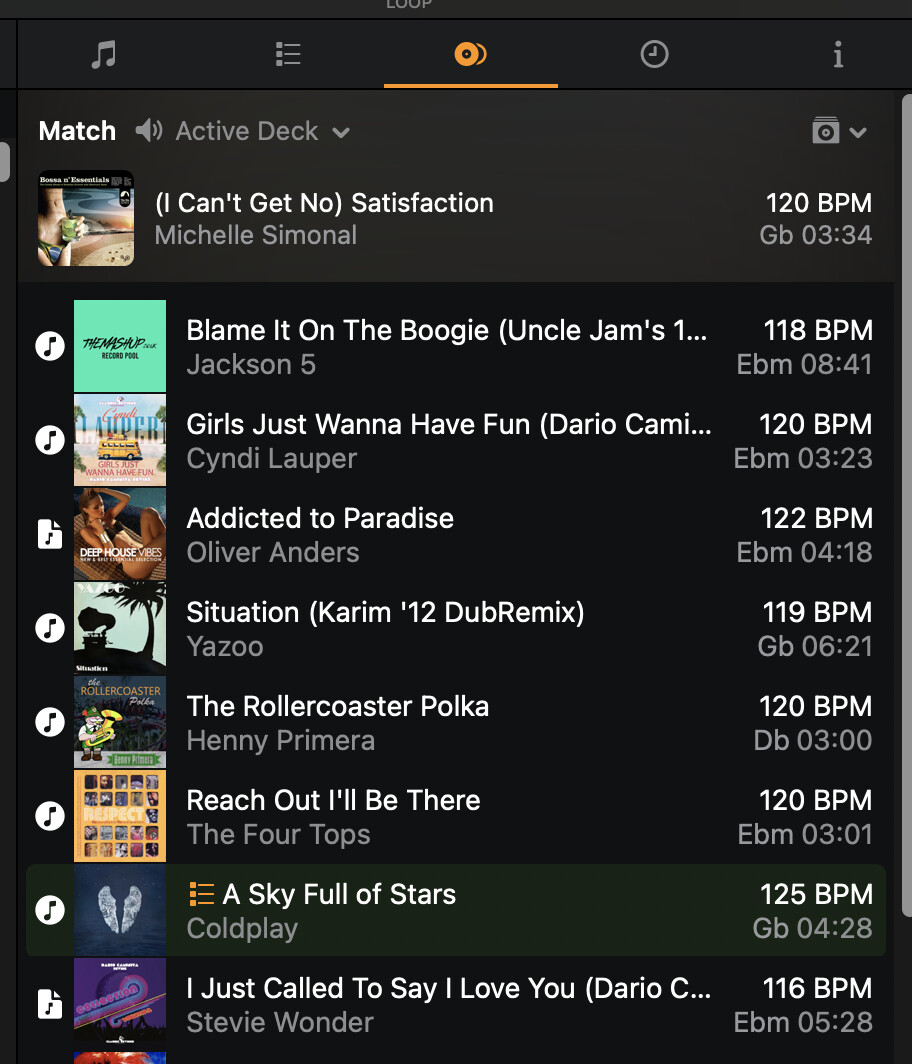
Hi, I am wondering what the difference is between the sheet-shaped icons and the icons that look like iTunes?
All the tracks are within My Collection, so that alone doesn’t explain the difference.
Hi, I am wondering what the difference is between the sheet-shaped icons and the icons that look like iTunes?
All the tracks are within My Collection, so that alone doesn’t explain the difference.
Hi @DJ_Big_Blender,
Those are the different Sources. Similar to the icons on the far left side of the main library. The circle with the single musical note is Local Music. The page with the musical note is for Linked Files from the Files Source.
Ok @Slak_Jaw,
Thanks for quick reply.
But I don’t have any linked files from the file source… all my tracks are in iTunes.
So that’s why I am surprised to see other icons there.
Also the Related tracks all show the linked-files icon and thats not the case either.
Well that’s what icons represent. I’m not sure what specifically is happening on your device. Perhaps at some point you added songs to your library through the My Files without realizing it.
Like you can see in this video the icons for Linked files and iTunes are show both (mixed), even though all is added via the iTunes integration.
I just don’t get this..
Hi again @DJ_Big_Blender, if you reimport the files from iTunes do they show the correct source icon then?
No a lot of them still show the Linked-files icon after re-importing the list.
And again all my files are from my local iTunes, so they all should show the iTunes icon I assume.
Okay thanks @DJ_Big_Blender