


The official XONE K3 mapping for DJ has brought us the ability to
-
Have key point colours matching the software on the K3
-
Set LED colour using midi out messages
I wanted to make my own mapping based on the official one, but tailored to my use cases. I typically use 2K 3’s with a XONE PX5 mixer. For more portable solutions, I have a Reloop Mixtour Pro.
I can now use the K3’s with both in a range of configurations ranging from 2 to 3 and four deck solutions.
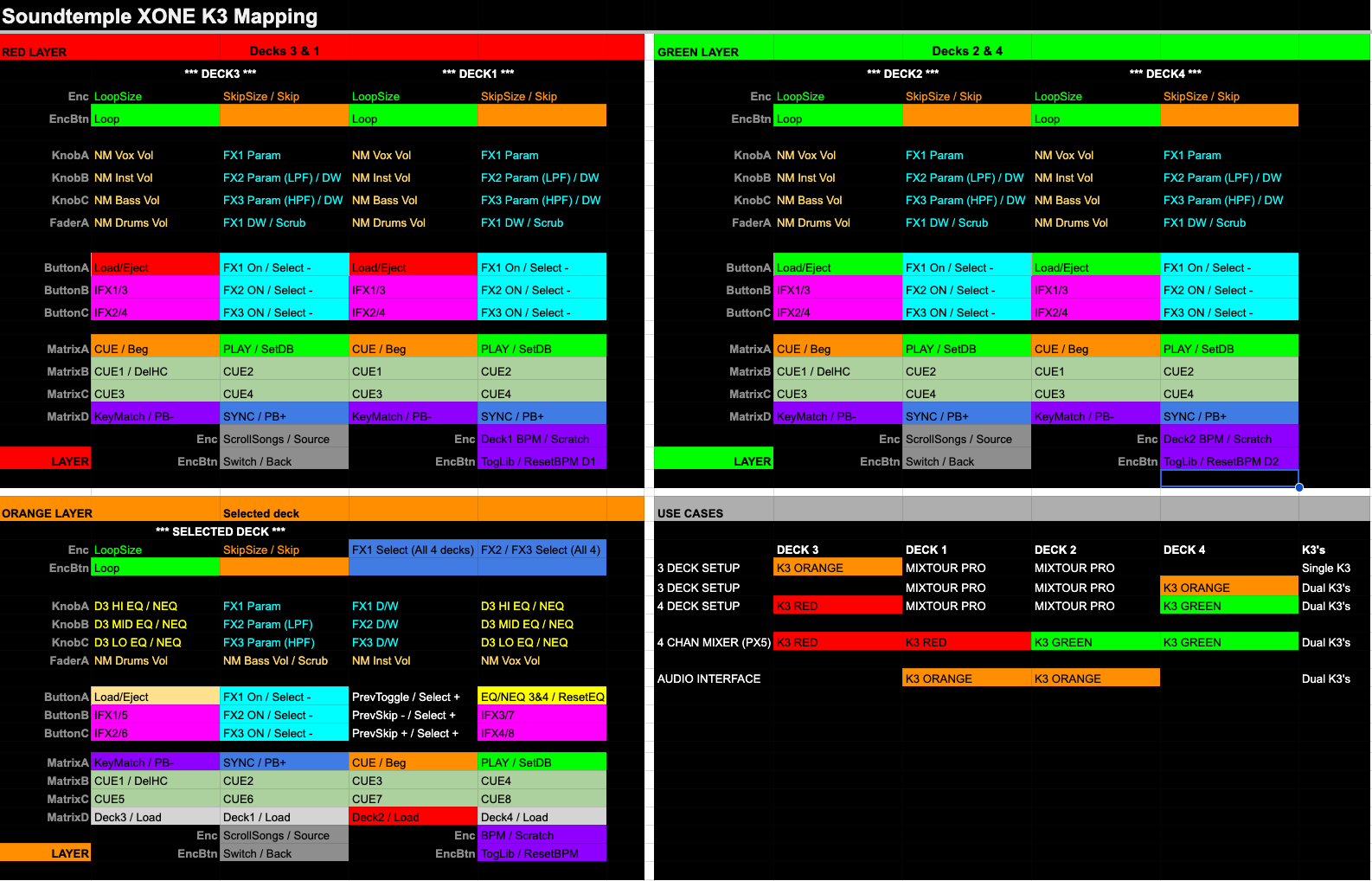
The mapping utilises three layers. Rather than switch layers whilst playing, the idea behind the mapping was to have layers for different purposes. So depending on your setup you can set one or two K3’s to the desired layer. For my purposes once set it can do everything I need without the need to switch between layers.
-
Red: Controls decks 3 & 1 and is typically situated on the left side of the PX5 or Mixtour Pro
-
Green: Controls decks two and four and is typically situated on the right side of the PX5 or Mixtour Pro
-
Orange: Selected deck control, so can work as a 3rd deck or single decks on either side of a mixer. It has dedicated 3 band EQ/Neural EQ controls for decks 3 & 4 and the ability to select FX on all 4 decks at once
Both K3’s can connect to the same mapping and run different layers. Even on the selected deck page they can operate different decks.
The mapping uses the XONE Factory map on the device, which transmits on global midi channel 15. So there’s no need to import any custom XONE mapping to the device. Just make sure your device is set to use the factory map on channel 15.
See pic for details on how the mapping works I wish we put this be good if I can just edit
I’m pleased to offer the mapping to anyone who thinks they can make use of it. Enjoy.
** Cue points colours on all 3 layers match software
K3ST_260322.djayMidiMapping (105.6 KB)


