


Thanks! Will do.
You’re welcome @BabyHercules
Got rid of the update, works perfectly now! Thanks again so much.
You’re very welcome @BabyHercules. Happy to help!
1 Like
ATTENTION / UPDATE:
Microsoft has released a targeted fix specifically for issues with Jogwheel Seek and Fine Tempo Adjustments. They are planning to roll out this fix to all users in April/May, but have made it available for download/installation as a short-term fix as well (see link below).
1 Like
NOTE: Please use the search function above before posting to avoid creating duplicate topics.
Device model: HP ProBook 455 G9
Version of operating system: Windows 11 25H2
Version of djay: 5.6.3
Hardware/controllers used: Hercules DJControl Inpulse 500
Hardware firmware version: 1.66
SUMMARY OF ISSUE:
After the latest 5.6.3 update, my controller shows twice in MIDI devices menu.
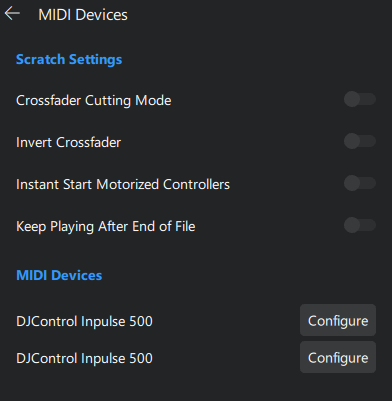
Issue persists even after restarting Windows laptop or connecting controller to a different USB port.
Hi @Apos, I’ve merged your new topic with this existing one. Please see above for more details.
Wow, I wasn’t aware of this!
After replacing the Windows.Devices.Midi.dll file, the duplicate entry is gone.
Thanks @Slak_Jaw
1 Like
You’re welcome @Apos. Glad to hear that worked.
Thanks.
This worked for me.
Both on Windows 11 x64 and Windows 11 ARM
2 Likes
You’re welcome @djcanitamix. Thanks for confirming.
1 Like
TECH SUPPORT! PLEASE AND THANK YOU!
Hello everyone! I’m in need of some technical support and I’m reaching out everywhere I can. I recently purchased my controller online and when I first used it, it worked completely as normal. I was able to cue, mix, press play and hear audio just fine.
However after a few days I came back to start mixing/organzing some new songs and suddenly my controller was unresponsive. I can still hear the audio but when I go to play/fade/mix/cue as usual, the controller doesn’t respond to my input.
Everything is connected properly, the cables are fine, I’ve tripled checked my laptop AND dj app settings but nothing seems to click. Also the lights are on, but not all of them come on like when I was first using it. Leaving this here in case anyone has had this same problem/ knows how to fix it.
PLEASE AND THANK YOU!
- Device model (e.g. HP LENOVO IdeaPade1 15 AMN7):
- Version of operating system (e.g. Windows 11 Home):
- Version of djay (e.g. djPro):
- Hardware/controllers used (e.g. DDJ-FLX2):
Hi @Nile_Hines, welcome to the Community! I’m guessing you recently updated to Windows 11 25H2. If so, please refer to this help topic for some workarounds:
1 Like
Unfortunately, the duplicate MIDI device issue appeared again, although I have replaced the Windows.Devices.Midi.dll file with the one from the fix above. I re-applied and restarted but this time it persists. I’m at loss here.
Very strange @Apos. Is this affecting how your controller works with djay at all?
There’s a newer version of the fix dated 18/3/2026 but although I applied it, it didn’t solve the problem.
To answer your question @Slak_Jaw, when I load djay, it seems the controller is unresponsive at first but after a while it works correctly. But I haven’t tested everything of course.
1 Like
Okay thanks. I’m not sure what else to suggest here @Apos.
Have you uninstalled all of these Windows Updates?
- KB5074105
- KB5077181
- KB5077241
You can find these in Settings > Windows Update > Update History > Uninstall Update.
Out of the three, I only see KB5077181 installed but it’s not in the “Uninstall updates” list, so it cannot be uninstalled after all.
That could be the culprit then. I recommend you contact Microsoft Support for additional instructions on how to remove that update or to rollback to 24H2.
I personally tested the Microsoft patch on four different PCs with different devices, and it worked on all of them. Double-check that you applied the patch correctly.
I just installed update KB5085516, and I didn’t have to install the patch after that update. Perhaps KB5085516 fixes the problem; try it.
1 Like


