


One thing that the Windows update KB5085516 fixed is that when I close Djay PRO, it closes completely as it should, because before, when I closed Djay PRO, it would remain active in the background. I’m talking about Windows 11 ARM, since I didn’t have that problem in Windows 11 x64.
1 Like
First of all, let me say that I’m an IT professional with many years of experience, having done a lot of user support myself.
Now, I installed djay on a new PC with Windows 11 25H2 Home:
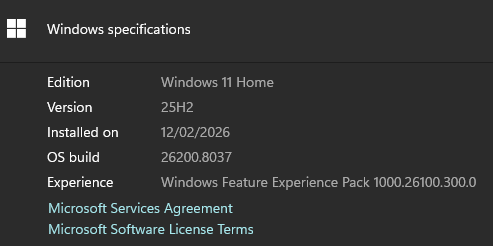
My laptop where I initally faced the issue is Windows 11 25H2 Pro.
Strangely, in the new PC none of the KB5074105, KB5077181, KB5077241 updates are installed:
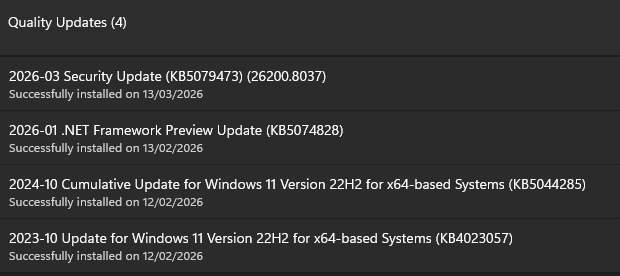
However, I have the same issue with the duplicate entries in MIDI devices:
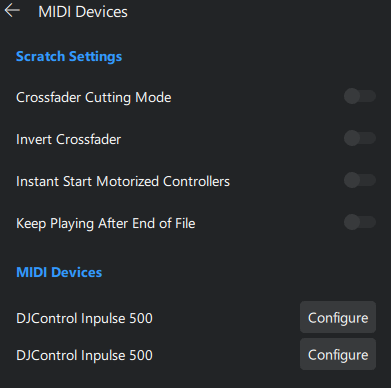
So I believe it should be looked at by Algoriddim’s engineers, as it doesn’t appear to be Windows related.
Another thing that I noticed while having this issue, when djay loads and after the interface has fully initialized, it takes around 20 secs for the buttons on the controller to start responding (no custom MIDI config applied). Is this normal?
Hi apos
If you do a clean install of Windows, those updates are installed automatically, which is why they don’t appear in the registry when you check for installed updates.
There is a way to install Windows and prevent updates from installing automatically.
1 Like
Hi @djcanitamix
I see what you mean, I guess you’re right.
I’ll try to reach out to Microsoft support or just wait for the official fix next month.
1 Like
Thanks for the additional details @Apos. I’ll share this with our engineering team.
This video explains how to install Windows without an internet connection, so that updates are not installed automatically. The tutorial is available in English and Spanish.
1 Like
- Device model : windows surface laptop.
- Version of operating system: windows 11
- Version of djay (e.g. 5.1.2):
- Hardware/controllers used FLX4
- Hardware firmware version (e.g. 1.0.1):
- Please consider sharing a short video or screenshots to help clarify your issue
A) SUMMARY OF ISSUE:
I use DJay pro with windows 11 ON Microsoft Surface Laptop using the FLX4.
Following latest update KB5072241, Dj controller not recognized when plugged in. It did light up. But buttons,cross fader etc did not work.
I checked cables, ports, another flx4 controller. Also uninstalled then reinstalled DJay pro. Still didn’t work.
Next uninstalled the windows update, all worked fine. Had to then remap to my preferences. All was fine.
Only success came from deleting the windows update.
2 weeks later windows reinstalled the problematic update.
Have again uninstalled and paused all future updates. Fortunately, didn’t have to uninstall DJay pro. All mapped settings as before.
Anyone else had this issue or any suggestions that mean I can keep uptodate with future windows updates ?
Head to the Serato forums where some workarounds have been posted.
Hi @ants_b, I’ve merged your new topic with this existing one. Please see linked topic below for several workarounds:
The WinRT MIDI 1.0 Timestamp Fix (Microsoft/MIDI) worked for me.
I tested it on four different PCs with different controllers, and it always worked. Read the application instructions carefully, because it worked for me on different systems.
2 Likes
To all the DJs working with Windows 11:
I had all the problems you described.
And the only solution that worked for me was to do a clean install of Windows 11.
To do this, when installing Windows 11, you have to skip the step of connecting to the internet. This prevents all the updates from being installed automatically.
At that point, everything should work fine.
Then perform a system recovery to revert to the previous state in case of any failure.
Then install all the updates, and then apply the WinRT MIDI 1.0 Timestamp Fix (Microsoft/MIDI).
In case it doesn’t work (which I doubt),
perform a system recovery to return to the point where everything was working correctly.
The link to the YouTube video I uploaded explains how to install Windows 11 without the updates.
1 Like
Thanks for sharing @djcanitamix
Thanks so much for quick responce.
1 Like
You’re welcome @ants_b
Uninstalling the update worked for me.
Clearly though, only a short term fix.
Thanks for confirming @ants_b. Microsoft is aware of this issue and is working on a more permanent fix.
What I’ve found really fascinating is that with all of these windows updates installed, if I launch VirtualDJ first, close it and then open DJAY, the controller is recognized inside both programs. You don’t even have to activate the VDJ software. What are they doing that this does not become an issue with their software?
Update: Shoutout to the user who recommended to check the Serato forums. There is a thread on there that discusses using a tool called ViVeTool to disable Microsoft’s MIDI 2.0. After doing that DJAY recognizes my controller 100% without launching VDJ first. I even have my beloved platter search functions back, which was not functional even using the VDJ workaround I stumbled upon.
It seems the culprit really is Microsoft’s MIDI 2.0 implementation, especially in my case. (Surface Pro 11)
I also found out about ViVeTool which didn’t work in my case, for reasons that I will explain below.
Found this MS page Required registry entries in Drivers32 for Windows MIDI Services - Windows MIDI Services which explains about the registry entries. Also found this MS tool Release MIDI Feature Enablement Checker for Retail 24h2 and 25h2 · microsoft/MIDI · GitHub which checks if MIDI 2.0 is actually enabled on a system. Here’s the output I get:
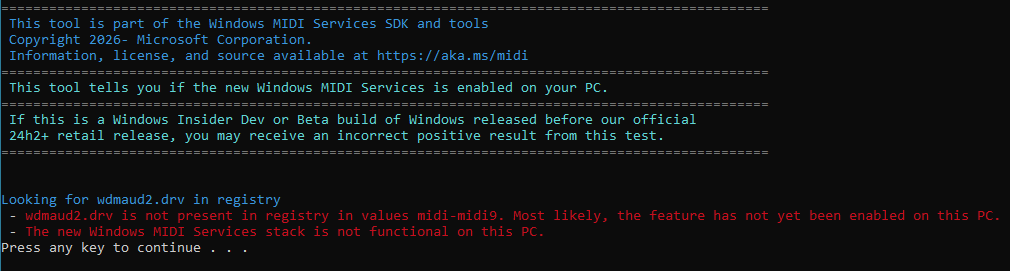
I checked and it is true that wdmaud2.drv is not in my registry. So, even if I have KB5077181 installed, the new MIDI 2.0 services are not enabled on my PC.
I then installed DJUCED which is the software that Hercules suggests for their controllers (I have an Inpulse 500). It recognised my controller correctly and it was fully functional.
So, I’m pretty sure now that my issue with the duplicate entries in MIDI devices is not related to Windows MIDI but to djay Pro 5.6.3
Thanks for sharing @Apos. I have passed this onto our engineering team for further analysis.
Quick easy guaranteed fix to resolve the MIDI issues until Microsoft rolls out another update soon is just do this easy workaround:
Press Win + R, type services.msc, and press Enter. Find Windows MIDI Service. R/H click it and select Properties. Change “Startup type” to Automatic. Click Apply and Start. Then everytime you start your computer it’ll make sure MIDI starts as normal. No need to uninstal any of the updates.
And for reference KB5079473 is also a cause of the issues as well as the 3 other KB updates.
1 Like


