The issue:
When Automix is playing Spotify tracks with Start and End points set to Manual, it freezes on the current track at the transition point. The next track loads in the queue but gets stuck and won’t start playing until I manually load / play it.
This only happens with Spotify tracks. Local MP3s work fine. And it only happens when Start/End is set to Manual - it never happened on Automatic before.
How to reproduce:
Set Automix Start and End points to Manual in Settings > Automix
Load a playlist with Spotify tracks and start Automix
Let it play through to the transition
It freezes on the current track - next track stays stuck in queue
Expected vs Actual:
Expected: Automix should transition automatically to next track.
Actual: It freezes and requires manual intervention.
My setup:
App: djay Pro 5.6.9
Platform: Mac on macOS 27.2 beta 2 (beta does not affect it, issue was there before)
Subscription: Spotify Premium
Tracks: Spotify only - tested with local files and no issue
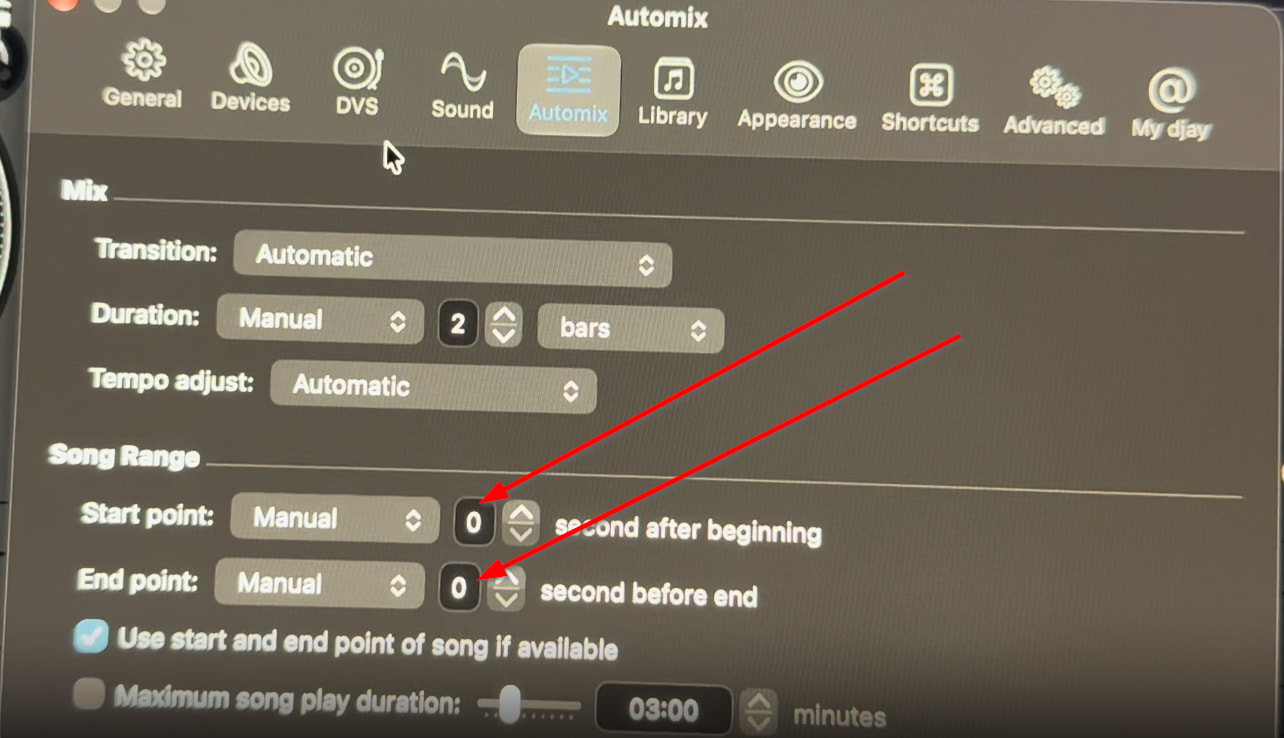
Automix Settings: Start Point Manual / End Point Manual
Hi @Cooljackdj, thanks for the setup details and steps to reproduce. I tested this on macOS 27.0, djay 5.6.9 and MacBook Air M4 with the same Automix Start and End Points in the Automix Settings. I was not able to reproduce this on my setup. I suspect the issue is related to your betamacOS. Please note, that we do not support beta OS versions. However, this is still helpful information that I’d like to share with our devs.
Can you please try to capture this behavior with a short screen recording so I can pass it onto the team?
Please also share a screenshot of your Automix Settings page - maybe my setup is missing something that you’re using.
After this, I recommend that you switch back to a non-beta macOS version and let me know if the issue persists. Thanks!
Hi, thanks for testing this on your end and for the quick reply.
A couple things to clarify:
1. This issue was happening before I installed macOS 27.2 beta 2, so it’s not caused by the beta. I only listed my current setup to be thorough.
2. Downgrading from a beta on Mac is really difficult - it requires a full wipe and reinstall back to 27.0, so I’m not able to switch back right now.
Would it be possible to keep this ticket open until the RC / public release of macOS 27.2? I’m happy to capture a screen recording of the freeze and a screenshot of my Automix Settings page, and re-test as soon as the RC / final version is out to see if it still persists on the supported version.
Understood. Yes, I will keep this topic open. Can you please share the screen recording and screenshot with macOS 27.2 beta 2 though so I have something to share with engineering?
Hi @Cooljackdj, thanks for the video. Honestly, I’m having a hard time seeing the issue because it appears that you are manually moving the crossfader using your mouse or trackpad which is forcing the transition to complete before it reaches the mix out point. Sorry if I’m missing what you are trying to demonstrate here.
Can you please share a screenshot of your Automix Settings screen?
Please also share a screenshot of your Crossfader FX Settings menu?
If you could capture a screen recording where you start an new Automix session from scratch and do not touch the crossfader with your mouse or trackpad that may help to clarify the issue. Thanks!
This time, I did not touch the. I made it mentally switch over automatic switch over. It’s still get stuck I also showed you the settings of if you need, tell me more about settings
Thanks for the additional video @Cooljackdj. That clears it up. djay is doing what your settings ask for. With Start point and End point set to Manual, 0 seconds, Automix waits until the current track has completely finished before it brings in the next one. That leaves no room for your 2-bar transition, so instead of a blend you hear the track end and the next one start from the top. That can feel like it froze. In your video, Stayin’ Alive plays right to the end and Goin’ Back to Indiana starts on its own a moment later.
If you want overlapping transitions, go to Settings > Automix > Song Range and either:
Set End point back to Automatic, or
Keep it on Manual, but give it a few seconds more than your transition length.
If you’d rather hear every track in full back to back, your current settings are fine.
I still have that problem and I give you the settings again, and I put automatic for the end of the song. When I when I transfer to the next song, it still gets stuck.
Hi @Cooljackdj, thanks for sticking with this, and sorry I misread it last time.
I think I see what you mean now. After each mix, the song that just finished gets loaded right back into the same deck instead of the next song in your queue. In this video, Sixteen Going On Seventeen finishes, Man in the Mirror comes in on its own, and then Sixteen Going On Seventeen loads again. Your History shows it too: that song comes up every other track. Down and Stayin’ Alive did the same thing in your first two videos.
This seems to be the same issue reported by another user with Automix and Spotify. Can you please try creating a playlist in My Collection using these same songs from Spotify? In the other topic, playing the same songs from a My Collection playlist did not result in the songs repeating.
Curly in my playlist on my iMac playlist on my computer is blank. I’m not I don’t know why the when I did that you’re stuck and I have to force the tongue and you sound to go over and squish to the next song.
Hi again @Cooljackdj, I think your issue is probably the same as the one linked below. Please review and let me know if copying your Spotify songs to a new playlist in the My Collection Source eliminates the song freeze/repeat issue in Automix. Thanks!
Hi @Cooljackdj, I don’t need anything else from you at this point. Our team is aware of the issue and are investigating further. Thanks for your help troubleshooting this one.