


The more info we give DJay Pro Devs, the better they will be able to make DJay pro stable, imo, every feedback and info we give, the better they undertand the issue and be able to rectify it. just my 2 cents:) fingers crossed that this issue is resolved. Appreciate the help:)
2 Likes
Hello everyone, 5.4.2 is rolling out to the various app stores and should be available to all users over the next several hours.
For more details on the full release, please see below:
1 Like
Thank you so much Slak_Jaw for the quick update response, Appreciate you bro 
1 Like
You’re welcome @eecy_cee. Happy to help as always!
1 Like
Just an update,
My crates are showing up fine, but I still have the issue where, I cant load song to a deck, I cant even analyse any songs,
I configure “SR App”
my “internal” and “external” folders show up (I cant uncheck “internal” so I can just use “external” drive) maybe that’s the issue I don’t know.
so my issue is if I enable “External Application” then select Serato" let it load, click on my crate dropdowns. select a song, try to load or analyze, this causes freezing till I force quit,
for me to get out of this freezing, I force quit, then restart DJay Pro,
uncheck “External Application”, then everything is back to normal,
I’m now able to load tracks from “My Files” and “Playlists”
I don’t know if this has anything to do with the fact that
the “Playlists” section is the exact same as “External Application”
in terms of it being exactly the same crates setup and maybe its conflicting with each other,
I could either chose to delete all my “Playlists” section files and crates and just have “External Application” running?? I’m not sure if that’s going to help my issues.
But I realise DJay pro needs the files in my “Playlists” section.
Could this just be a me issues cause I have almost 70k files,
if you have a smaller library could that help?
Hi @eecy_cee, can you please share a short video of what you’ve described above? I want to make sure the engineering team can clearly see what’s going on. Thanks!
1 Like
Thanks for the video @eecy_cee. This is very helpful. I’ve shared this with the team and will get back to you when I have a response. Thanks!
1 Like
Thanks again, as always, I appreciate you Slak_Jaw
You’re welcome @eecy_cee. Thanks!
Hi again @eecy_cee, Can you please capture a Sample Process using Activity Monitor on your Mac while the beachball is shown?
- Please make sure that you collect the Sample Process while the issue is occurring.
- Open Activity Monitor: Locate and open Activity Monitor on your Mac. Usually found in the Utilities folder within your Applications folder.
- Select CPU: In Activity Monitor, ensure the CPU tab at the top is selected.
- Choose djay Pro: Scroll down and locate the djay Pro App process in the CPU list.
- Sample Process: Click the gear icon (Actions) in the Activity Monitor toolbar and select “Sample Process”.
- Save the report: After sampling, save the generated report for submission and further analysis.
- Upload the report: Upload the report to your Google Drive/Dropbox, enable sharing permissions, then share a link to the file here.
Thanks!
1 Like
heres the text pads, Thanks Slak_Jaw
1 Like
Thanks for the quick response @eecy_cee
1 Like
Hi again @eecy_cee,
- Can you please upload your djay Media Library database file to your Google Drive/Dropbox, enable sharing permissions, then share a link to it here or send it to me in a DM? On macOS it can be found in ~/Music>djay.
- Please also check the iCloud Syncing status in djay Settings>Advanced at the bottom. If the status is e.g. “Initializing” let it sit until it switches to “Active” (this could take several hours with a large library), then try again.
- After testing #2 above, if the issue persists, we can try using a fresh database to see if this improves things. Start by making a backup of your existing djay Media Library to an external drive, iCloud or simply to a different folder on your Mac. With djay closed, delete the djay Media Library file from ~/Music>djay, then launch djay. This will create a blank database with no My Collection playlists or saved cue points. Then test with this database and confirm if there is any improvement.
Thanks!
1 Like
No probs
I dont use Cloud Sync at all
will do
1 Like
Okay so my suspicion in my earlier comment seems to be the issue,
I already have all my music/crates loaded in my “Playlist” section (My whole library)
Now When I enable “External Apps” my whole music/crates library is reloaded again.
Now I have 2 sections (“Playlist” & “External Apps”) that has loaded my music/crates library twice.
I think DJay Pro is overwhelmed and this is causing the Freezing,
The only way to get out is “Force Quit”
This issue only affects DJay Pro users that has imported their Serato library through the “Playlist” section
“Warning” Before applying this fix, Please backup your (djay Media Library.djayMediaLibrary) file, onto another folder or onto an external usb drive or flashdrive. You can restore your library with your backup if you dont like the fix.
My fix for this issue is: completely delete all your “Playlist” files and playlist.
or as mentioned by Slak_Jaw
Once you restart DJay pro, you are now ready to enable “External Apps” select “SR app” and let your library load, thats it, now alls you have to do is analyze all your files,
This fix works, but the downside is my cue points are gone, its no biggie for me I can start again but I feel the “External Apps” is a lot more stable then “Playlist”,
“External Apps” does the same thing as the “Playlist” section but its much better, more stable,
Your Serato library is fully updated everytime DJay Pro loads,
(My “Playlist” section Did not update my serato library) this is why I think “External Apps” is much better
Also I found that my Djay Pro Library file (djay Media Library.djayMediaLibrary) was not bloated, and its around 200mb (External Apps), compared to the 2.3gb file size when I had files in the “Playlist” section
Note: this also handy and saves me money cause I dont need to purchase “Mixo” or “Lexicon” to transfer my Serato library over to DJ Pro,
Time will tell, I will report back if theres any issues. I appreciate the help, thanks Slak_Jaw and the Algoriddim Devs team,
1 Like
Thanks for the detailed update and workaround @eecy_cee
1 Like
Windows 11, Serato resides in my music folder in its default location on drive c.
If I click to configure SR Crates, the only option is a network drive, but I do not have any Serato crates stored there.
I don’t see any way to point djay pro to the correct location to find my crate files. What am I doing wrong please?
ETA: I searched the knowledgebase. There are no hits on “Serato” or “Crates”. The user manual for Windows is years out of date. For all the marketing hype you generate, it doesn’t seem like Windows users get any love, even though it’s by far the most widely used desktop OS.
1 Like
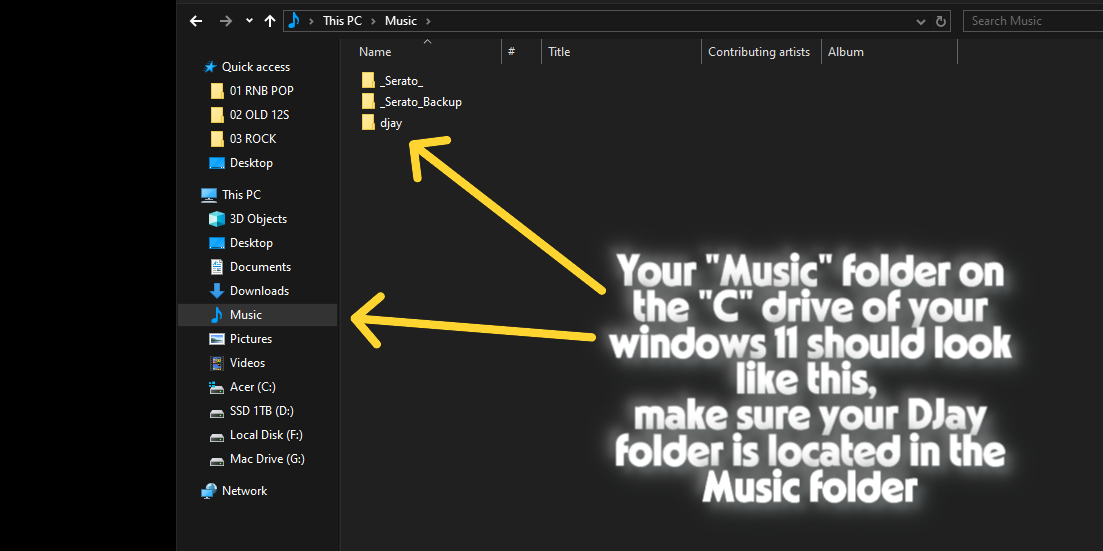
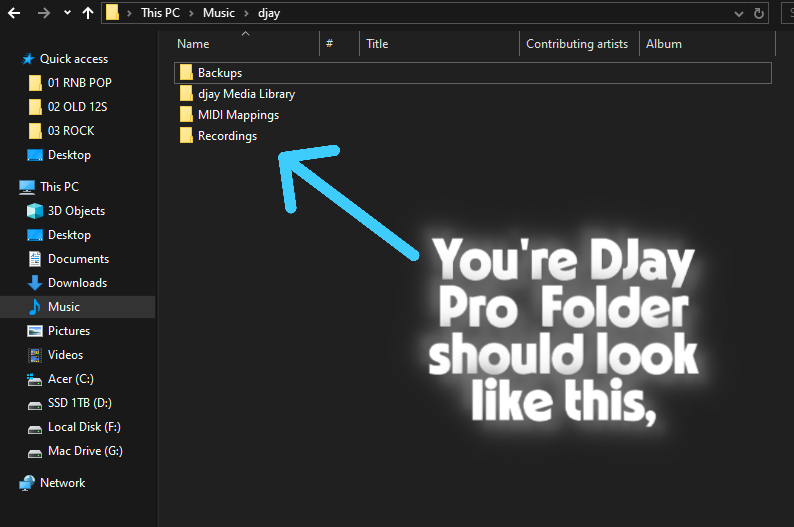
If Your DJay Pro Folder is in the “C” drive location, then DJay Pro “External apps” will detect it and it will show up in the “Sr crates” configure menu, Your music should be on your internal drive as well,
1 Like
This is exactly how my folder structures look. Everything installed in default location, and djay pro only sees my mapped network drive, not the folders on drive c.
All my music is on my internal drive. All my programs are installed on my internal drive.
It simply doesn’t work for me the way you’ve described it, sorry.
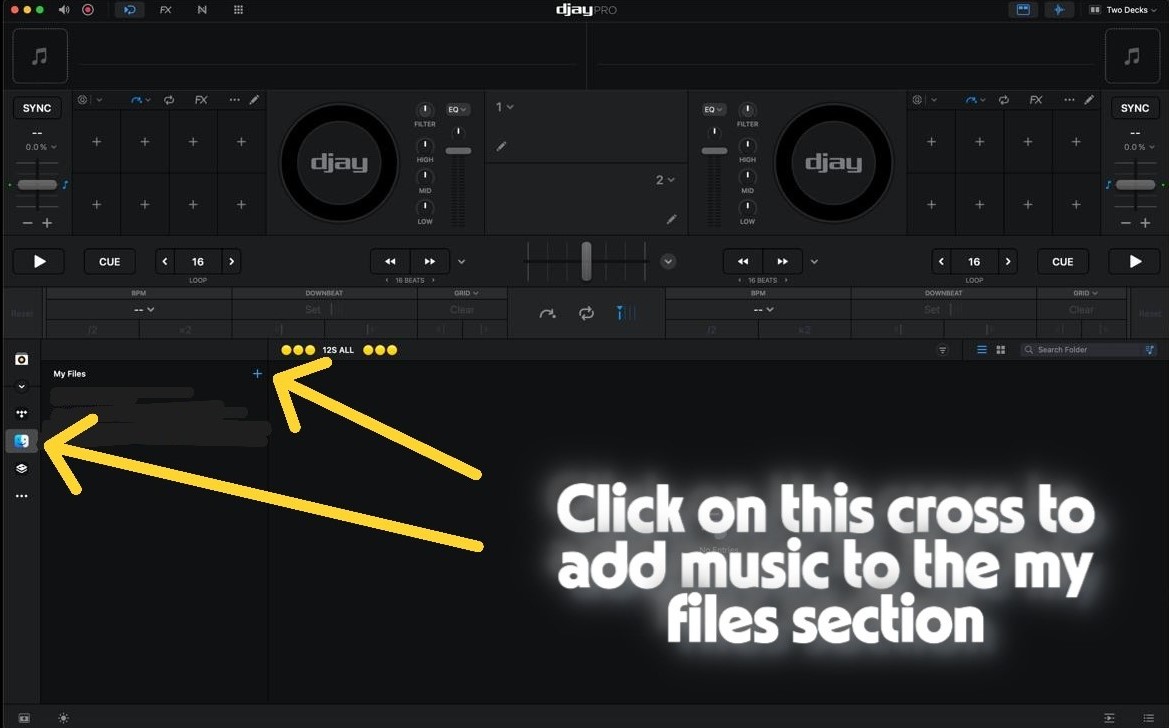
does your library load when you use “My Files” in DJay Pro
You can add music folders to this section, but you have to click on the cross and go through your directory where your music folders that contain your music tracks are located.
If Djay Pro “My Files” Detects and Loads your library then hopefully “Sr crates” will load your music.
Note: Its much better if all your music and music folders are located in one main folder.
1 Like


