


Your a lot of help,
Doubt its an Installation error as the app works fine with a Pioneer XP2 and the FLX10 1,14 works fine with Serato and Recordbox.
It is obviously a Variable that hasn’t been considered / encountered during Beta testing.
Your a lot of help,
Doubt its an Installation error as the app works fine with a Pioneer XP2 and the FLX10 1,14 works fine with Serato and Recordbox.
It is obviously a Variable that hasn’t been considered / encountered during Beta testing.
Hi @DaMacfunkin, do you have an Algoriddim djay account and active subscription on any other devices? I’m guessing this might be isolated to the free trial version on Windows, but I haven’t heard back from our engineering team.
No I don’t, I only signed up yesterday when this version came out, at which point it gave me a 7 day trial that will turn into a full subscription…
Okay, thanks for confirming. Our team is already looking into this. I’ll get back to you when I have news.
Do you all ever release pdfs or guide to how compatible controllers are mapped. I’m clicking around trying to confirm what buttons control what but would be so helpful to have a full guide…before I go in a remap the whole thing
Hi @Logan_B, welcome to the Community! We do not provide pdf MIDI mapping guides for individual controllers.
Do you have the flx 10? If so here is the official hardware diagram from Pioneer DJ/Alpha Theta.
Hi there, I have documented the midi mappings for the DDJ-FLX10 that I did. Focus is on stems. Maybe helpful for you…
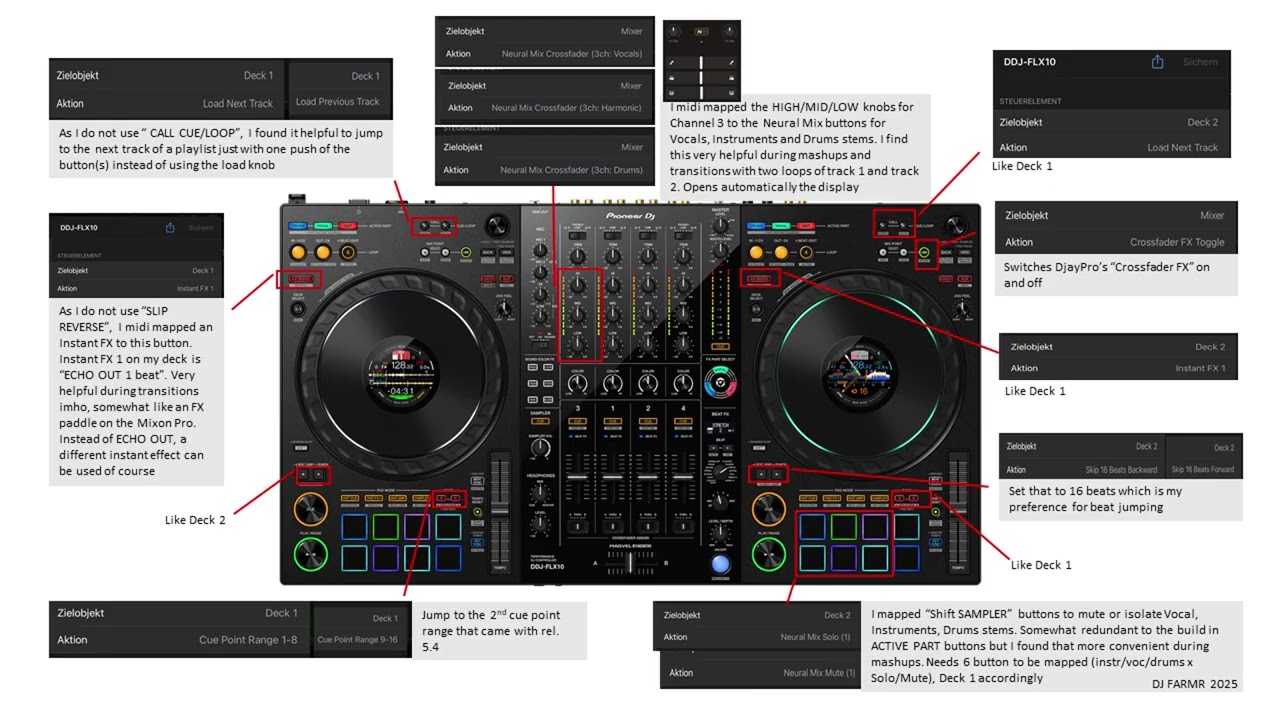
Thanks for sharing @Dysfunk_DJ and @turbopussy
Does anyone know when using iPad/iPhone you can at least have your own image on screen, rather than ‘no driver’
4 posts were merged into an existing topic: FLX10 not working on iOS, djay 5.4
Any update on this please?
Day 4 of trial and I haven’t actually been able to trial it?
Hi @DaMacfunkin, the team was able to replicate this issue with the Free Version and believe this is the same issue you’re experiencing. They are working on a fix which should be released in an upcoming update (likely 5.4.2). I’ll report back here when I have more news. Thanks!
Are you sure that’s the reason?
iPads support HID (Human Interface Device) profiles, enabling them to interact with various external devices like keyboards, mice, and game controllers. This support is facilitated by the [CoreHID framework]
I can’t get the digital marker to start at the 12 o’clock position when setting cue point.
So annoying……. I switched back to Serato … 15 mins into my set….when I hit a cue I want the marker at 12 o clock not some random position
This is happening regardless of what controller/dvs setup you use. Even without a controller.
The workaround so far is to turn keylock off or if for some reason instant start for motorized platters is on turn it off.
Algoriddim is aware of this.
I have the Rev 1 , Rev 5, SR2, sx2 and have used the flx10 before screen support this is the first controller and and only controller that does this at the moment. Well II’m glad at least they are aware of it.. gonna try this work around the next time I gig with the flx10. 
Hello everyone, 5.4.2 is rolling out to the various app stores and should be available to all users over the next several hours.
For more details on the full release, please see below:
Having a blast with FLX10 and DJay Pro 5.4! There are a few things that don’t seem to be working with the FLX10 integration that would be really wonderful to have. Wondering if these are on your radar, or if I’m doing something incorrectly!
-long press on the page buttons doesn’t seem to bring up the pad info on the screens
-can’t seem to toggle between cue points 1-8 and 9-16 using the page buttons
-Pad FX and Pad FX 2 seem to bring up the same bank of 8 effects
-Sampler button seems to only allow access to samples 9-16?
-Key shift pad button doesn’t seem to do anything?
Hopefully these little kinks get ironed out in future updates!
Cheers


