Deck 1 playback freezes mid-track — Mixon 8 Pro (iOS)

Technical stuff:

  • Device model: 2024 iPad Air 11 inch (M2) 512 GB ( 441 GB available)
  • Version of operating system: iPadOS 26.5 (Chroma Cables USB-C 1m Black)
  • Version of djay pro: 5.6.8
  • Hardware/controllers used: Reloop Mixon 8 Pro
  • Hardware Firmware version v5339

A) SUMMARY OF ISSUE

The booked gig was for 4 hours DJing. After 1 hour working, I loaded a song and after a while the song stopped. The party stopped. I was shocked and not happy. My confidence as a DJ get smashed.

B) DETAILED STEPS TO REPRODUCE:

Using TIDAL streaming with DJ extension, My iPad is working on WiFi using my mobile phone hotspot. I always test the speed when arriving on site. The measured speed was 214 Mbps. Also I got enough data in my mobile contract (like 20.000 MB, one party takes rougly 800MB) So there is a track playing channel 2 and I am loading a track on channel 1. I did my smooth transition and after playing for 1m13sec the song stopped playing unable to start it again. I had to load a new song and quickly start it for the party to continue. This has happend to me on friday and on saturday. Different locaties, different party’s. Everytime there was no hickup in the network, nor did I made a mistake. (pressing wrong buttons or something else)

C) EXPECTED RESULTS: song plays without interruption. So, everytime I have a gig, I restart my iPad before the party starts. In another topic I replaced my USB cable with an expensive one. Also disabled the 80% charge limit.

D) ACTUAL RESULTS: song stops playing and it make me feel like a bad DJ because I get the blame.

other topic link

That’s the risk and the chance you take if you choose to play gigs using only streamed music, especially over wifi from a mobile phone.

The risk will always be there, unless you can cache the songs beforehand (some services offer this) or you actually purchase the music, as DJs always did in the past.

2 Likes

Hi @Ludo_Looijenga, sorry you got hit with this mid-gig — I know how stressful that can be.

One thing in your report stands out: you loaded a different song and it started playing right away. If this was bandwidth, hotspot dropout, or a lost TIDAL session, that new track likely wouldn’t have played either. That points at a single stalled track rather than the connection — and it’s similar to what you described in your Play button doesn’t respond topic, where a reload was the only thing that brought the deck back. I’d like to treat these as one issue rather than chase them separately.

A few things that would help me narrow it down:

  1. In that August case, were those tracks also streamed from TIDAL, or were any of them local files?

  2. When the song stopped, did the playhead and waveform freeze, or keep scrolling with no sound?

  3. Any error message or banner on screen at that moment?

  4. Was it the same deck both nights?

  5. Next time it happens, please grab a full iPad screen recording before you reload the track. That’s the single most useful thing you can send me.

Two things worth doing in the meantime:

  • Set TIDAL quality to Normal rather than High or Max, to reduce the load over a phone hotspot. Please note, unfortunately, this will likely result in any saved hot cues or loops being shifted slightly off-grid due to the different song encoding.
  • Log out of TIDAL and back in from djay’s settings. This refreshes the authentication between djay and your account.

For gig insurance, I’d keep a local emergency playlist in My Collection — actual files on the iPad, not streamed. TIDAL playback in djay needs a live connection. You may also want to look into Beatport Streaming as this service offers an Offline Locker so you don’t have to rely 100% on WiFi or a mobile hotspot. I hope that helps!

Hi again! and thanks in advance for your continuous support.

Today I received a bad review from the customer, complaining about the music stops.:roll_eyes:

I will do my best anwering your questions:

  1. In the august case, it was also streamed from TIDAL
  2. When the song stopped the playhead and waveform froze, but the play button was green.
  3. No error messages on the screen at all
  4. Yes both nights, it was the same deck.
  5. Full ipad screen recording will try to do this outside a party. Because I have no time doing this during a party.

About the TIDAL quality settings, just checked and they are already set to "normal” Also everytime I am preparing my setup, I am logging fresh into TIDAL.

As I am a indepent contractor, I am aware of backups on all aspects of my equipment. Sure I have a library of local files, about 2500 songs i have local on my iPAD. So if my internet is not working at all, I can always continue the party.

Cloud streaming with Neural Mix is one of the main reasons I jumped ship from Pioneer to Djay Pro. Because people expect having all the music in the world when requesting during a party.

Offcourse I will now consider Beatport with it’s offline cache capabilities. I have Spotify and TIDAL, hopefully I can replace them both with Beatport subscription.

1 Like

Allegedly Denon have said that Spotify and offline cache will be introduced on the Prime 4 G2 in the future, so IMO it could become broadly available to other DJ software/hardware.

Maybe they will introduce a DJ Tier with offline storage, stem separation - and a higher price.

1 Like

Thanks @Ludo_Looijenga, that’s exactly the detail I needed.

Your answers likely rule out bandwidth. The single most useful clue you’ve given me is that it’s the same deck both nights. From your write-ups, both times the track was on channel 1 while channel 2 kept playing — can you confirm that’s the deck? If it’s always deck 1, that’s really useful information.

Two more things when you get a chance:

  1. When it froze, did the jog wheel, pitch fader or cue points do anything on that deck, or was it completely unresponsive?

  2. Did the deck ever recover on its own if you left it, or was reloading always the only way out?

Understood on the screen recording. Try it at home instead: connect the Mixon 8 Pro, start a screen recording, and just let djay run for 90 minutes or so streaming TIDAL, swapping tracks on deck 1 every few minutes. Both failures hit around the one-hour mark, so a long idle-ish session may well reproduce it. Worth running the same test with local files on that deck too — that tells us whether it’s specific to streamed tracks. Thanks!

Hi Slak_Jaw,

To answer your questions:

  1. Yes, it’s always deck 1
  2. It was completely unresponsive
  3. Sometimes the deck recovers after some time, but mostly reloading is the only option.
  4. Screen recording is not possible for coming 2 weeks, because I have a well deserved vacation.

Ok, so I did 2 party’s this weekend and I have some usefull information.

Friday I was DJing on WIFI from the location with TIDAL Streaming. I had a music stop again, so this rules out the possible cause of Mobile Hotspot.

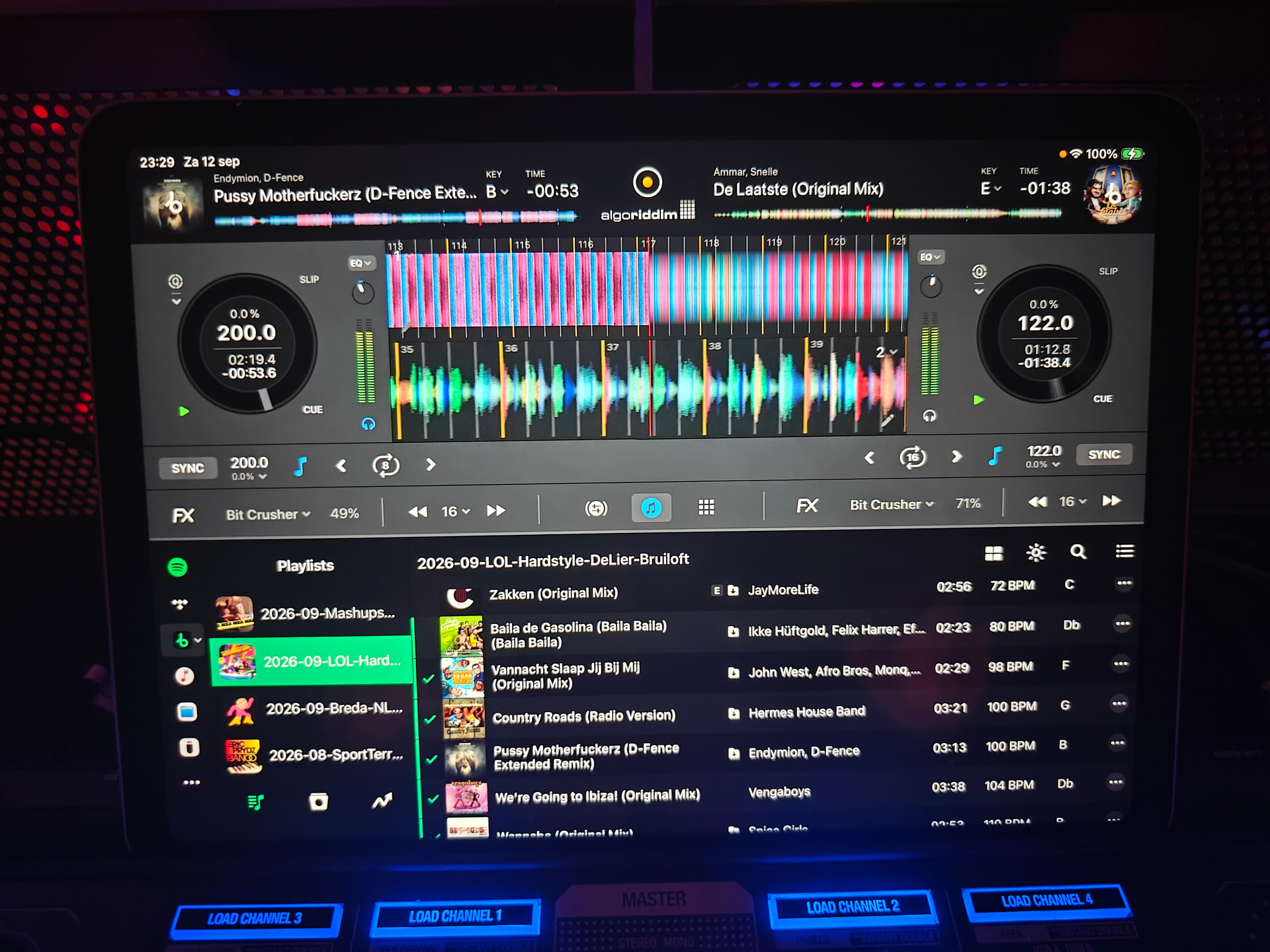
Saturday I was so sick of the problem so I have setup Beatport with Offline Cache functionality on my iPad. Transfered all my playlist. In the evening I did a wedding, connected to WIFI and got 2 music stops, these 2 moments 1) I was playing streamed request song (uncached) and 2) a cached song I prepared upfront. This last stop, I made a picture, see attached. You can clearly see the song on deck 1 has a cache icon in the playlist underneath.

For me this made me clear it is a bigger problem involving music playback! I wish to be very clear that this gives me very bad feeling about the software I used to love. Please investigate this further more, because I am sorry to say, that this will cause me to return to Pioneer / Alphatheta soon. This is not what I expect from a company that states “Pro” in the name. Please give this priority, music that stops is the number one fear amongst DJs.

Thanks for the follow up and addition info @Ludo_Looijenga- this is super helpful! Based on the fact that this is happening with offline/cached songs and always on Deck 1, I think we’ve been chasing the wrong thing.

The symptom you described — playhead frozen, waveform stopped, play button still lit green, deck unresponsive — is exactly what djay does when it believes the jog wheel is being held. It’s not that playback failed. It’s that djay thinks your hand is on the platter, so it’s holding the track still, precisely as it should. That explains everything we couldn’t explain: why it’s source-independent, why the cached Beatport track froze the same way, why the other deck carried on happily, and why it sometimes releases on its own.

The Mixon 8 Pro has a known history here, and it’s specifically the left platter. Another user on firmware 5339 had the left jog wheel falsely registering touch. The firmware didn’t fix it and Reloop replaced the unit with a tested one, after which it was fine. You’re on 5339, and your problem deck is Deck 1.

There’s also a grounding element to it, which could explain why this bites you at venues and not at home — capacitive sensing is sensitive to how the controller is earthed and what else is on the same power strip.

Try this before your next gig: switch Deck 1’s jog wheel out of scratch mode into pitch bend mode. A false touch then nudges the pitch instead of stopping the music. You lose scratching on that deck, which for a wedding set is a small price for a track that never stops.

Worth trying too:

  1. Power the Mixon on without touching the platters at all — the jog wheels auto-calibrate at startup, and a hand resting on one during power-on throws that off.

  2. Put the controller on its own power outlet, with a high-quality surge protector and not shared with the PA.

  3. At the venue, touch something earthed and see whether the wheel behaves differently.

When you’re back, the two-minute test that settles it: load a track on Deck 1, press play, leave everything alone, then very lightly graze or press down on the left platter. If playback stops, we have our answer.

If it reproduces, please contact Reloop Support directly. Another user in your position got a tested replacement unit from them, and that’s the real fix. I’m sorry it took four events and a Beatport subscription to sort this out. You did the hard elimination work and it’s what pointed us in the right direction I think.