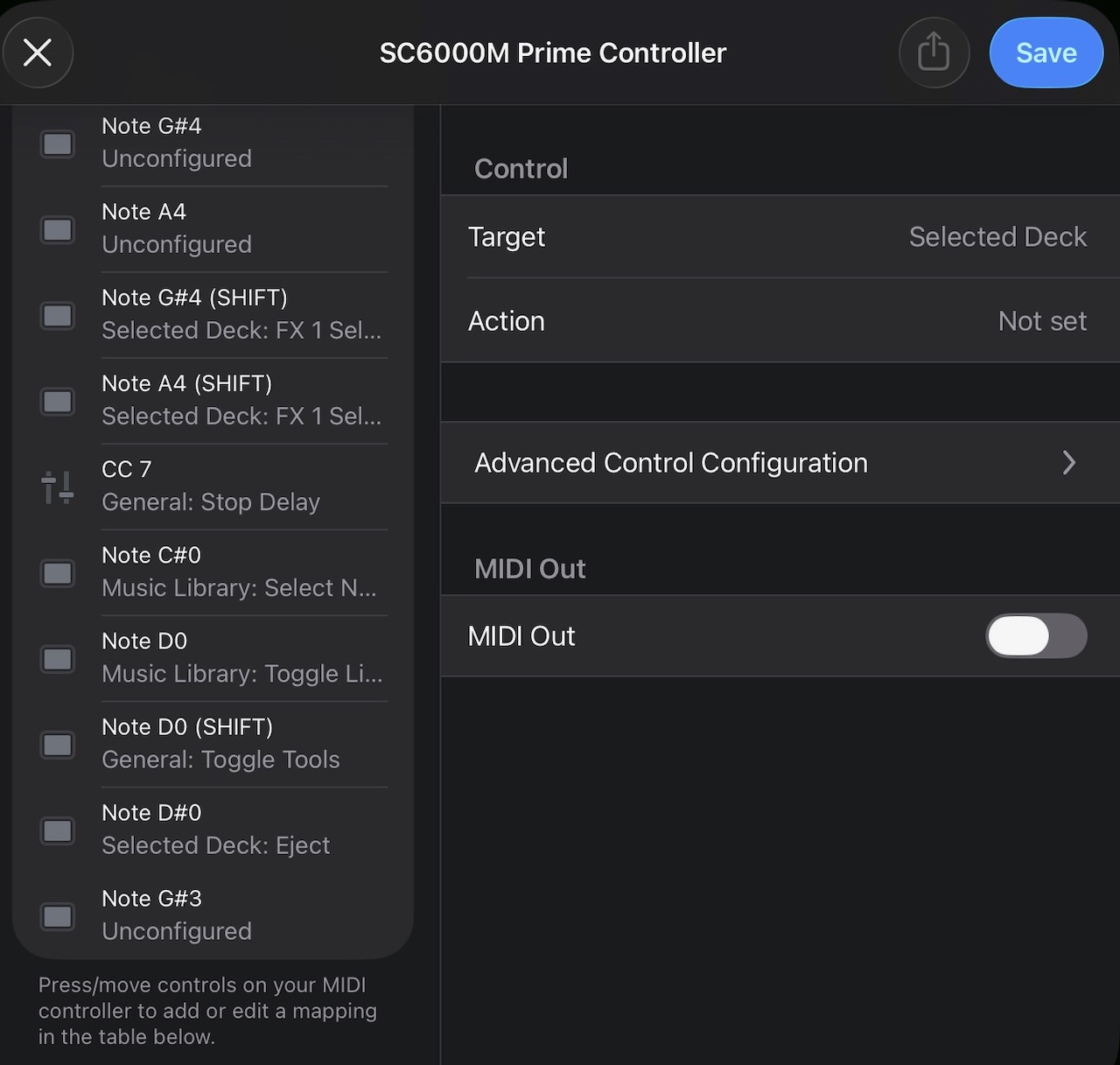
Was trying to midi map a button on my Denon SC6000M and found on the midi map screen that a button was constantly sending steady signals non-stop (Note G#3). Like every 0.25 of a second according to how fast the midi note blinks on the left column (like a steady fast beat lol).
When pressing other buttons, they get recognized but instantly gets replaced by that “stuck” midi note / button.
Anybody have this problem before? How to potentially resolve? Doesn’t seem like a media player hardware / button issue. Seems like a midi signal problem. I dunno. I’m open to any ideas. Thank you!
Edit 1: Revised some info, verified that constantly sending button is not one I recognize (not the button I wanted to map). Wish I knew what button that was!
Edit 2: Removed USB-C hub to iPad and connected media player directly. Same result.
And fwiw, more internet searching for 90 38 7F gives this result in the Hercules T7 controller specs:
I tried pressing every button and knob on the SC6000M and none give 90 38 7F. All start with “80” (even shift presses) and most end with “00”. So it seems like totally something else from the deck altogether. The 7F clue seems like something constantly “pressing” but notice I never saw it state “00” which is “release”. So more clue that its not a hardware button or switch based issue. Maybe some weird electrical signal it is generating?
Another clue is that no one else has ever seemed to have this problem as far as my searching has gone. Which I assume that means it’s a specific to me problem and not some common occurrence that happens here and there to people hooking up controllers to Djay or any other software.
I’m tempted to update to latest firmware, but I’d rather not do this as I have a gig coming up. Right now it’s just annoying but AFAIK it doesn’t affect my performance on Djay. After the gig, maybe I’ll dive deeper and try and make some changes. Still open to any advice though!
You’re welcome @zrevs1. I would contact Denon Support or try the Denon Community to see if someone can help you figure out what button that MIDI message relates to.
Thanks for the idea. Some users in the Denon community are suggesting it is the platter as well.
However, how would I check for this? In the Djay midi mapping screen, I move the platter but the midi signal it displays is a totally different signal then the G#3 note it keeps pinging.
Someone said that they had a similar experience when trying to midi map in Traktor. In general, it is a Serato specific midi signal that was interfering. See my next post to @Slak_Jaw for a slight bit more detail. I’m not coming up with much doing a lot of searching though. Hoping the Djay community can chime in with their experience. I can’t be the only one IF it is an issue that all these motorized platters have.
Hi @Slak_Jaw , I did try the Denon Community and I did get an interesting answer.
As I stated my post just before this, a user said that they encountered a similar problem when trying to map the SC5000M and SC6000M to Traktor. They stated that either Serato or Denon (they didn’t remember) told them that there is a Serato specific midi signal being sent for platter tracking. That seems to align with my issue and if true, would exactly explain the issue.
Would you be able to check with Djay’s engineers/developers if this is the case according to their hardware experience or testing?
I’m somewhat doubtful though because I’m pretty sure many before me would have come across this problem with either the SC5000/6000M or one of the other motorized platters.
I’m also hoping that someone knowledgable regarding the Denon units knows how to somehow disable or workaround this signal to once again effectively enable midi mapping. It would just really improve the Denon hardware’s integration with Djay. Again, perhaps the Djay engineer’s have ideas?
Hi @zrevs1, our engineering team has confirmed that the jogwheel is sending this repetitive MIDI note. They are working on a solution to prevent this in the MIDI Learn tool which should be included in an upcoming update (likely 5.6.4). Thanks!
Wow! That is awesome news. Feels really good to go from my observation and question to action + solution. I’m thankful (again) to have this line of communication available. Appreciate your and the engs/devs time and attention to this. Personally, this is a big reason why I made the switch to Djay. Thank you.
Does this mean the SC6000M would be able to be mapped to DJay Pro after the next update? Even without screen compatibility, that would be big (and welcome) news for me.
Slak_Jaw is best to answer this for sure. As a user, I can only give my personal experience:
Overall, the SC6000M has been great with Djay already. The motorized platter works really well and is very precise. No drifting even when scratching and is really stable. And I’m pretty picky about the feel. So far, no complaints at all on that front.
All buttons have worked as expected. I have an LC6000 too and I like that I can go between Layer 1 & 2 with one button press with the SC instead of multiple presses on the LC. Especially because I like working from just one player. Even the library browsing works knob with fwd/back works better than expected. Okay, maybe a couple things can be improved. With some small attention being given to the SC6000M now for this midi issue, maybe it’s worth giving my 2 cents in another post.
But anyway, all critical buttons are mapped as I would want it by default. There are a couple buttons that are unmapped and those are the ones I was looking to do something with that would save me from relying on my mixer to do. To your point, with full midi mapping access, I could probably go even more in-depth with mapping and re-map some of the buttons/functions I don’t really use much. This “bug” was interfering with that but I could see that if it was solved, the ability to re-map was already ready to go.
I remember trying to map this unit a few years ago and gave up due to not being able to get a decent signal from the platters. I never revisited this, as it has never been mentioned on the official supported devices page. I too have a couple of LC6000’s and I’m happy with the integration from them, but if I could swap them for my 6000m’s then that would be superb, something I’ve been looking for, for some time.
I’m aware I’d have to map these myself, but it would definitely be worth the effort.
I’m guessing in the past it needed mapping for it to work. I can confirm it is now well mapped by default. The only slight problem being addressed now is remapping from the default. But as-is, there is no critical or gamebreaking problem. I said it earlier in this thread but from all my searching in this forum and elsewhere, no one else ever mentioned or brought up this issue so apparently there hasn’t been this great need to remap it. I guess I’d consider that a testament to how well it works out of the box.
IMO, you could make the swap to use your 6000M’s now. I think you’d be mostly happy with it. And then if a fix for remapping comes in, it’d potentially be even better if you had specific requirements that weren’t being met. I know my QoL would be improved by just remapping a couple buttons that I usually have to rely on touching the iPad screen or button combo presses on my mixer that I’ve mapped.
I’m also putting together a suggestion / wishlist for the SC6000M. Feel free to add to that post if you’d like. For how awesome and premium this media player is, I feel it deserves the best integration with Djay as much as is possible.
Once again, thanks for the guide. I appreciate your effort.
I will look in to this later on - maybe this weekend, but I have another question. I was trying to map this a few years ago on Mac. Are you using the 6000m’s on IOS, because that would be even more incredible. You could just put the Ipad on top of one of the screens and go from there.
And you’re absolutely right, these players are sooo good. I’d love to add any suggestions I can think of, if you’re starting a thread.
Good suggestion on putting the screen there. I’ve had it in front of me on a stand but I’ll give that a try one of these days and see if it improves my workflow or is more comfortable. But the stand to me is sorta vital because I place the iPad on a portable bluetooth keyboard that has a tablet holder slot thing. I use the keyboard for faster music searching. Though tbh, I recently had a gig and totally forgot to turn on the keyboard and really didn’t notice until after lol, so you may have a point there.
Seems like a small thing of where to put the screen, but for us on iOS, part of the reason why I like it so much is the ability to use the screen as another way to interact with Djay. Actually, I would honestly say that using Djay on the iPad is probably the biggest reason I made the full time switch to Djay. I’ve thought about using my laptop but I don’t think I can go back to not being able to have the option to quickly touch something I want to change. Not everything is logical or efficient (or even possible) to map to buttons / knobs / faders on my mixer and the 6000. I tend to do this with FX, doing things on the internal deck, scrubbing through the track (LC6000 has this covered though), messing with Neural Mix stuff on the fly, etc. I always mention that hardware “feel” is important to my DJ’ing and I’ve recently appreciated being able to extend that to the software as well.
Lastly about using the iPad, it’s been pretty freeing to not be bringing and maintaining a laptop for DJing. So much faster and simpler to use for DJing without the unnecessary functions and problems of laptops. No real drawbacks other than screen size. Even then, Djay’s work towards good UI is apparent because I’ve never felt like having a bigger screen was necessary while in the mix. Nice to have? Definitely… would love a 13” iPad lol. But while I don’t, it’s not bothering me. And I don’t have great eyesight lol. For any advantage a laptop would have, the speed of touch vs a trackpad when I can’t do something through hardware is just a big net positive.
I’ve found Djay + iPad has been the most focused, straight-forward, and in some ways most advanced combination I’ve found yet for my style and needs when DJ’ing.
(though if one day Apple makes a touchscreen Macbook… okay, I might change my mind )




 )
)


