Hardware/controllers used: ddj flx10, ddj sz2 and all other controllers
Hardware firmware version: up to date
A) SUMMARY OF ISSUE:
i always notice anytime i use the jogwheel to scratch it doesnt seems tight and free like in Serato DJ
B) DETAILED STEPS TO REPRODUCE:
In serato dj the jogwheel behavior is tighter and freer when scratching … I love it better scratching in serato dj than Djay pro i hate to say that but i Dont have a choice
C) EXPECTED RESULTS:
please make the jog wheel behavior tighter and free like serato dj pro if possible make it more better than that of serato dj especially when scratching and bending of songs
Thanks for the input @Brown_bkp. It would be great if you could provide a comparison video of the scratching performance difference between Serato and djay. This will help communicate things to our dev team. Thanks!
I will try and make a video but it might not be noticeable mere looking at the video but you can notice it better through how the jog wheel feels as a dj
I Dont know if you understand what im trying to say mere looking at the short video of both serato dj and Djay pro jog wheel behavior while scratching and nudging music it not tighter and the waveform speed is not corresponding with the hardware deck which makes scratching not feeling great on Djay pro compare to serato dj the hardware jog wheel stops at thesame time with software waveform when i backspin
My hunch is that this has something to do with latency. Can you check in Serato what the USB buffer size is set to? (NB Djay pro does not expose the latency setting, it seems to auto-calculate this using some kind of hidden algorithm).
Thanks for the videos @Brown_bkp. Can you please also share full details for the device you are using (ex. M1 MacBook Pro) and what OS you are running (ex. 26.5)? Thanks!
Sorry I am only a curious user here - not an algoriddim staff, but…
Can you kindly redo this video on the iphone, exactly as you did on the serato? I noticed on serato you have a loop running on deck 2 as you scratched the first beat on deck 1. then a spin-back on the deck2 loop .
I totally agree with you, on the overal snappiness of serato when it comes to scratching and rapid cue-drumming. No doubt there
The video above is not because of the loop watch carefully when i backspin on serato, the hardware jog wheel stop at exact time the wave form on the screen stops but on djay pro video above the wave form on the screen stops some seconds and the hardware jog wheel still spinning … I have said it earlier that i really dont know how to explain the issue mere looking at video because that what every dj feels while scrtaching in djay pro and im sure you are feeling that too when scratching especially when you have played on serato dj for a long time …you can tell the differenceence
Hey just wanted to chime in this is an issue I have noticed as well after a year of use with Djay after years before with Serato. Djay pro latency settings need to be user adjustable. Serato scratching is tight, Djay’s is sloppy. Nothing we can do until Djay let’s us adjust latency.
Then that is why we need to complain about this issue so that Djay team can find solutions to it …so if im quiet about this how would there be a solution to it
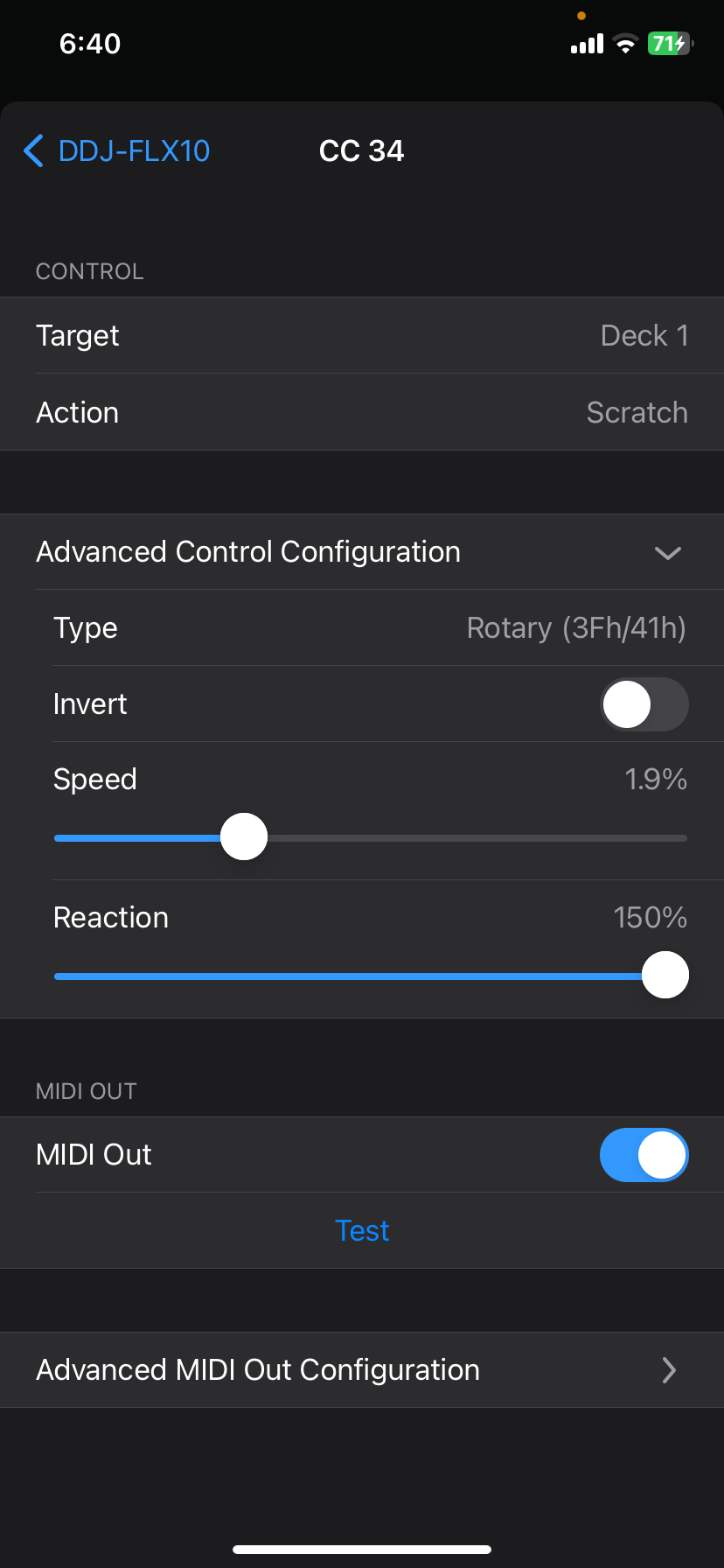
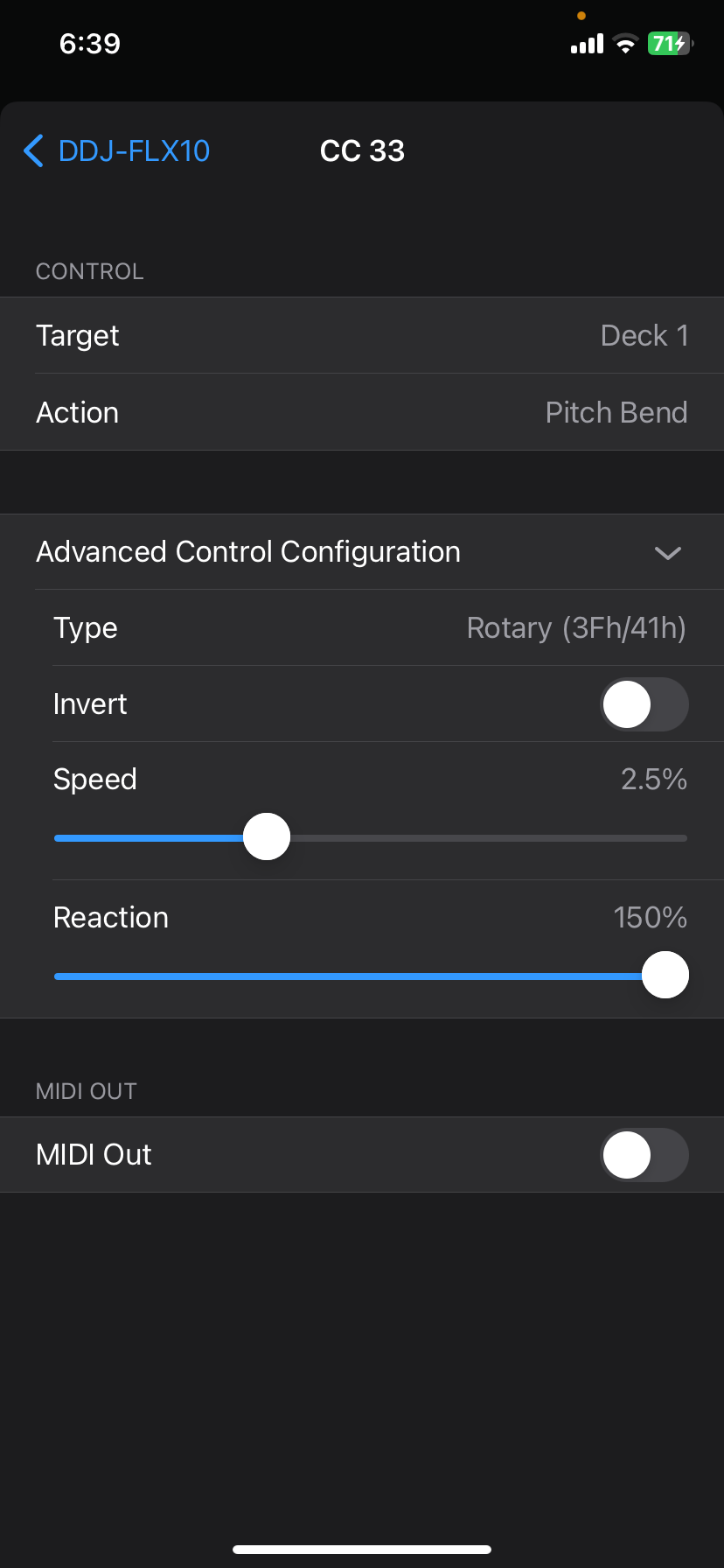
Well i think i found a partial fix to this issue and its improve the scratch feeling and speed i think its useful for anyone seeing this as issue but the most annoying part about the fix is that you have to keep mapping for every new player you are playing with for the first time
Talking about the partial fix you just have to go to midi mapping both on iphone or Macbook after that touch your hardware jog wheel then click on ‘advance control configuration’ set the speed to 2.0 perfent do it for both deck also nudge the jog wheel then increase the speed to 2.6 and save the mapping