Funnily enough, I’ve just come to that same conclusion. I’ve really had a separate iPad and MacBook setup, even to the point of having different dj controllers on each.
But I love the idea of just using my iPad, so for gigs, now that beatsource and beatport are one. I’m going down the offline locker route as well. I don’t collect music unless it’s vinyl, so for gigs where I’m playing more what the crowd wants nowadays rather me putting an underground set together, streaming with an offline locker seems the perfect combination.
I also hear quite a bit of chat that if your are not using Serato or Pioneer gear, you are not pro. And even not too long ago there was talk about Virtual DJ having to change its name to get away from the reputation of being a piece of DJ software for DJs that only play on Windows laptops, in their bedroom, using a mouse as a controller!
As for which software is pro and which isn’t, I kind of feel like this is a bit like the debate over which hardware is pro and which isn’t. Some DJ’s still think it’s Technics 1200’s or nothing. While others say you’re not pro unless you’re playing on Pioneer CDJ’s. I switched from turntables and CDJs to a laptop and controller pretty early on and I remember a lot of DJs frowning down on my Traktor setup. For me, the club gear felt too limiting or restrictive; DJ software and MIDI mappable hardware just offered way more creative opportunities. IMO the tools don’t make the DJ - Laidback Luke is a prime example of this playing huge festivals on a Mixtour Pro with his iPhone. Either way, whenever another DJ asks me “hey what software is that?”, I try to take the time to showcase the power and flexibility of djay and usually they are simply blown away. I also agree that competition in this space is great and has resulted in some fantastic innovations that we couldn’t have dreamt of a decade ago.
The first time I ever dj’ed in a club - I had gone for my routine drink, then I sought of asked the resident dj to allow me cover his warmup period. He asked me if I actually do dj’ing and I answered
“nope, I just love listening to good music”
When I got to the booth and used my ipad to dj in their hercules setup, they couldn’t believe I was the one - the bar owner came and asked me to go 2 hours into the peak time. Feeling awkward that a regular bar client performed better than them house dj’s I later learnt they went around telling people I was playing a pre-recorded nonstop track. I didn’t blame them because they didn’t even know the software to begin with, let alone that I was holding a mere ipad.
Hi @Scoop and everyone. This is a classic debate of visual perception versus actual performance.
Many DJs associate a ‘Pro’ setup with heavy, cluttered software. But the reality is that Djay Pro offers the exact same core features—and often executes them much better—than the tools 99% of decent club DJs actually use during a real gig. You don’t need a bloated interface to be professional; you need stability and zero latency.
A huge part of this ‘unprofessional’ myth comes from DJs running poorly maintained, bloated laptops. If you treat your gear like a professional—running a clean, optimized system with strictly legal software and a properly managed local library—Djay Pro’s stability in a live environment is unmatched. I’ve seen ‘industry standard’ setups crash mid-set while Djay Pro runs flawlessly for hours.
And regarding the comparison made earlier… if Djay Pro is considered a ‘toy’ app because it has a clean, modern interface, then what exactly does that make VirtualDJ? Exactly.
At the end of the day, the crowd doesn’t care about the logo on your screen. They care about the mix. And for high-energy, fast-paced live sets, Djay Pro more than delivers
The difference is…the VirtualDJ interface can be 100% customised to any user requirements.
It uses vector graphics so there’s no issue with blurry appearance on large screens. There are hundreds of skin designs. Users can easily add their own custom knobs and buttons.
On the other hand djay Pro looks OK on a phone or tablet, but run it on a large screen and it looks awful (IMHO). Blurry graphics, huge sliders vs tiny rotary knobs. In some views the slider proportions are comical (really short but really wide).
Regarding the need for large screens… you don’t exactly find 32-inch monitors in club booths. For track prep at home? Sure, whatever works for you. But for actual DJing, a massive screen isn’t a requirement. The same goes for custom ‘skins’. As long as the software does exactly what it needs to do, the aesthetic skin shouldn’t matter. What truly matters is that the interface is clean and everything is instantly accessible during a live set.
I know VirtualDJ is a powerhouse. My DJ partner uses it, and I used it years ago too. I have no plans to go back right now simply because I find its interface too cluttered; it just puts me off. Interestingly, VDJ suffers from a very similar unfair stigma. Because it was historically easy to pirate, people assumed ‘anyone can have it, so it must be a beginner’s toy’, which led to it being massively undervalued. Djay Pro faces that exact same kind of bias today.
There is a huge conceptual error in our industry: the idea that if you don’t use Rekordbox, Serato, or Traktor, you aren’t a ‘real’ pro. I actually migrated to Djay from Rekordbox. I had to open RB yesterday for a specific task, and honestly, the rock-solid stability I get with Djay Pro is something Rekordbox wishes it had. Plus, Djay’s graphical interface is more than enough for my needs.
Is Djay Pro perfect? Of course not. It has things to improve, I’ve given the devs my fair share of tough love on these forums, and I’ll keep doing it. The competition is fierce, and who knows what software I’ll be using tomorrow. But right now? For me, Djay Pro is absolutely a professional tool.
Vdj has an interface that feels 20 years old; it almost looks like an accountant-turned-DJ program, and the skins are embarrassingly ugly! DjayPro is well-designed, has a modern, clean interface, and is more intuitive to use.
The ability to use it seamlessly on Mac, iPad, and iPhone is exceptional!
Fair point, you absolutely can use custom skins. But for me, having to rely on third-party skins or spending hours tweaking the UI just to make it visually digestible adds unnecessary friction.
As DJs, our prep time is valuable. I prefer to spend those hours properly managing my local library, analyzing tracks, and tagging metadata, rather than customizing how my software looks. Djay Pro offers a clean, native, and modern macOS experience right out of the box. Plus, with native design, I never have to worry if a custom skin is going to glitch out or break during a live gig or after an OS update.
At the end of the day, to each their own! But a streamlined, native workflow out of the box is a big part of what makes a tool ‘Pro’ for me
Having tried all the various software at some point over the years, multiple times. Serato still has hands down the best implementation of DVS, the most accurate and most responsive. The others are nowhere near in that regard, including Djay.
It’s also the only software on the market that has a dedicated 3 deck layout, I use 3 decks I only want to see 3 decks, Serato is the only company offering that.
No - again VirtualDJ can display however may decks the user desires, up to 99. Plus the sampler can even be used to add more, as it can load one-shots, loops or entire tracks.
It may not be available in the default interface, but there are three deck skins out there - and a forum full of skilled users who could make you one for a few beers. Tools to design and create your own also exist.
If anyone wants further info feel free to drop me a PM.
I’m just grateful that we have choices and aren’t all restricted to perform with some one-size-fits-all “industry standard” tool. Imagine if all professional guitarists had to use the exact same guitar…
It’s not native though is it, and the last time I looked there wasn’t a single 3 deck skin on their portal for user skins. After 3 hours of faffing around I decided I like my DJ software to just work when you connect it. Im sure VDJ is fantastic for those who like sitting at a computer faffing around with settings rather than being on the decks mixing.
Yep, go ahead and pick the worst possible example LOL
No a three deck skin is not available by default (as I said) because let’s face it, 99.9% of setups are designed around 2 or 4 decks, and always have been. Hence your comment about it being “the only one on the market”. It’s non standard.
So for the majority who use 2/4 deck setups there’s no “faffing”.
If you want something bespoke then there’s a little effort, but (as mentioned) it doesn’t have to be you that does it. If you want an exact duplicate of that Serato layout, it’s possible.
It wasn’t the worst example. It was what popped up when I searched for it.
The Rane SL3 was an extremely popular 3 channel sound card, the Reloop Flux is a popular replacement. And even with 4 channel devices, some people might just want to have it as compact as possible by removing the redundant 4th deck.
And this is the exact problem with VDJ, I don’t want to have to go looking for a solution from a forum, or ask someone to design one. I just want to turn software on, have a clean and clutter free interface and have the ability to select the amount of decks I want to use, and it simply doesn’t offer that.
I have had the blues using the IPad with djay because I always just mirrored my MacBook playlist to the iPad. For me that doesn’t work. So now I just use the iPad for my fav playlist ( no sub folders) specifically for my weekly gigs…. Around 2,000 songs . NO stress Tidal & Apple Music on stand by… extremely fast and definitely pro!
It doesn’t offer three decks on the default skin, no - because it’s non standard. As you said yourself, the other platforms don’t have it, and controllers are all either two or four decks. It’s an even number market. What do you use deck 3 for anyway?
Personally I’d rather be able to set up my software the way I want, rather than what someone else thinks I want. There are plenty of people using VDJ as it comes, but what puts it in a class of its own is being able to make it uniquely yours.


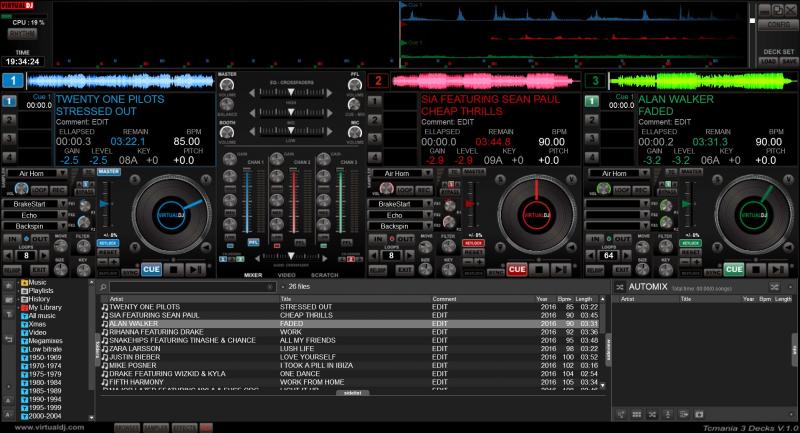
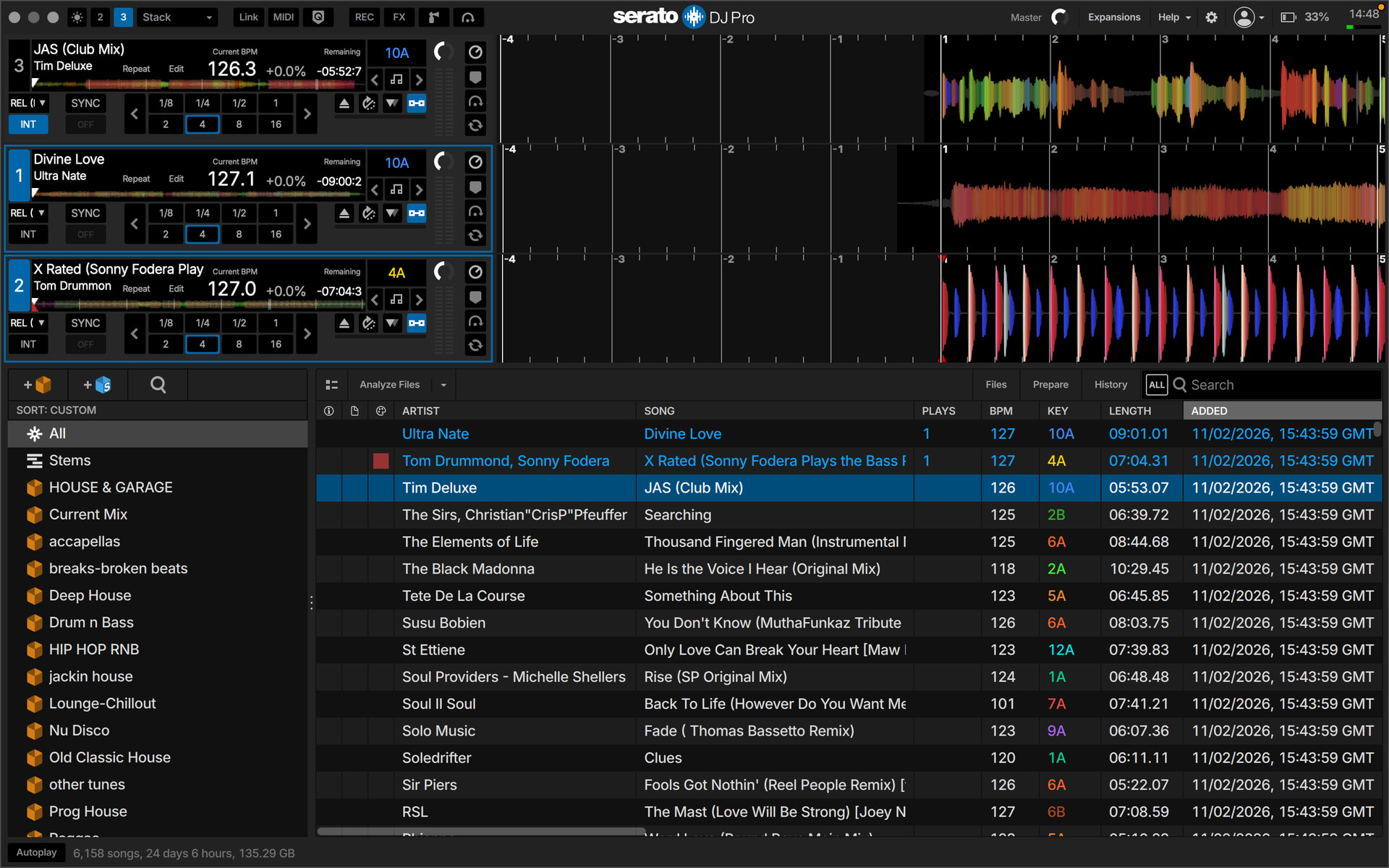


 What do you use deck 3 for anyway?


