Duplicate Ghost Files

System Specs:

  • Hardware: Mac Mini M4 & MacBook Pro (Synced Library)

  • Storage: External Volume (APFS)

  • Software: djay Pro (Latest Version)

The Issue: I am experiencing persistent duplicate entries in “My Collection” for the same physical file path. These are “ghost” entries: two database records pointing to the exact same file path (file://...).

Troubleshooting Already Performed:

  1. Standard Deletion: Deleted duplicates from playlists; they reappear upon application restart.

  2. Master Database Purge: Deleted duplicates from “All Tracks” (Master Collection). They reappear after restart.

  3. File System Integrity: Confirmed no file system duplication (the files are unique on the disk).

  4. Metadata/Tagging: Renamed physical files on disk. djay Pro correctly flags the original entries as “Missing” but then keeps the original “ghost” records indexed, often creating new duplicates when the file is re-imported.

  5. Environment Isolation: * Disabled “iCloud Sync” and “Music/iTunes” library sources in the sidebar.

    • Ensured no folders are listed in “Automatically import new files.”

    • Deleted local cache (~/Library/Caches/... and ~/Library/Containers/...).

  6. Database Integrity: Verified that I am working from a single .djayMediaLibrary file.

The Behavior: The database appears to be “self-healing” or reverting to a cached state where these ghost records are hard-indexed. Even after forcing a “Relocate” and cleaning the master collection, the duplicates return, suggesting a corrupted database index that is retaining references to deleted objects.

The Constraint: “Write metadata to file” was previously disabled, so I cannot simply wipe the library and re-import without losing thousands of hours of cue/beatgrid work.

My Questions:

  1. Is there a command-line utility or a supported method to perform a Database Integrity Check/Repair on the .djayMediaLibrary file?

  2. How can I force djay Pro to flush its internal SQL index to prevent it from re-populating these ghost records from the cloud/local fallback?

  3. Are there known issues with the M4 silicon/macOS containerization causing persistent state-caching that bypasses standard UI deletions?

Any assistance from the technical team would be appreciated, as I am currently unable to maintain library consistency across my studio and live rigs.

About 0.5% of my library affected. Once in a while I find duplicate entries pointing to same file.
Must be a bug - annoying because one of the duplicates would not be in any playlist.
I don’t think mine reappears when I delete it

Hi @DjBigBasha, welcome to the Community! Thanks for the detailed info — this is very helpful.

Regarding your three questions:

  1. No. There’s no command-line utility or user-facing integrity check/repair for the djay Media Library. The only supported database-level recovery is restoring an automatic backup from ~/Music/djay/Backups — djay creates one per day on launch and keeps the last 10.
  2. iCloud isn’t repopulating these. djay’s iCloud sync only covers cue points and loop regions per song — it does not sync My Collection, playlists, or track entries, so it can’t be the fallback source you’re seeing.
  3. Nothing known on M4/containerization. Related: the folders you cleared aren’t where current djay Pro stores data. App data (including the Media Library) lives in ~/Music/djay/, and track analysis data in ~/Library/Group Containers/VJXTL73S8G.com.algoriddim.userdata/Library/Application Support/Algoriddim/. That’s likely why the cache deletions had no effect.

For context, we have an open report of duplicate entries pointing at the same file path. The reproducible trigger there was editing Title or Artist inside djay after import, on files stored in iCloud Drive. Yours are on an external APFS volume, so I’d like to determine what’s different in your setup before I report this to our engineering team.

  1. How exactly is the library “synced” between the Mac Mini and the MacBook Pro? (iCloud Drive, Dropbox/Syncthing/rsync, or manually copying ~/Music/djay/?)
  2. Does the duplication happen on both Macs, or only one?
  3. Is djay ever running on both machines at once, or open while the sync agent is active?
  4. Do the two entries show identical Title/Artist, or do they differ?
  5. Was the external APFS volume ever a cloud-backed folder (iCloud Drive, Dropbox smart sync) at any point?
  6. Please also share your exact djay version # and macOS version #.
  7. Finally, can you please also upload your djay Media Library file from ~/Music/djay/, plus a couple of the duplicated tracks to your Google Drive/Dropbox, enable sharing permissions, then send me a link to the files in a DM?

Thanks!

Hi Team,

I have completed further testing to isolate the root cause of the persistent duplicate entries.

Steps Taken:

  1. I manually moved the entire cache/support directory (~/Library/Group Containers/VJXTL73S8G.com.algoriddim.userdata/Library/Application Support/Algoriddim/) to my desktop to perform a clean state reset.

  2. I performed a full library re-analysis.

  3. Result: The duplicate/ghost entries persist exactly as they were, confirming that these ghost records are hard-indexed within the .djayMediaLibrary file itself and not in the analysis/cache layer.

Files for Engineering Review: I have uploaded the following to:

  • My djay Media Library.djayMediaLibrary file.

  • Sample audio files showing the duplication issue.

  • Console logs capturing the application launch/index load process.

Additional Context: As requested, here are the answers to your specific troubleshooting questions:

  • Sync Method: I perform manual manual copy/replace of the ~/Music/djay/ folder between machines via an external APFS drive. I do not use cloud sync tools to prevent file-locking.

  • Duplication Scope: The duplicates are present on both my Mac Mini and MacBook Pro, confirming that the corruption is being propagated during my manual library transfers.

  • Simultaneous Usage: I strictly avoid running the app on both machines at once.

  • Entry Comparison: Metadata (Title/Artist) is identical; internal database IDs differ.

  • Cloud History: My external APFS volume has never been mapped to a cloud-backed folder (iCloud/Dropbox).

  • Environment: djay Pro v5.6.6 on macOS 26.5.1. On Mac mini, and 18.7.1 on MacBook Pro

Please let me know if you are able to identify the orphaned object IDs in the database and potentially provide a clean version of the index.

Best regards, George

@DjBigBasha — thanks for the thorough testing, and for uploading the files. I’ll share these with our engineering team.

Two of your results I’d read differently, though:

The Group Containers test. That folder only holds track analysis data. Playlists, My Collection entries, history and queue have always lived in the djay Media Library at ~/Music/djay/ — so removing the analysis folder and re-analyzing was never going to touch collection records. That result is expected behaviour, not evidence of a corrupt index.

Duplicates on both Macs. Since you’re copying the whole ~/Music/djay/ folder between machines, both are running the same database file. Identical entries in both places is simply what copying one database to two locations looks like — it doesn’t confirm corruption is propagating. And two records with matching metadata but different internal IDs are two valid entries, not orphaned objects.

So before we call this a corrupt index, I’d like to rule out the transfer workflow, because one thing stands out:

  1. djay must be fully quit before the folder is moved or replaced — on both machines. If djay is running when you swap the folder in, it writes its in-memory library back out on quit and undoes your deletions. That would look exactly like “self-healing.”

On your last question — I’m not able to hand-edit your database or return a cleaned index, and there’s no supported tooling for that on our side. Getting your files to engineering is the right next step, and the isolation test below will make that report much stronger.

I have some more follow ups before I share my report with engineering:

  1. The decisive test: on the Mac mini only, no transfers at all: quit djay → relaunch → delete a duplicate from My Collection → quit djay → relaunch. Do they return? If they don’t, the transfer workflow is the likely cause, not the database.
  2. When you copy/replace ~/Music/djay/, is djay fully quit on both machines at the time — and is it quit on the destination before you replace the folder?
  3. Do you replace the whole djay folder, or let Finder merge it?
  4. Which direction was the last copy before the duplicates were noticed?
  5. You listed djay 5.6.6 for the Mac mini but not for the MacBook Pro. Can you please confirm if they are both running 5.6.6 or is the MBPro on an different version
  6. macOS 18.7.1 on the MacBook Pro — can you double-check that? There’s no macOS 18.x; did you mean 15.7.1?
  7. Roughly what percentage of your library is affected, and did it start at a particular point (a djay update, a new transfer, a specific import)?

Thanks again!

1 Like

Hi [Slak_Jaw],

Thank you for the clarification. To ensure we are on the same page, I want to clarify my findings, as there are a few points where my experience differs from the expected architecture:

1. The Duplicates are Persistent: To be clear: the duplicate entries are present within the djay Media Library database itself. Purging the cache folder did not remove them; it only stopped them from reappearing after I manually deleted them. The duplicates exist in the collection until I manually intervene to remove them, at which point they stay removed—but the purge of the cache was the necessary step to allow those deletions to “stick.”

2. The Sync Workflow: I want to clarify the transfer process: I have never performed a transfer while djay was open. I ensure the application is fully quit on both the source and destination machines before any file operations occur. I replace the entire ~/Music/djay/ folder and do not use the “Merge” function.

3. The “Decisive Test” Results: When I performed the test on the Mac mini (deleting the duplicates, then quitting and relaunching), the duplicates stayed deleted. This confirms that my transfer workflow is not actively creating the duplicates during the move, but rather that the duplicate entries were already embedded in the database I was copying.

Answers to your follow-up questions:

  • Sync Protocol: As noted, djay is always fully quit on both machines during transfers.

  • Direction/Scope: The duplicates are present on both machines. Since I am replacing the entire database folder, it is clear the database I am moving already contains these duplicate entries.

  • Version/OS: Both machines are running djay Pro v5.6.6 and the MacBook Pro macOS 13.x (Ventura). ( sorry for the typo) :blush:

  • Occurrence: Roughly 5% of my library is affected. The duplicates appeared after the update to 5.6.6; it seems the library migration or database update process during that version transition may have created these duplicate internal IDs.

Conclusion: Since you already have the database file and track samples I provided, I believe these files will confirm that the duplicate entries are hard-indexed within the library file itself. My testing suggests that the duplication was likely triggered by the database update/migration in v5.6.6, and the cache purge is simply the functional workaround required to allow the database to “forget” the records I manually delete.

Thank you for your patience and for helping me troubleshoot this. I really appreciate the time you and your team have taken to look into this with me. Your technical insight into the interaction between the library and the analysis cache was incredibly helpful in getting my workflow stabilized.

I look forward to hearing what the engineering team finds, and I appreciate all the support in getting this resolved.

Best regards,

George"

I want to add something I noticed, it might help or not :smiley:

I’ve identified a likely trigger for the duplication: Mixed In Key. It appears that when Mixed In Key modifies the ID3 tags of tracks already indexed in djay (changing the Key/Comment metadata), djay fails to update the existing record and instead treats the file as a new, distinct entry. This explains the ‘2A’ vs ‘Ebm’ duplicate I am seeing. I suspect the internal ID mismatch is being triggered by the tag modification after the initial import.

Interesting thread. One thing that stands out from your specs: you’re running a synced library across two Macs (Mini + MacBook) with the audio on an external APFS volume. In my experience with library databases in general, that’s the classic recipe for double records: if the two machines ever saw the volume under a slightly different path or the sync ran while both apps were open, each machine can write its own record for the same file, and the sync then merges both into the database instead of deduplicating them.

Might be worth testing whether new ghosts only appear after you’ve used the second machine. If yes, that would narrow it down a lot for the engineers, and in the meantime, letting only one machine write to the library (the other read-only) should stop new duplicates from forming.

1 Like

Hi @benmodigell, welcome to the Community! Thanks for the input.

1 Like

Hello Ben,

I never Run with machines at the same time , as I work (analyze, adjust, modify, or compose ) on the Mac mini then I use the MacBook only for perform.

its always the same path I even make sure that I always use the same port for the USB so the bus driver never get confused.

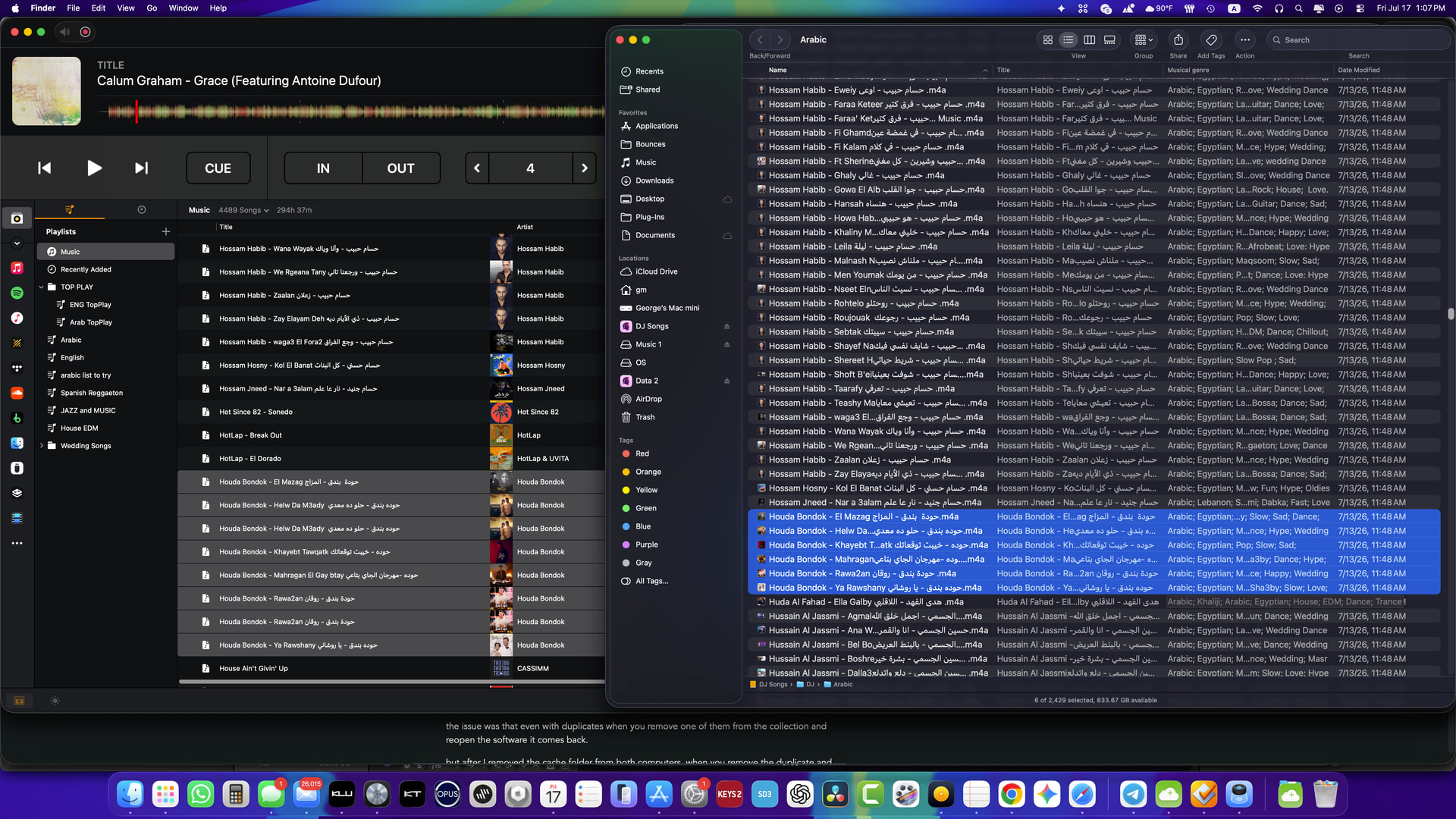
the issue was that even with duplicates when you remove one of them from the collection and reopen the software it comes back.

but after I removed the cache folder from both computers, when you remove the duplicate and reopen the software it doesnt show up again.

so their is a duplicate on database even when you remove the cache folder. HOWEVER before removing the cache folder its show up again but after removing the cache folder it doesnt.

as you can see in the screenshot thats from the Mac mini, and the cache folder is already removed.

thank you so much. I hope I didnt make a problem to anyone and hope this will help someone else as I saw from the community.

Without saying MIK is bad or good, all I can say is that djay (in general, from my experience) does not like massive and sudden library/metadata overhauls such as MIK does. I stopped using MIK almost after only a year or 2 after buying it (call it lost money), because I didn’t quite feel the “energy” rating it brought, and absolute key analysis wasn’t much of my thing anymore (if I doubt a key, I run it thru 3 dj softwares and decide where the tie is).
Now because I ran both djay and serato in mirrored playlist format, same sources…I realised recently that some tracks in serato had exact same duplicates (pointing to same file). No idea how that is even possible.

To demonstrate how djay doesn’t like massive overhaul of hundreds or thousands of track metadata at once, I used serato and deleted all MIK “energy x” tags in comments field at once (select all in serato, delete): and quit serato with proper library backup
Going back to djay, none of the metadata edit for any track was recorded (it retained the MIK “energy x” comment in comment field! Yet, if I check those same tracks in an ID3 tag editor, no such comments exist in metadata (comment field blank as in serato).

Conversely, if I delete the comments field in only 5 or 10 tracks from serato, djay reflects the changes as expected.
Hence my conclusion: it doesn’t like massive overhauls

Thanks for sharing @Armigo

Hoping it gives some insight
@Slak_Jaw, sorry slight off tangent here:
I need some help though - as I have been busy cleaning my duplicate ghost files, I conveniently checked
“Do Not Ask me Again”
in the prompt that usually asks:
“Are you really sure you want to delete this track from library?”

Now I realised simply by hitting the delete button on my keyboard while in “Music” or “Recently Added” tab, I can actually inadvertently remove a track off library and djay won’t warn me!

Can you point me back on how to get that prompt back? Is it gone forever?

Hey @Armigo, there’s no dedicated control in djay to restore just that one prompt, but there is a way to reset djay’s preferences (which controls it) back to default.

On Mac: Quit djay, open Terminal, run:

defaults delete com.algoriddim.djay-iphone-free

This resets Settings > General/Audio/Library to default — including that delete confirmation — but does not touch your tracks, cue points, BPM/beatgrid data, recordings, or MIDI mappings. Heads up: it resets everything in those settings tabs, not just this one dialog, so you’ll want to redo any other custom tweaks afterward. I hope that helps!

1 Like

Hi again @DjBigBasha — that’s a great catch, and the screenshot is maybe the most useful thing shared in this thread so far. I think this might settle it…

Look at the two COMO TU rows: identical except the Comment column — one reads “Ebm - Energy 4”, the other “2A - Energy 4”. Those are the same key and the same energy, just written two ways (2A is Ebm on the Camelot wheel). A database migration duplicating a record would copy it as-is, comment and all. Two different comment strings means djay read that file twice, in two different tag states — so this is a re-import after a tag rewrite, not a 5.6.6 migration artifact.

The trigger is almost certainly Mixed In Key’s Settings > Tag Options > Use Camelot Key notation in comment tags. If you switched that on and re-ran MIK over tracks already in djay, MIK rewrote the Comment tag on each — and djay logged a new record instead of updating the existing one. Note that every other track in your screenshot carries a Camelot comment; the “Ebm - Energy 4” entry is the odd one out, which fits it being the older record from before the switch.

That’s definitely a useful find. Our existing report on this had Title/Artist edits as the trigger, and specifically found Genre edits did not reproduce it. Comment edits doing it too widens the picture, and I’ll pass that on with your files.

Again, I wouldn’t lean to heavily on the cache purge as the mechanism. Collection records don’t live in that folder, so there’s no route by which it restores deleted entries — and you changed several things at once (purge, full re-analysis, transfers). It may be coincidental, so I’d rather not have people clearing that folder as a potential fix.

Going forward: please finish all MIK tagging before importing to djay, and don’t re-run MIK over tracks already in your collection. That’s the only confirmed prevention we have right now.

I have a few more quick follow up questions:

  1. Did you change MIK’s Tag Options — specifically “Use Camelot Key notation in comment tags” — and re-run MIK across your library? If so, when, relative to the 5.6.6 update? MIK’s own docs note that changing Tag Options requires re-analyzing or rewriting tags to apply them.
  2. Are the affected ~5% exactly the tracks you re-ran through MIK? That would close this.
  3. For the COMO TU pair specifically — do both entries point to the same file path? (You confirmed this generally; worth confirming for these specific tracks.)
  4. Controlled reproduction test: fresh file → import to djay → flip the Camelot comment setting in MIK → re-run MIK on that file → check djay. Does a second entry appear?
  5. Does it reproduce if you edit only the Comment with a different tag editor (not MIK)? That isolates the field from the tool.
  6. Which Mixed In Key version # are you running?

Yes!

Not directed to me but: hear me out - there are 2 serious problems:

(A) “Ghosts” can NOT be cleaned (minus dangerously invasive tech-work OP alluded to above) - they just keep re-appearing on next launch.

Has engineering given a clean deletion procedure yet? I have ALL my ghost files bagged now - I just need a proper exorcism for them! More on how I surrounded them all in a different thread…

(B) Djay does NOT like any external id3 tagging post-import - doesn’t matter which one is used (serato, Mixed in Key, kid3, mp3Tag etc), and also doesn’t matter whether bulk-edit or just few, but bulk edit seem to be the most rapid trigger. The “ghosting” process is not only a delayed phenomena that happens on it’s own accord (hours, days, weeks?), but also an an unpredictable event that is hard to reproduce on short notice.

I elaborate on them…

(A) Remember about 9 hours ago I took time and cleaned all my ghosts??

Well, they all returned back, plus new ghosts!.
I have had them for, perhaps a year or so. I don’t do bi-directional database transfer (main computer is my performance computer and the library file never gets replaced - i just copy from it if i need to leave it behind, and I never return back the "used’ copy.

However, my culprit workflow is that I commonly edit cues and metadata in serato (primarily first b4 importing to djay, but also many times afterwords while doing tags, metadata cleanups such as removing caps, non-ASCII characters, etc. I also use kid3 sometimes to do the same or add artwork. Occasionally I do the same on djay. Sometimes I remaster a track or get a higher quality video version of a pre-existing track and replace them altogether.
How I replace them and maintain their playlist placements and playability in both djay and serato intact is by keeping the same filename as the old copy and hitting “replace” in Finder copy-n-paste duplicate warning, then I re-analyse, re-cue and edit metadata to my liking as above. In this way the track goes straight into respective playlists the old one used to occupy (or so I thought).

I actually used to assume I only have new ghosts, and that the old deleted ghosts were long gone (turns out I was just not too keen, given that the ghosts were only a fraction of my huge library to notice frequently. At the time I thought it was a only one-off past error event, and that my estimated affected files could be just about 0.5%. Little did I know that new ghosts have been piling up following every library “cleanup” work I did - now I put a finite number to that, having spent considerable time on the library today, and thank goodness for djay’s briliiant “Export to CSV” utility!. (More on that later)

After the many hours of futile “ghost clearance” operation today, I changed to “research mode” on only 5 most recent ghost tracks that had emerged during the sessions I was attempting “ghost cleaning” - however this number after an hour or so, creeped to 11 new ghosts as at the time of typing this sentence. I was camped at the djay “Recently Added” tab to monitor appearances but I stopped and focused on just 10.
Peculiarities:

  1. Six tracks I clearly remember editing (or deleting) metadata in serato/kid3, or replacing with improved versions in finder (keeping same filename as old, to avoid relinking). The other 4 tracks I had not touched before.
  2. 4 ghosts have exact id3 metadata as original as shown in djay. In the 6 that differ, the original retains old tags, and the ghost takes on the revised tags (unfortunately)
  3. No ghost was sitting in same playlist as original - ALL ghosts first sit outside playlists until or unless inadvertently placed in a playlist.
  4. Playing on deck either ghost or original marked the other as played. Same happened for new cues and loops created on either of them, inside djay. This phenomenon reversed itself after some hours as more ghost creeped in - loading the ghost does not tally with the original! (Unpredictable).
  5. After deleting the ghost, it remains absent for only that launch session of djay and reappears on next launch as a “Recently Added” file not attached to any playlist, but loosely shadowing the original as in point 4 above. Original, as seen in djay still separately retains the old “date added” tag.
1 Like

How to discover and count the ghosts, if you use My Collections only as your complete library.

Concept: A track has 1 distinct file-path. Any 2 or more tracks sharing same file-path means one is a ghost. Ghosts are imaginary tracks sharing same file-paths as originals.
In my case, I found one triplicate ghosts, besides duplicates

Export entire library (be in Music tab / My Collection, where you see all tracks)
Click “Export to CSV file”

Open CSV file with Microsoft Word Excel and save in xslx format - or use a spreadsheet app of your preferred skill-set.

In this excel you get, the number of entries is the same as your library track number (Mine was 16921 tracks so column A (Title) ran from Cells A1 to A16922
Column G was url (the file-paths of each and all individual tracks contained in my djay library

  1. Select Column G (Url)
  2. Go to Home > Conditional Formatting. and * Select Highlight Cells Rules > Duplicate Values.
  3. In the pop-up box, choose a preset color (such as Light Red Fill with Dark Red Text) to set your own text and background colors.
  4. Click OK.

From now on, ALL your ghost tracks in excel will be in shaded in light red fill and dark red text on this column.

Now proceed to either sort or filter this column by color, so get all your ghosts on top of the sheet.

I just discovered I have been perfroming with a total 418 ghost files! You’d argue, that’s just 2.5% of library size, - hmmm- Most shocking finding was that ghosts tend to court the most used files (your favourite bangers are the ones most likely to be ghosted)!

1 Like

Thanks for the detailed troubleshooting and explanations @Armigo - this is very helpful! Using the Url column to find shared file-paths is exactly right: a ghost is a second collection entry pointing at the same file on disk, so duplicate paths in that column are your ghosts. Nice work, and thanks for writing it up so clearly.

One refinement so your numbers are more accurate: Excel’s Highlight Duplicate Values colors every cell in a duplicated group, including the original, so it flags both the real track and its ghost. As a result, your 418 is exaggerated because of duplicates/triplicates. To count the tracks exactly, please copy the Url column to a blank sheet → Data > Remove Duplicates → the number it reports removed is your real ghost count. Keep your color method for finding and selecting them, just not for counting.

The issue now seems fairly consistent across everyone in this thread:

  • Ghosts share the original’s file path, so this isn’t a relink/missing-file problem.

  • The trigger is modifying a file after it’s been imported, tag edits from any external editor (Serato, Mixed In Key, kid3, mp3tag), or swapping the file on disk while keeping the same filename. djay re-catalogues the changed file as a new entry instead of updating the existing one. Bulk edits seem to set it off fastest.

  • It’s delayed, the new entry can surface hours or days later, which is why it’s so hard to reproduce on demand and why a quick test “passing” doesn’t clear it.

Importantly, this seems to rule out the earlier transfer theory as the cause: DjBigBasha runs a single performance machine that never has its library replaced, and still accumulates ghosts. So transfer only carries ghosts that already exist — it doesn’t create them. This is a useful correction.

On the “exorcism” question (A): We don’t currently have a clean removal procedure, and I’d avoid hand-editing the database; the risk to a library that size definitely outweighs any potential benefit. Deletions not surviving relaunch appears to be part of the bug, not something a manual purge reliably fixes. The CSV audit give us is a complete, exact inventory of every affected track, which is probably the most useful info for getting this fixed. I’ll share that plus the sample files already shared with the team.

There are two things that still can’t be explained: #1 the tracks that ghosted without ever being edited, and #2 why play-state and cues are shared between ghost and original at first and then decouple.

I have some follow up questions before I share this new info with engineering:

  1. For the untouched ghosts specifically, are those 4 files sitting in a watch folder, or were they ever part of a library copy brought over from another machine? Trying to find the second trigger.

  2. When a ghost first appears, is it always in Recently Added / outside any playlist, for you as well @DjBigBasha and @benmodigell?

  3. Roughly how long after an edit does the ghost tend to surface — same session, next launch, or days later? Any pattern at all helps.

  4. Does anyone see ghosting from editing tags inside djay itself, with no external editor involved?

  5. @Armigo, of your 418 flagged rows, roughly what share are files you’d edited or replaced vs. never touched? A percentage is enough.

Suggested Workarounds:

  1. Freeze external tagging once a track is in djay. Do all Serato/MIK/kid3/mp3tag cleanup before import; treat post-import edits as ghost-generating.
  2. Expect a ghost when you swap a file on disk. The same-filename “replace in Finder” trick is convenient but appears to be a reliable trigger.

Thanks again for the careful and detailed work on this @Armigo - very helpful!