Mac Mini M4 2025
macos 26 Tahoe
djay pro 5.4.2
FLX 10, Firmware 1.14
Hi everyone,
I’m new to the forum, this is my very first post – so hello to all of you! !
I’m using djay Pro on Mac together with the Pioneer DDJ-FLX10.
I noticed the following behavior:
When a track is paused and I press on the top surface of the jogwheel, I can move the track very precisely (frame-by-frame), which is perfect.
But when I only turn the outer edge (Jogwheel Edge) while the track is paused, djay Pro reacts in a very jumpy way. Fine adjustments are almost impossible.
Interestingly, this issue does not exist on my DDJ-FLX4 – there the edge works smoothly even when the track is paused.
What I’d like to achieve:
I want the outer edge to also move the track smoothly and precisely while the deck is paused – just like the jogwheel surface does.
When the track is playing, the edge should of course continue to act as a regular nudge / pitch bend.
My questions:
Is it possible in djay Pro’s MIDI mapping to set up conditions, e.g. “if deck is playing → Pitch Bend, if deck is paused → Scratch Move”?
If yes, how exactly can I configure this either in the mapping editor or by editing the .djayMidiMapping file directly?
Does anyone already have an example mapping that achieves this behavior?
is this a problem which is adressed to the dev?
Thanks a lot in advance !
I think many FLX10 users would benefit from such a setup.
Hi @Herbstblatt90, welcome to the Community! Thanks for the details about your setup and the issue - this is very helpful! This sounds like unexpected behaviour based on your description. I don’t have access to a FLX10 to check for myself, but I’ve passed this onto our hardware team to see if they can replicate this. I’ll report back when I have news.
In the meantime, if you could capture and share a short video of this, that would be helpful. Thanks!
You’re welcome @Herbstblatt90. Thanks for the video - this is very helpful. Can you please confirm if you are using the (built-in) MIDI mapping or a custom edit? Thanks!
Btw, this looks a bit like what I am experiencing myself on my REV5.
I called this "lack of sensitivity"or “floating effect”, because the more the move is slow and small, the less Djay is reacting at all (same “stuttering” as above : nothing and then fast move). Impossible to do precision CUE point setting, for example. Just the same as here above.
So, I think this problem might be more general than FLX10.
At least, REV5 is impacted too.
It is possible these topics should be merged, With both FLX10 and REV5 names in title.
do you have any news from the dev-team? I think the issue is also there, when you try to beatmatch and fine adjust while the track is playing. It would be great, if it can be fixed with an update.
Hi @Davidv100 and @Herbstblatt90, I spoke with engineering and have some more insights to share regarding this.
This is a bit of a unique situation. In djay, we normally have a behaviour where jogwheels in pause mode always “scratch” no matter which part of the jogwheel you use. However, the FXL10 was built with the Serato behaviour in mind and has a mechanism in the firmware that ignores jogwheel movement on the rim below a certain speed. Part of the reasoning behind this is to avoid reading jogwheel movement that is caused by subwoofers rattling the controller. This creates the behaviour you’ve reported. Unfortunately, there’s not really any way to “fix” this except to adapt the Serato behaviour. Unfortunately, that would be an entire behaviour change that would likely be viewed as unexpected to most djay users.
thank you very much for your detailed reply. That makes sense now why the behavior is different on the FLX10.
I did a quick test with Rekordbox, and there the jogwheel reacts immediately on the edge, even at very slow movements. So I was wondering:
Is there a way in djay to create a MIDI mapping where the jogwheel turn (only when the deck is paused) triggers scratch/jog move instead of pitch bend?
Basically something like: “if deck is paused → jogwheel scratch, if deck is playing → pitch bend.”
That would completely solve the issue for me and probably for many others as well.
It is not only FLX10, REV5 is just the same.
Which means possibly more Pioneer/AT gear.
And therefore, the request by @Herbstblatt90 makes perfect sense to me, because again, it is probably a more global issue (with gear of this companies).
Although I suspected something like what @Slak_Jaw said, as I documented myself this in indeed happening at low speed / small movements, which again seems to confirm this is all about the same issue (FLX10 / REV5).
The solution by @Herbstblatt90 would solve it. Without this, setting cue points with the controller is almost impossible.
Alternative Idea : Can Djay detect when the jogwheel is rotated without touching the plate (I mean : using the edge) ? If so, I would suggesting allowing to midi map this specifically.
Thank you.
Question : something seems to be missing though : How do Serato users use their controller to set cue points if the platter is always in “scratch” mode (and not feeling slow or small movements) ? Something seems to be missing in the explanation (or is it just me ?).
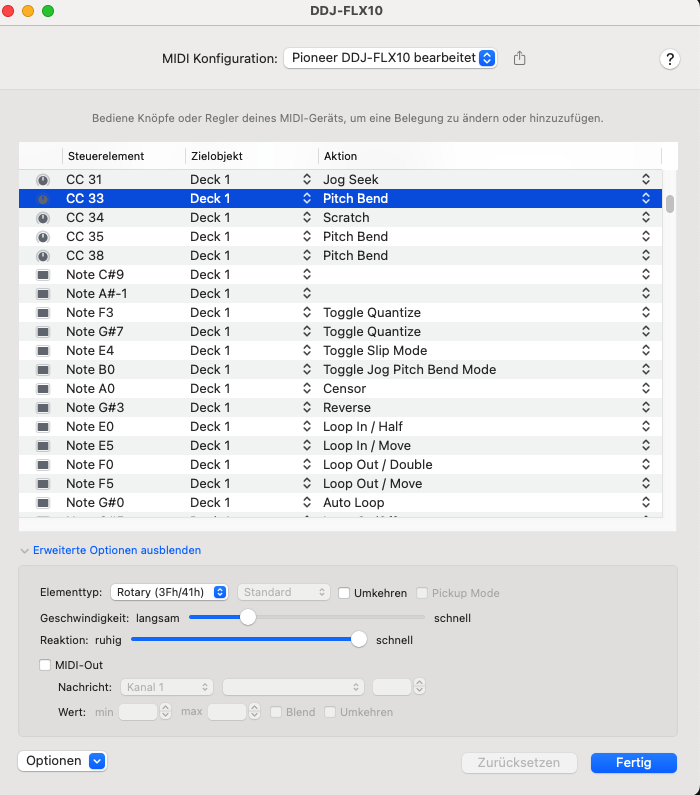
I tried mapping the jogwheel rim to Scratch instead of Pitch Bend, but it still didn’t allow for really fine adjustments.
However, what actually works: when I hold Shift
and turn the outer rim, it reacts perfectly smooth and is fully fine-tunable – exactly how I’d expect for cue adjustments.
Would it be possible for djay Pro to use this same behavior automatically whenever the deck is paused?
That way the rim could stay as pitch bend during playback, but switch to the fine-tunable control when paused.
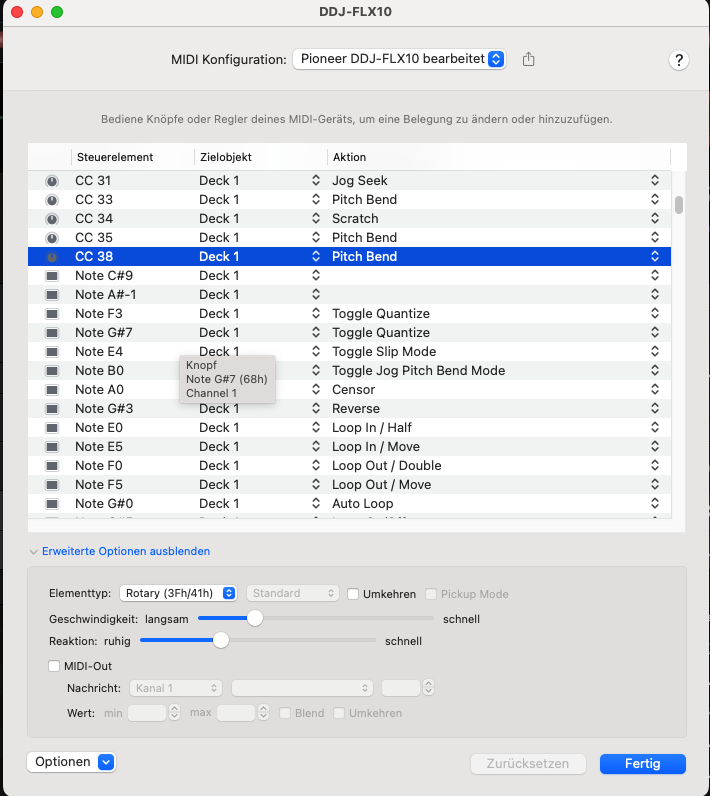
• CC 38 = turning the outer ring while holding Shift → reacts much smoother, perfectly fine-tunable, exactly what I’d expect for cue adjustments when paused.
Even if I set all parameters of CC 33 (speed, reaction, etc.) the same as CC 38, it never behaves the same way. The only way to get that precise movement is with Shift + rim.
We basically need the behavior of CC 38 applied to CC 33. That should be something the developers can program easily I think.
Hello @Herbstblatt90 ,
Will do.
But in my memories (two weeks ago), holding shift makes everything way too fast for fine cue adjustments.
Anyway, will this week-end and report here.
(edited : I first said today (Friday Sept, 26) - but it won’t work. Will try this week-end.
@Davidv100 try to use only the outer ring of the jog on your REV 5. On the FLX 10 it works like this: with shift + pressing the top surface of the jog you can search fast forward, while shift + the outer ring lets you move slowly.
Hi @Herbstblatt90, I spoke with our engineering team about this. The controller sends different MIDI when turning the edge of the jogwheel, which has this “lower speed limit” baked in. This changes when holding the SHIFT button, but it’s all done within the hardware. There is nothing we can “detect” or fix in djay - when you turn the edge of the jog slowly without the SHIFT button pressed the hardware doesn’t send any MIDI at all. I hope that helps explain things.
@Slak_Jaw thanks a lot for the explanation I understand now, but it’s a bit of a pity – because in Rekordbox (and also in Serato) the fine adjustment on the jog rim works as expected.
Since the FLX10 is officially mapped for djay, maybe it would make sense to get in touch with AlphaTheta about this? They might be able to provide a way to handle this better on the firmware/MIDI side.
Would be great if this could be considered in cooperation with them.