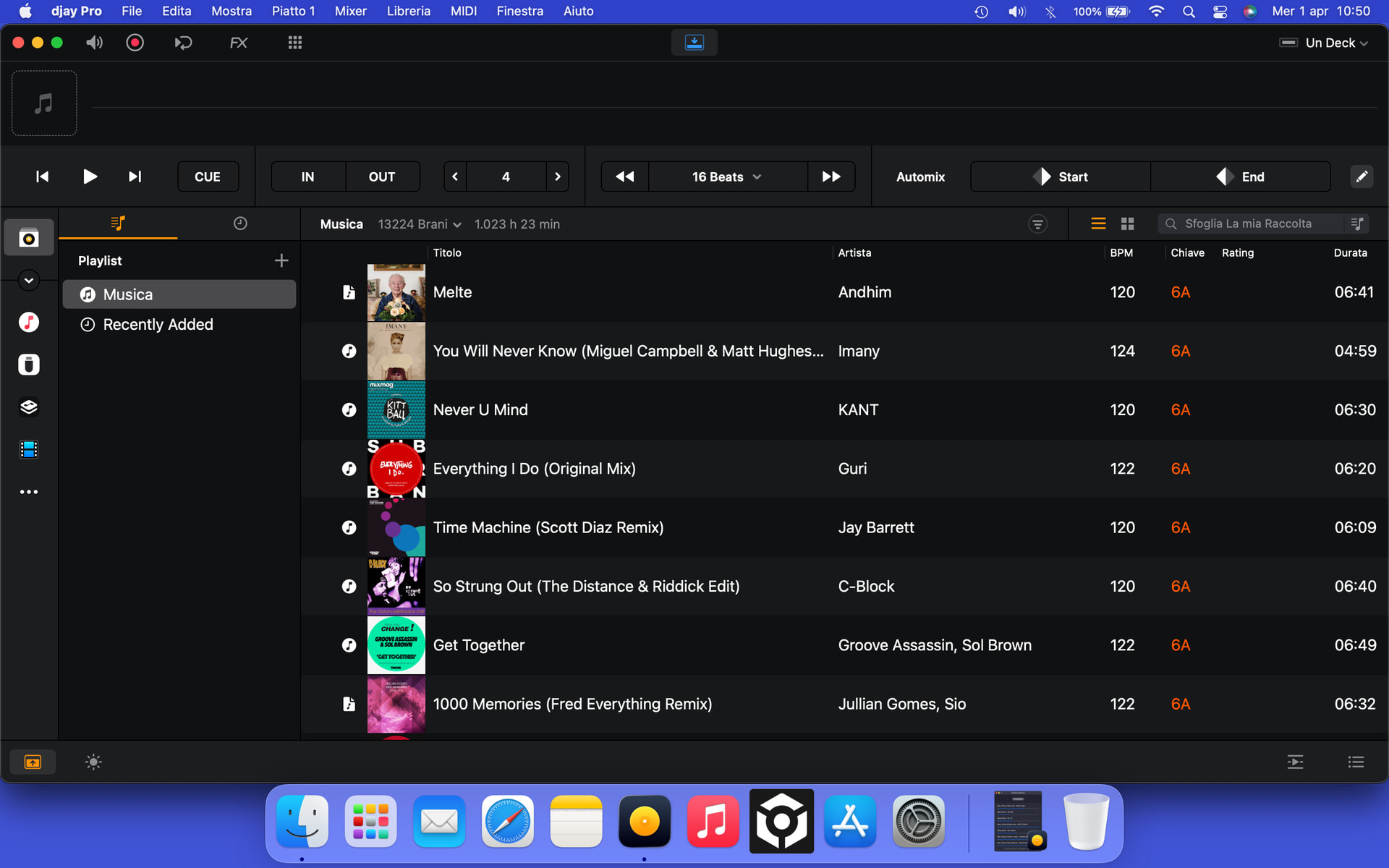
I tried transferring my entire library from iTunes to my library again, including all the playlists.
Before transferring everything, I disabled everything except iTunes.
The software often struggles when searching for songs, and the rainbow appears.
When I need to analyze a playlist, I have to do it multiple times because it hasn’t analyzed all the songs.
When it finishes analyzing the songs in the playlist, it tells me the analysis process is complete, but that’s not true because I see many still waiting to be analyzed.
Leaving aside the issue with the covers, I don’t understand the logic behind why some are visible and others aren’t, even when I can see them in the Finder and in iTunes.
In the end, I completely uninstalled Djay Pro and reinstalled it from scratch.
I’ve found that using it with the default iTunes source, as I’ve always done, works well without lag or other problems.
Hi Sergio, have you tried the steps I suggested above?
are the files that you are having issues with been purchased then moved away from their default location? I’ve had lots of experience with these missing album art files both on my computer, on a Denon Prime 2, other software and my car MMI. In the end I used MP3 tag and re-applied the artwork manually, at which point it doesn’t have any issues.
Let’s forget about the cover art issue, because if you manually add the cover art within iTunes and also see it in the Finder, I think it’s sufficient.
The biggest problem is that the software lags when using my library.
The rainbow wheel kicks in when you least expect it, freezing everything.
The few times I use this software, I’ll continue to use it exclusively with iTunes by default. This way, it won’t cause any problems because it’s perfectly integrated.
I’ve just added my full music library to the app in the files tab to see what happens as I normally use the Serato tab as my library in Djay.
Judging by the loading wheel I feel it might be one to leave overnight. Are you trying to add this music whilst you use the app to DJ? or are you fully loading it into Djay and letting it analyse before trying to use it to DJ?
For the artwork, ive discovered that opening ‘get info’ in Apple Music, screenshotting the original artwork with shift-command-4, then clicking ‘add artwork’ (even if its already there) will load that screenshot back into the file and add it again, then when you click ‘reload tags’ or similar it will show up.
I don’t use Serato. I don’t know how it integrates with Djay.
The few times I use Djay, I use it exclusively with the iTunes source. It works fine that way.
If I move my entire iTunes library with all the playlists, the problems start. Lag when you least expect it. Rainbows galore.
With Rekorbox, I have no problems with iTunes.
The “Get information and re-add the cover” option doesn’t work, especially since the cover already exists and you can see it in the Finder.
I don’t try to add music while using the app. I’m DJing.
Regarding song analysis, another problem arises. If you give a playlist to analyze, it tells you it’s analyzed all the songs, when that’s not true. I have to repeat the analysis several times until, scrolling through all the songs, you realize it’s analyzed them all.
No, no, thanks.
The few times I use this software, I’ll continue to use it exclusively with the default iTunes source. That’s the only way it works without any problems.
Hi @Sergio1, regarding missing artwork, please see the above reply from earlier.
Also, I have renamed this topic so we can focus the discussion on your other issues instead. In the future, it would be best to create a single topic for each issue so we can keep the discussion focused. Going forward, let’s focus this discussion on your issues importing iTunes into My Library.
If you’re looking for a flexible way to manage your music in djay, we recommend using the native “My Collection” library source in combination with the Finder (on macOS), Files (on iOS), or Explorer (on Windows) library sources.
To get started:
In the Finder/Files/Explorer source, use the “+” icon to select the files or folders you’d like to make available in djay.
Create a playlist within “My Collection” where you’d like these tracks to live.
Drag and drop your selected tracks from the Finder/Files/Explorer source into your new playlist in “My Collection.”
“My Collection” allows you to create custom playlists and folders that automatically index tracks from various sources within djay, including streaming services, djay Music, locally stored files, and files from external devices/locations.
A byproduct of this approach is that it lets you work directly with your file sources, bypassing the need to use the Music app altogether. Since djay links to your files rather than importing them, it’s essential to ensure that your file paths remain consistent.
It is also important to note that if you add new tracks to a source folder (like an external drive), those files will appear in the Finder/Files/Explorer source within djay. However, they won’t automatically show up in your custom playlists in “My Collection” as you’ll need to manually drag them into the appropriate playlist to keep everything in sync.
Please try this procedure and let me know if that helps or not. Thanks!
I prefer using Djay Pro via the default iTunes source because it doesn’t cause any problems.
Also because it’s software I rarely use.
I use it when I’m with friends to entertain them, even if they’re not DJs.
I know I won’t be able to export to a USB stick unless I go through my library.
For that purpose, I use Rekordbox without any problems.
I’ve tried everything, including the one you suggested.
It’s not for me.
If one day there’s an update that allows me to transfer everything from iTunes to my library without any problems, and that can read all the metadata, including cover art, like Rekordbox does, then I’ll give it a try.
Thank you again for your interest, and if there’s an update that’s relevant to me in the future, please let me know.