Another one bug i find it from the first day i installed the dj pro (december 2025)
sometimes when im mixing
one channel doesnt have sound..i see the lights from the deck but no sound
i must load another song and play normal again
this happens 4-5 times in 3 months…
flx10 +macbook pro m1 pro…
Thanks for the details about your setup and the issue @Nikos_Filopoulos. Since this sounds repeatable, can you please capture and share a short screen recording of the issue to help clarify what’s happening? Thanks!
you know when you played its difficult to do that….
imagine no sound on air
but in headphones you listen and you see there is sound on channel, but no when fader is up NO SOUND at all,you must load another song to played well
never from streaming sound,
only my music,
my usb cable is brand new and yes i use udg type cable…i have 2…i dont think its cable,its a bug
1 Like
Thanks for confirming @Nikos_Filopoulos.
- Are you connecting directly to your Mac via the UDG cable or are you using a hub or adapter?
- I would try connecting to a different USB port on your Mac as well. I’ve had issues with intermittent USB port connections and switching ports often solves it.
- Please try to capture the issue on video so we can try to troubleshoot it further. We will need more info so that we can try to reproduce it on our end and properly determine the cause.
udg cable type c from flx to macbook
i dont use hub
i use 2 ports one for flx and one for my external samsung t7 ssd
i often switch the usb ports i dont use the same every time
1 Like
Thanks for the additional info @Nikos_Filopoulos. Well hopefully you can catch it on video or provide the exact steps that lead to the issue so we can try to reproduce it on our end.
1 Like
Hello @Slak_Jaw
After long time the bug has returned it again Saturday night
Here is the video
Hi @Nikos_Filopoulos, thanks for catching this on video. Can you think of any specific steps that led to this?
No…
If I know the answer I tell you 
When I change another track it’s OK
Okay thanks. About how often does this happen?
From the Beggining I’m using Dj pro
Once in a month I thing,now I’m season and he does this before 20 days,I’m playing every day
1 Like
Thanks @Nikos_Filopoulos. This is helpful information.
There is nobody with this bug? Only me?
I have flx 10 but haven’t encountered this issue.
1 Like
Thanks for sharing @Dysfunk_DJ and @turbopussy
Hi again @Nikos_Filopoulos, I can’t think of anything else to suggest so I need to pass this onto our hardware engineering team for further review. If possible, I need some more info from you first though. Can you please try to answer the questions below?
- djay version #:
- macOS version #:
- FLX10 firmware version #:
- Is it always the same deck/channel, or does it vary?
- It’s hard to tell from your video, but at the moment of failure, is the software waveform in djay still moving and is djay’s own on-screen channel meter showing signal, or are the “lights” only on the FLX10 hardware?
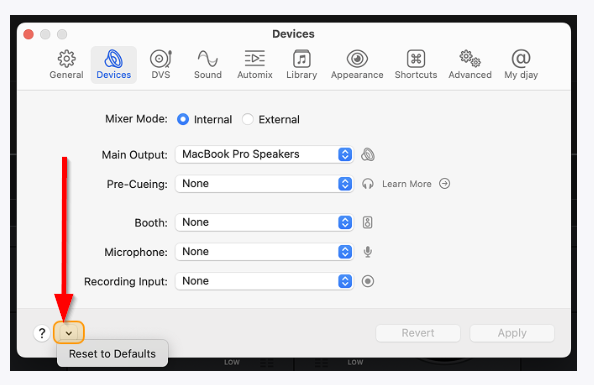
- Is the FLX10 running in djay’s default audio configuration, or have Device/Audio settings been changed? If not or you are unsure, please use the Rest to Defaults option
- Any custom MIDI mapping, or stock FLX10 (built-in) mapping?
- Are the affected tracks on the internal SSD or the external Samsung T7, and what file formats are they (for example WAV, ALAC, MP3, FLAC)?
- Was Neural Mix or any stem isolation, EQ kill, or filter active on that channel when it went silent?
- Which deck layer was active on the FLX10 at the time (decks 1 and 2, or 3 and 4)?
Thanks!
hello,
i dont use any mapping
only the officials
i use latest versions of macos and djaypro and flx10
if you mean the deck the left side???i didnt notice that,i play channel 2-3
the file was mp3 on external,and i played internal
i didn open any stems (you see it ) and the filter was open but to another channel and didnt use it