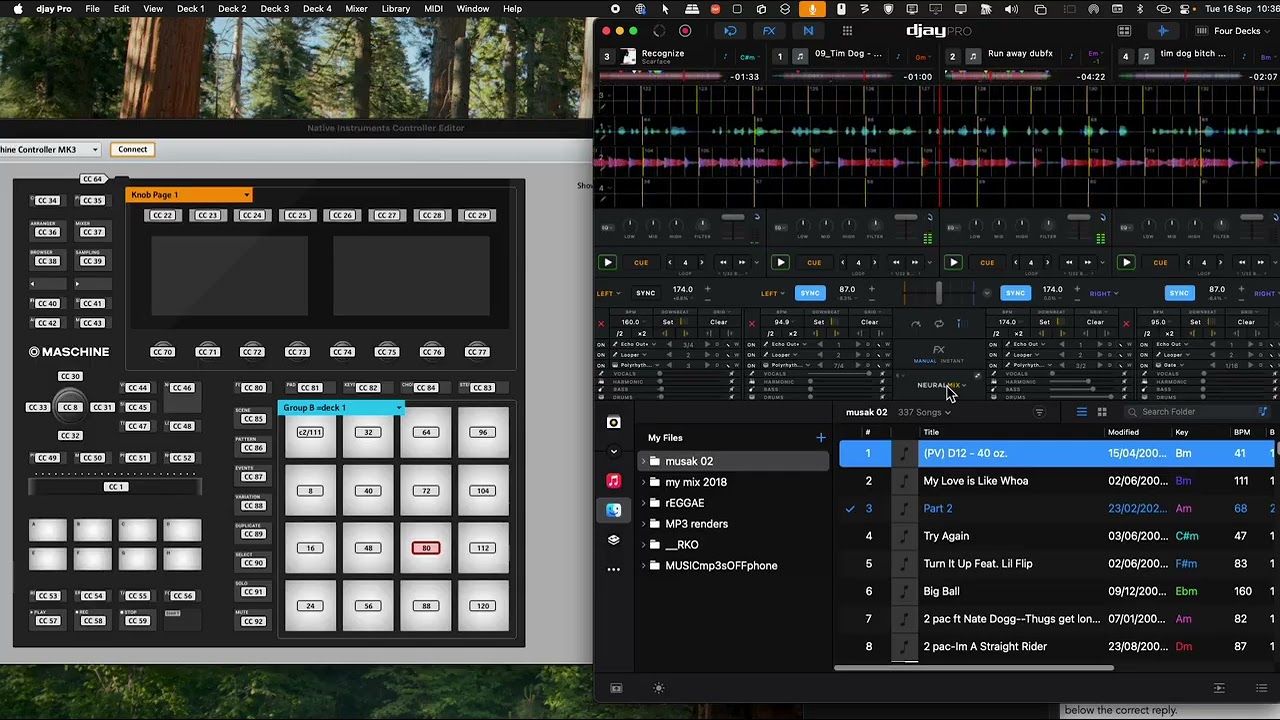
im not entirely sure if this is possible currently within Djay Pro…
but the idea is purely for monitoring purposes… as opposed to any functionality
suggestion: midi pings a feedback messages for beats across 4/8/16 bars continuously /per deck basis
admittedly we have our ears as a secondary monitor… to listen for any out of time drumlines or vocals, …but often times it is diffucult to know sometimes which direction the vocals need to move …whether advance or trigger a delay by 1/8 step backward…
having resolution to see these offsets would be helpful across 16 midi pads
the Led-feedback monitor can provide visual feedback, to take a quick glance at where the alignment of LED’s are in relation to the anchored beat..
im guessing this is useful for those who would have a minimum of x16 or x8 midi pad’s in their setup, and deal with sync’ing with external applications..
for myself i have midi LED pad-tracking elements(DAW based)… but im unable to integrate any feedback elements from Djay Pro from the timeline… hence the suggestion
Thanks for the suggestion @7nz. Interesting idea. I have forwarded this to the dev team for consideration. In the meantime, please use the blue Vote button at the top left of this page so we can gauge user demand for this feature. Thanks!
Hi, Slak_jaw
im wondering with this suggestion i have put forward…
is there anyway currently to have the time line tracked?
Part of the added reason why im asking… is the “Scrub” function provides a excellent method of jumping and “Always” remaining in sync…
oddly enough its better than using the “cue points” but lacks any method of tracking where your cue points would be on the current timeline… which makes scrubbing a little hit&miss on where your cue points are positioned on the relative timeline… as the tracking of the timeline and cue points on a time is not implemented
i figure that a user could assign lets say 16pads or as many pads as necessary to provide better cue point syncing, and monitoring… with each pad being on the same CC & channel across x amount of pads
then by adjusting the midi parameter values between 0-127 and dividing it by x to space the scrub jumps… effectively allowing you to jump around in your song…like you would as though you had cue point…
i’d encourage you or anyone reading this… to use the scrub function and assign it to midi CC buttons but increasing the parameter values evenly ie, dividing up the 128 midi values by 4,8,16
i may attempt to put a video of both the controller to demonstrate actively how it might be a workable method for those who utilise a 8x8 button matrix controller
i wouldnt advise using faders or knobs for this method… as it is not a accurate method, and can cause skips, which is undesireable
i did the mapping across 4 decks… to test it… and it works rather well.. if i set 16 divisions(16 buttons) it comes out to 8 bars per division
if setting 32 divisions which is a lot of buttons.. you can get it down to 4 bars per division…
this can be offest by tightening the bpm ie. x2 or /2..
more testing needed
to get this to work… you first need to set the scrub as a fader by learning the button which should register as a fader… then inside advanced control settings(midi-out feedback)
..you change the buttons parameter values using your hardwares software editor…then apply the number divisions within the hardwares software editor of the controller you use…
…this side of the configuration cannot be done within Djay…
Group
Values
0
0–7
1
8–15
2
16–23
3
24–31
4
32–39
5
40–47
6
48–55
7
56–63
8
64–71
9
72–79
10
80–87
11
88–95
12
96–103
13
104–111
14
112–119
15
120–127
using the first Values 0,8,16,24 etc etc
if that makes sense LOL
but it works!!
probably best to do a video…
A correction is in order… after carrying out some initial testing
the 16 button divisions, & the corresponding bars varies depending upon the full length of the song…
so if a song is 3minutes as an example… the bars division are relative to the time…
which means this whole suggestion/Idea needs to be revised…
and the requirement is that the timebase… needs to be based on Beats or bars relative to a anchor point( which is usually the 1st cue point)
this is fascinating! I actually came to the forum to see if I could do something similar…
my goal is to load a song to the load/play cue point. then press a button to bring it back 2 or 4 measures, so I can then use the 2 or 4 measure transition.
Does that seem possible with what you figured out?
theres the skip beat forward & backward, which can be mapped, which is in line with what you are hinting toward…
i have standard buttons mapped for those, on a per deck basis, which takes up 64 buttons in total spread across 4 decks… so it depends on how many buttons you want to sacrifice for that purpose
you should also be aware… the bars lengths(beat jumps) will change depending on the beats per bar
I’ve been really enjoying mapping DJ actions to my stream deck XL.
I can create pages, visual cues, all the stuff.
I’m doing straight forward pop music - so if I have the cue at the verse, I’d love to be able to load it, then ‘rewind 2 bars’ to set it for my transition.
interesting use of the stream deck
by chance are you using Realearn with reaper to map the stream deck XL?
as i recall it being used as a midi device in Reaper
im not! you can map it directly in the software. the catch is that you DO need to have their software open in order for it to work, but you create virtual midi bus from SD to PC (iac or loop midi), and you map the buttons in the SD software just like you would a controller, note on / off, value, velocity, etc. I love having PAGES of DJ software stuff on it. Also, it takes MIDI in, so I’d image you could do the same things you’re doing above, and have it change the color of the buttons based on note on/off
There’s a 3rd party software called companion, it replaces the stream deck software. same concept. I like it more becuase you can host it on a r-pi, and then use RTP midi on the network, but it’s super nerdy.