This is my personal MIDI Mapping for the DJ TechTools Midi Fighter Twister.
It’s similar to my previous mapping except BANK 1 is now fully focused on Neural Mix Controls and includes the newly released Neural Mix Crossfaders.
Shift functions are shown in orange.
3 Band Neural Mix EQs are controlled in the center 2 columns with Push->Mute and Shift+Push->Solo
Manual FX are controlled on the outside 2 columns with Push->On/Off and Shift+Push->NM FX Assign
The bottom row controls the Neural Mix Crossfaders with push controls for Crossfader FX.
The bottom left encoder is a secondary Shift Button in addition to the side buttons.
Imagine this device with USB-C (pass-through) and then RCA out and a headphone jack on the front, a bit like the Xone K2. I would love to use it standalone with just an iPhone or something and plug it in to a mixer.
I’ve downloaded your two files and studied them intensely. Then I’ve modified bank one and two for my needs, and all works fine execpt the upper left and upper right Fader / Knob.
The “half moon” shaped led below the upper left Fader / Knob starts blinking when '‘I m activating a loop while I’ve dedicated that Fader / Knob tot FX enabling and FX paramater. So that’s not supposed to happen.
The “off-color” of the Fader / Knob I’ve set to dark blue. The “on color” should HOLD on light blue when i push the Fader / Knob which does not happen.
Same in bank two where I’ve set other colors with the Midi Fighter Utility. Pushing the upper left Fader / Knob there does not hold the color I’ve set and when I keep it pressed it glows through all different colors.
It’s only happening with that upper left and upper right Fader / Knob. I really don’t get It since all the other Fader / Knob’s in bank one and two behave as I’m mapped them.
So also the upper right Fader / Knob does not planned color things. Pushing that Fader / Knob the “half moon” shaped let also starts glowing into different colors.
I’ve spent day’s and really can’t correct it. I hope you can help me out.
See dropbox with your two files modified by me… Dropbox
Hi @djbo, I’m pretty sure this is controlled outside of djay’s MIDI Learn tool. Currently, there is no way to enable/disable flashing LEDs in the MIDI Learn tool. This was set in the original (built-in) MIDI mapping. To change this, you’ll most likely have to modify the XML file of your mapping using a text editor.
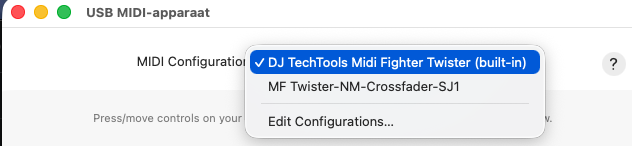
Hi, @Slak_Jaw, think i’m starting to grasp it now. I’ve started from scratch (to clear up my confusion) and noticed that in DJ TechTools build-in MIDI Configuration the issue where i was struggling with isn’t there but is the same in your “MF–NM-Crossfader-SJ1” midi configuration (See screenshot).
No way out unless i can figure out how to modify the XML file of my mapping using a text editor as you wrote. Hmm, never done this.
And in the build-in DJ Techtools Midi Fighter Twister MIDI Configuration the upper left and right Fader / Knob’s are set to ‘Loop Duration (Rotary)’ which is useless even is you set pushing the knob to ‘Auto Loop 4’ instead of the standard simply ‘Auto Loop’. Turning the knob makes it jump immediately to 1/32. The one who made this MIDI configuration didn’t test it i assume.
Hi again @djbo, if you search around this Community, you will find some users that are very familiar with modifying XML files. They might be able to point you in the right direction. Otherwise, a good LLM should be able to analyze a copy of your XML and provide you with some guidance. Just make sure you keep a copy in case you make any mistakes.
i search this community, not getting any wiser. Opening copy’s of my “DJ TechTools MF twister Edit djbo” mapping using a text editor no problem, finding what i am looking for impossible.
You were absolutely right that modifying the XML file was the way to go! However, it turned out to be quite a bit more complex than just opening a text editor. With the help of Claude (Anthropic’s AI), we spent many hours over multiple sessions to fully solve the flashing LED issue and much more. Here’s what we learned:
The core problem The flashing LEDs were caused by output entries in the XML mapping that sent values to MIDI channel 2 (the MFT’s LED channel). As long as djay sends any output to channel 2, it overrides whatever you set in the MFT Utility.
The solution The fix depends on what you want the LED to do:
To stop flashing: Remove or empty the output <dict/> on the problematic entries. An empty output lets the MFT hardware control the LED itself.
Toggle LED behavior (e.g. orange when off, light blue when on): This is a combination of:
Setting the correct Switch Action Type in MFT Utility (Note Hold or CC Hold depending on the bank)
Keeping the djay XML output empty so djay doesn’t override the MFT’s toggle behavior
LED color control: If djay has any midiMaxValue output to channel 2, djay wins and MFT Utility colors are ignored. Remove the output entirely and MFT Utility has full color control.
Key discoveries
Bank 1: Note Hold in MFT Utility + empty djay output = perfect toggle (orange/light blue)
Bank 2: CC Hold in MFT Utility + empty djay output = perfect toggle
Bank 3 & 4: Make sure Switch MIDI Numbers are unique per bank to avoid conflicts!
The rotary LED ring feedback requires controlType=control in the output dict
The final mapping file After 25 iterations, we ended up with a clean mapping file where all problematic output entries were either emptied or removed. The MFT Utility then handles all LED colors and toggle behavior perfectly.
Hope this helps anyone else struggling with the same issue!
Yeah, had to pay for the Claude Pro version (only for a month) because it took me several days of chatting with claude about the issues, but he found them analysing the XML file, asking me questions etc.
No , it’s not true i just realized after a long sleep!
I forgot the midi configuration Show / Hide Advanced control options!
Update: Solution found via djay’s Advanced Control Options — but with important nuances!
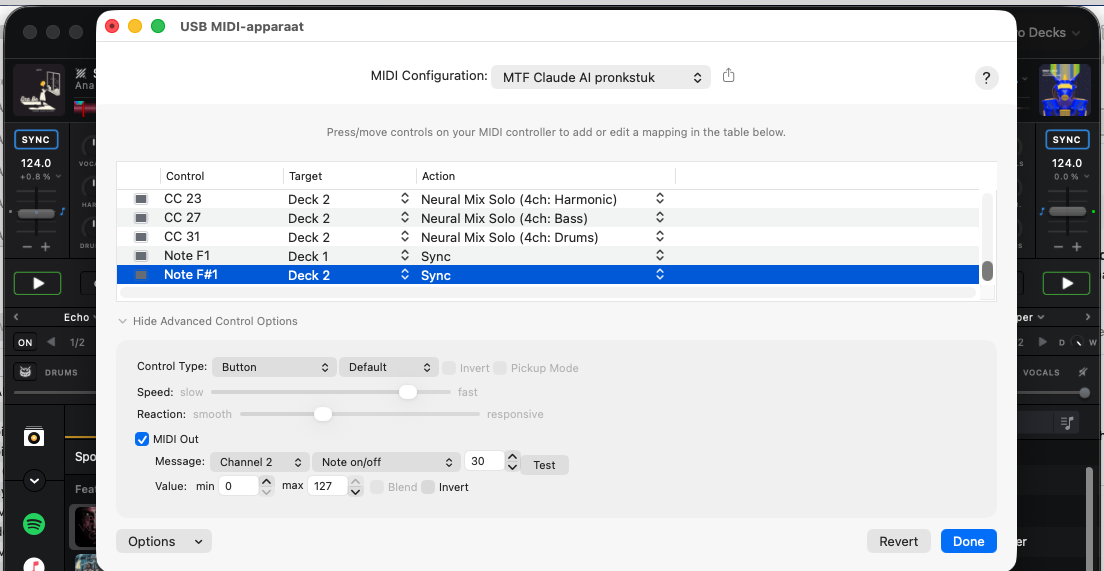
After days of deep-diving into XML files and MFT Utility settings, I realized I had overlooked djay’s built-in Advanced Control Options in the MIDI configuration window for the Sync button specifically.
By clicking “Show Advanced Control Options” for the Sync button entry, you can simply enable MIDI Out and configure:
Channel
Message type (Note on/off)
Note number
Min/Max values
This makes djay send LED feedback directly back to the controller, so the LED stays lit when sync is active and turns off when sync is disabled.
However — and this is important — most of the LED issues we solved could NOT have been fixed via Advanced Control Options alone. The real problems were deeper:
CC Hold vs Note Hold in MFT Utility → Advanced Control Options cannot fix this
Empty output <dict/> in the XML to stop djay from overriding the MFT’s own LED behavior → XML only
Switch MIDI Number conflicts between Bank 3 and Bank 4 → MFT Utility only
controlType=control for rotary ring-LED feedback → XML only
Lesson learned — the correct order of troubleshooting LED issues with MIDI controllers:
First check Advanced Control Options in djay’s MIDI configuration → enable/configure MIDI Out
Then check MFT Utility Switch Action Type (Note Hold, CC Hold, etc.)
Only as a last resort, edit the XML mapping file directly
The Sync LED was the one case where Advanced Control Options was the direct solution. Everything else genuinely required the deep-dive approach through XML and MFT Utility.