


Hello everyone,
I’m not sure if this is a suggestion, a question, or a bug, so @Slak_Jaw, please feel free to move this thread to the correct category. Sorry for the inconvenience.
Here’s the situation: In Djay Pro 5.5.2, I’ve noticed that some buttons/functions on the Pioneer DDJ-RR controller do not work as expected.
Specifically, the PAD MODE buttons (HOT CUE, PAD FX, and SAMPLER—highlighted in the image) do not trigger any response in the app or via MIDI. They are not included in the native mapping, and I cannot find an option to map them manually
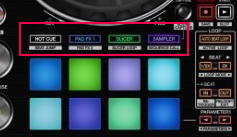
In Rekordbox, pressing these buttons on the controller automatically switches the software interface to that specific view. For example, pressing HOT CUE opens the saved hotcues panel.
However, in Djay Pro, the PAD FX button is not mapped to open the FX panel in the UI.

This forces me to use the mouse to manually navigate the interface and click the FX tab. The same issue applies to the SAMPLER button.
Interestingly, the SLICER button works correctly: when pressed, the pads activate, and the waveform changes to Slicer mode, even though there isn’t a visible button assignment in the native mapping settings.
I’ve also noticed other missing functions (I’m not sure if these are bugs or specific to this controller):
- Grid /2 button (halve BPM)
- Grid x2 button (double BPM)
Note: I would like to be able to access these functions using the controller’s Shift button (secondary layer), as these buttons have dual configurations.
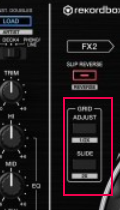
There are other buttons not configured in the original mapping that I cannot add due to the lack of options. While these don’t personally affect my sets, since I already have an open ticket regarding this controller, I think it might be worth reviewing the DDJ-RR native mapping more thoroughly.
That’s all for now. Please let me know if there’s anything I can do or if this is indeed a bug. It’s preventing me from getting 100% out of Djay Pro during my sets.
Thanks!


