


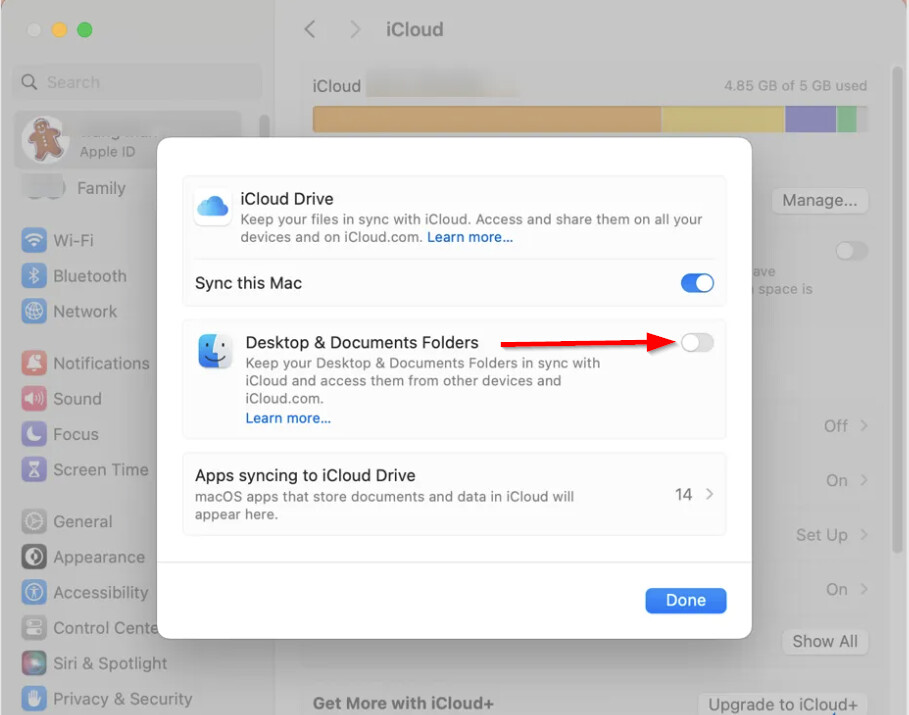
Hi @explash, thanks for answering my questions. To enable Desktop and Documents folders in iCloud Drive on macOS (including Tahoe 26), follow these steps:
-
Make sure you’re signed in to iCloud with the same Apple Account on all devices you want to use.
-
Click the Apple menu () in the top-left corner and choose System Settings.
-
Click your name at the top of the sidebar, then click iCloud.
-
Click Drive (or iCloud Drive).
-
Confirm that Sync this Mac is turned on.
-
Turn on Desktop & Documents Folders.
-
Click Done.
As requested earlier, Can you please capture a **Sample Process** using **Activity Monitor** on your Mac while the issue is occurring?
-
Please make sure that you collect the Sample Process while the issue is occurring.
-
Open Activity Monitor: Locate and open Activity Monitor on your Mac. Usually found in the Utilities folder within your Applications folder.
-
Select CPU: In Activity Monitor, ensure the CPU tab at the top is selected.
-
Choose djay Pro: Scroll down and locate the djay Pro App process in the CPU list.
-
Sample Process: Click the gear icon (Actions) in the Activity Monitor toolbar and select “Sample Process”.
-
Save the report: After sampling, save the generated report for submission and further analysis.
-
Upload the report: Upload the report to your Google Drive/Dropbox, enable sharing permissions, then share a link to the file here.
Thanks!


