


Okay, thanks @DJTimTurner
hi @Slak_Jaw
Never!
Every time I receive a flash drive or USB external drives with music to play, I always copy the files to the laptop’s hard drive first, because I know that USB drives are slow and can always fail.
1 Like
Thanks for confirming @brunolima
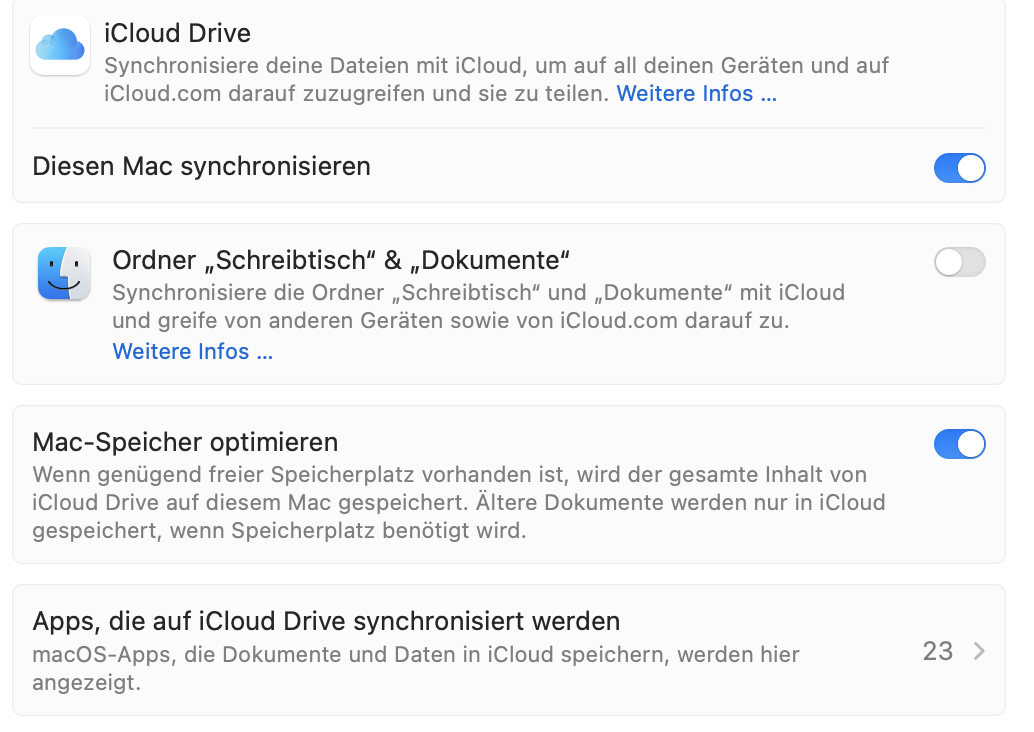
Hi again @DJTimTurner and @brunolima, have either of you ever had your desktop/documents stored in iCloud enabled?
Okay, thanks @DJTimTurner
Hi @Slak_Jaw
Yes, I use that feature.
And recently I upgraded my 200GB plan to 2TB, which had stopped updating because it filled up.
Thanks @brunolima
- Mac Air M1 16/1tb
- macOS 15.7.7
- Version of djay 5.6.8
A) SUMMARY OF ISSUE:
-
I was on macOS 12 or 13 before and everything worked perfect. I was able to go to Histories during the set, it was fast and no problems. I decided to go to macOS 14 and problems appeared. Tried to switch to macOS 15.7.7 and problems didn’t disappear. Which problems? When I go to Histories, it is not fast enough now, when I open sets, I can’t see some tracks, and sometimes as you can see in the video, Djay starts to freeze, everything is not working and I have to restart my Mac so Djay can work again. I don’t why this problem appeared, maybe there are some changes in macOS paths to files or something, but it’s terrible that I have to pray that Djay will work properly
Can’t fit video here, doesn’t download, so here’s the link to Google Drive:
https://drive.google.com/file/d/1h2sjomTpQwKB53NXoh1xM9HA-LnBJIrv/view?usp=drivesdk
1 Like
I have been experiencing similar problems. I do not have to re-start, but I am experiencing brief hangs and pauses when quickly scrolling through playlists. Sometimes I will scroll down into a list of blank tracks OR the playlist only has 30-60 tracks and then suddenly “pop” with a longer list (100+). This behaviour makes the program feel jerky and un-reliable.
Previously, the experience was smooth and reliable.
Yes, all the same
@explash Which djay llibrary are you suing? (iTunes, Local Music, My Collection, one of the streaming services, or Linked Folders in Finder section? If using either My Collection, Local Music or Linked Folders, where are the files located? Internal or External? If ext, HDD or SSD?
-
try a fresh install of djay (hoping your djaymedialibrary file is not corrupted. What’s the size?
-
try 15.7.4 or older (Afew users and I have had some unrelated library issues with both 15.7.6 and 15.7.7).
@Michael_Wisniewski This is happening on what laptop? OS version?
I’m using only local library, no external devices. Yesterday tried to reinstall djay, result is the same.
If I’m already at 15.7.7, how can I install 15.7.4?
Laptop: Macbook M1 Air (2020) 8/256
macOS: 26.5.2 (25F84)
djay Pro: 5.6.8
notes: 90% using My Collection, occasionally using Apple Music and Files
Hi @explash, I’ve merged your new topic with this existing one as they sound closely related. Please see above for more details.
In the meantime, I have some follow up questions for you:
- Confirm whether iCloud sync for djay is currently enabled, and whether it has ever been enabled or disabled in the past.
- Confirm whether Desktop and Documents in iCloud Drive is enabled on this Mac.
- Confirm which djay library source the tracks live in: My Collection, My Files, Music/iTunes, or a linked folder.
- Confirm whether any streaming service is connected, and whether the History sessions that fail to display contain streaming tracks, local tracks, or both.
- Provide the size of the djay Media Library.djayMediaLibrary file and the approximate number of History sessions stored.
- Confirm approximate free space on the internal SSD.
- Capture a Sample Process from Activity Monitor while the app is in the frozen state (see instructions above).
- Capture a Console.app log filtered to djay covering the same window (see instructions above).
- Confirm whether the freeze also occurs when browsing My Collection or a playlist without ever opening History.
Thanks!
Hi @Michael_Wisniewski, your issue sounds more like this topic: djay Pro 5.6.7 freezes repeatedly while browsing Finder
1 Like
iCloud sync is always off for djay
How to know if documents and desktop are enable for iCloud?
No link folders, i use only My Collection while playing
No streaming services are on, only local
Size of library 445mb, more than 100 histories
Free space is always different, maybe 100gb
Today I caught freezes 2 times in My Collection also. Couldn’t do anything for 1 min, then couldn’t start any track. When tried to load selected track on deck 1 or 2, it was like “pls relink file, missing” but file is there. When restarted Mac it was ok. Restarting only Djay didn’t work
Upd: iCloud drive was connected with Djay, now not, problem didn’t disappear. And I use no external SSD
djayMediaLibrary size 450mb is about big; how many tracks do you have in there? I have 16,000 and my library size is 296mb. History of 2 years.
Not big difference. 16500. The problem is everything flew before update


