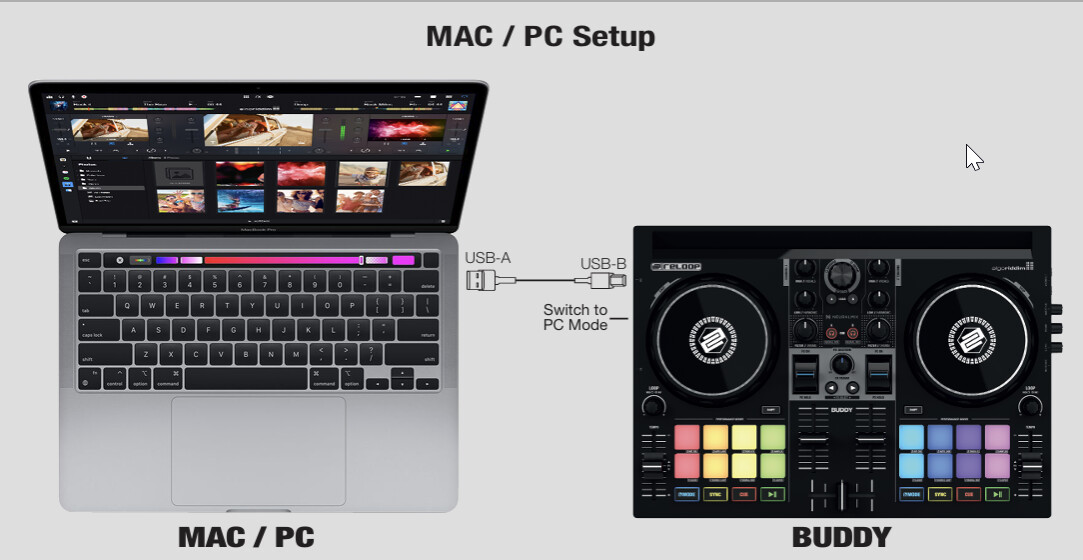
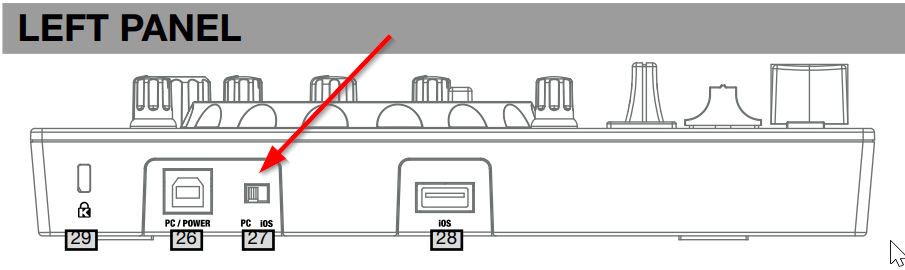
Hi @Slinky, welcome to the Community! Sorry to hear you’re experiencing this issue. When creating new topics, please do not forget to answer the questions in our template with specific details about your setup not just “iPad” or “Latest Version”. This helps all of our community moderators to provide the most effective support to users with the utmost efficiency. Thanks!
Device Model (ex. 2020 iPad Air 4th Gen): Version of operating system (ex. iOS 17.3.1): Version of djay (ex. 5.1.3): Hardware/controllers used (ex. Reloop Ready): Hardware Firmware Version (ex. 2.7):
Was the Reloop Buddy working previously and recently stopped working or is this your first time connecting it to your device and djay?
How exactly are you connecting your Buddy to your device? Please share some photos including all cables, adapters and chargers.
Hi @Slinky, I’ve upgraded you from New User to Basic User. You should be able to upload photos now. As requested above, please provide full details about your setup. I cannot help you further without this information.
Device Model: Version of operating system: Version of djay: Hardware/controllers used: Hardware Firmware Version:
Mod connect PC not iOS
Windows Error usb crash connect device
USB B tried deference cables, don’t work, power on not working controller.
Drives soft last version Reloop and Windows.
Please make sure only one device is connected to the Buddy at a time - disconnect the other USB-A cable that is shown in your video. Only connect the USB-B cable.
Make sure the cable is connected directly to the laptop without any adapters or USB hubs
Make sure the laptop is connected to power and charging normally
If that doesn’t work, try a different USB socket on the laptop
If that doesn’t work either, please share screenshots of your djay>Settings>MIDI Devices and djay>Settings>Audio Devices.
Thanks for confirming @Slinky. Sounds like it could be a hardware problem then. I can’t think of anything else to suggest as the troubleshooting steps I’ve shared above normally solve issues like this. I recommend that you reach out to Reloop Support to see if they can provide assistance with this specific hardware. Thanks!
First, try to use both USB inputs of the buddy at the same time.
Meaning :
Feed it with power from a power adapter using the left USB port (USB B : the square one).
Connect your iPad to the right USB port.
Check that your Switch is set to IOS (not computer).
Check in settings that your controller is recognised.
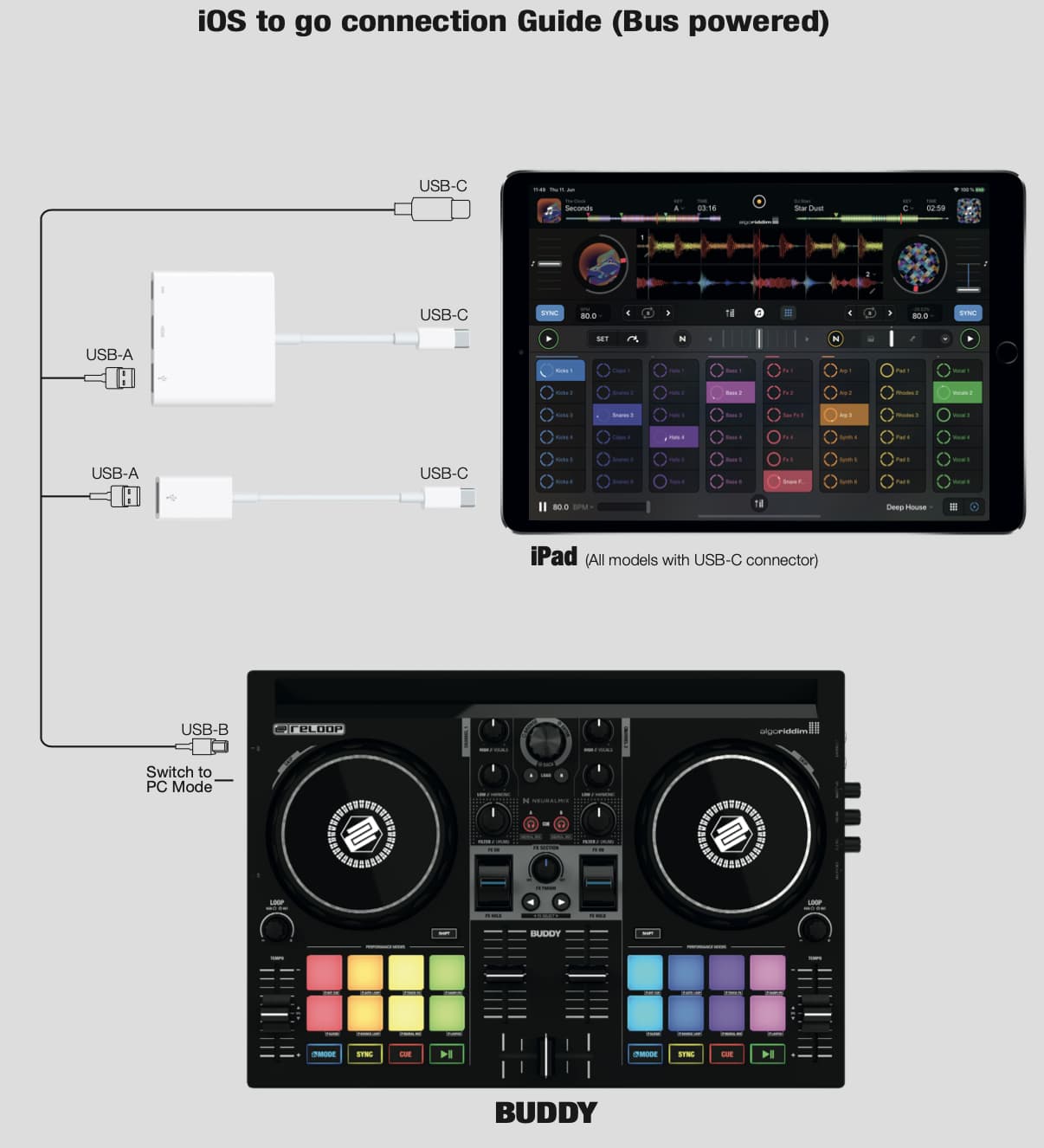
Once this works, you can try the more convenient configuration :
If your iPad is powerful enough, you actually do not need to power it separately.
In this case, you can plug your iPad in the left USB slot ( = the USB B slot : the square one).
So, you would not even need the right one.
In this configuration, the switch on the Buddy must be set to “PC”, not “IOS”.
This second set-up only works with powerful iPad’s (and USB-C)
In both configurations, check that the Reloop Buddy is recognised by Djay in the Djay Midi Settings.
Another point : if you are trying to use adapters, or hubs, on the way, you might add a whole new set of complexity, and only the native Apple Camera Adapter will work.
Here below, the configuration guide (just in case you miss it).
Hi! I tried this, but it didn’t work. The device isn’t recognized and freezes.
It’s not recognized or working correctly on any of the devices. It works when the controller is turned on, but it responds to the audio card signal and to pressing the Shift and Mode buttons. It doesn’t work on anything else.
Well yeah… if you tried everything above, including toggling the PC/IOS switch, then it doesn’t look good indeed…
But anyway… the sound card on the buddy is a bit poor.
It is a nice tool to play with at home, but oncee you really want to use it outside, even for a small party, these issues are real (I mean small buzzing issues and other audible issues - I am not talking about audiophile stuff). Like many other people I used an external DAC with it. But then you cannot pre-cue in headphones.
It is a nice little controller tho and has the best integration with Djay - but it does need a hardware upgrade (USB C, better soundcard and power management).
I wouldn’t recommend current version anymore.
I am adding a bit more info about the soundcard and power management issue.
I know it is not the problem you are facing right now. But it is still food for thoughts in case you need to exchange the device. If later on, you switch to a more powerful iPad, the Reloop Buddy will be uncomfortable with it. The volume button in Djay will be wobbling a bit, and you might also hear low buzzing noise. Again, this devise is really nice, but a hardware upgrade is long overdue (which is a pity, bc otherwise it is indeed a nice little companion for Djay).
Yes, I know the audio card on this controller is very iffy, but it’s enough for me to use it. I’d just really like to solve this technical problem and figure out how to fix it.