With djay and Spotify Premium, you can now mix millions of songs from the entire Spotify music catalog – including your own playlists and Spotify’s editorial selections. Explore powerful DJ tools or let Automix create nonstop, beat-matched mixes for you.
Award-winning, beginner-friendly interface designed for instant fun with your Spotify Library.
Automix for continuous, automatic mixes of Spotify playlists.
Support to DJ with Spotify using DJ hardware: over 100 devices supported via plug-and-play to your Mac or PC.
Intelligent beat-matching for smooth transitions across genres.
A full suite of DJ tools, loops, tempo & pitch changer, and 30+ audio effects.
Ultra-low latency and a world-class mixing engine, built for Mac and Windows to deliver maximum performance when mixing Spotify tracks.
Can I use Spotify with the free version of djay for Mac and PC?
Yes. With a Spotify Premium account, the free version of djay gives you full access to your Spotify Library including essential DJ tools like the mixer, filters & effects, cue points, looping, and more. A djay Pro subscription is optional and unlocks additional features such as Automix, hardware integration, and FX add-ons.
Can I also use djay with Spotify on my mobile device?
djay is available across all platforms including iOS and Android. However, Spotify integration is only available on desktop (macOS, Windows).
Are any djay features restricted when using Spotify tracks inside djay?
Certain djay features are not available when using Spotify, including Neural Mix (stem separation), recording, analyze library (offline batch analysis of tracks), creating and editing playlists, Match (track recommendations).
Can I use DJ hardware with Spotify in djay?
Yes. You can connect any of over 100 supported DJ hardware devices – including MIDI controllers (USB + Bluetooth), CDJs, DVS with turntables, audio interfaces, and mixers – and use them to mix your Spotify tracks inside djay.
Which versions of djay support Spotify and what are the minimum requirements?
Spotify integration in djay is supported starting with version 5.4.3 on Mac and PC. It runs on any Mac with macOS 10.15 or later, and on PCs with Windows 10 (version 21H1) or later.
What are the core features of the Spotify Library integration in djay?
Essential features include:
Access to the full Spotify music catalog
Access your personal playlists and Spotify’s editorial playlists
Playlist search and track search
Browse by BPM and Key
Load up to 4 tracks for simultaneous playback
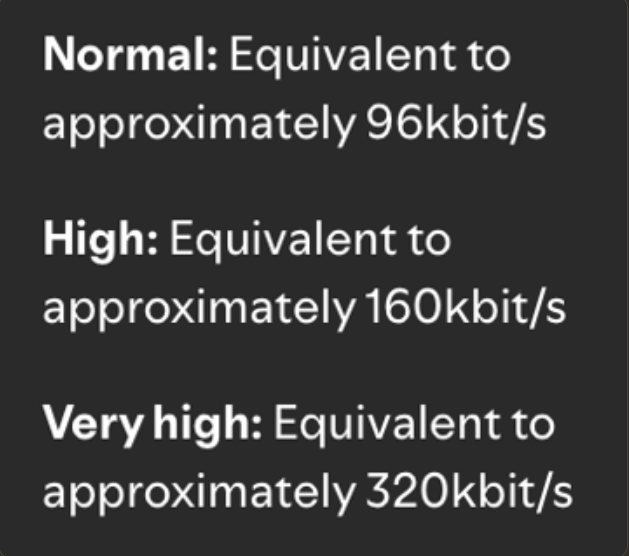
Adjust playback quality from low to high
Dynamic audio quality setting (low to high)
What Spotify Premium features are restricted when using djay?
When using Spotify inside djay, some Spotify Premium features are not available, including:
Offline mode
Accessing to playlists you didn’t create yourself
Lossless audio playback
What countries is the Spotify Integration currently available in?
Not for everyone… did the update and no sign of spotify icon. There is a list which countries get this?
When we had to migrate spotify playlists to Apple Music, there were (still are) a free transfer for djay pro subscribers service by tunemymusic. Hope with spotify comeback there will be a same easy but helpful way to transfer from Apple to Spotify playlist @Slak_Jaw
Unless Spotify is cheaper than Apple Music, I don’t think I will switch over as I have found they are very similar with Spotify being a bit better catalogue wise,
How Come some countries are better than others? like i am from Palestine and i can use any of these features , but just a few miles away , in Israel is avaible? Does this mean Spotify has a political agenda as part of their services? cause i pay the exact same amount of money as others users and i have both softwares on their pro versions.


 Award-winning, beginner-friendly interface designed for instant fun with your Spotify Library.
 Can I use Spotify with the free version of djay for Mac and PC?