Suggestions from a Traktor user after 1st gig with djay

Hello,

For background and context :

I am a long time Traktor user, on PC. For my gig, I also used my PC, but with DJayPro, and my controller, a Reloop Jockey III Remix that I mapped in DJay.

So, now my remarks :

1 - Sync function : works well, except for the first beat > unlike in Traktor, when press play in DJay, it takes the time of the first beat to align properly with the other playing deck. So it can be fairly common to be slightly offbeat during the first beat…not so great if you wanna throw your track in the mix directly at full volume. This doesn’t happen in traktor, sync is sync, from the first beat on. So this needs to be fixed in DJay.

2 - Cue function : the options I have found in DJay’s midi mapping seem to cannot reproduce properly what I would call the normal cue function like in Traktor : when press cue, just simply go back to the last cued position. As for the time being, what I have noticed is that, for example, if I am positioned on Start cue and I then press cue1, the cursor will go to cue1, and if press play it will play from cue1. but then if I press the cue button, the cursor will bring me back to Start cue. To have it go back to the cue1 position, I would need, when on cue1 mark, to press cue button to tell the program that this is the new cue position. that extra action (pressing on cue after cue1) makes no sense to me and can even mess up things, like it did with me, during a gig, when there is a certain pressure and that this unnecessary routine can be easily forgotten.

3 - track analysis odd behavior : I have noticed that many of my tracks, after analysis, are not well marked : DJay locates the first beat at half bar. if this was just for one track, I wouldn’t say, but this happened to me on many tracks during my gig (tracks that I had not analysed before because they were tracks that I knew) Traktor doesn’t do this.

4 - Also was wondering : around the end of the evening, the worse happened - PC crash. altho my pc is not the slowest - 16 GB of RAM and 4 GB Graphics and AMD Ryzen 5. The thing is, my PC really seldom crashes. There it had been running DJay for at least 5 hours and suddenly BOOM ! So I do suspect it has to do with DJay. So my question is have you had other reports of such issue and what do you recommend to do. FYI I’m running windows 10.

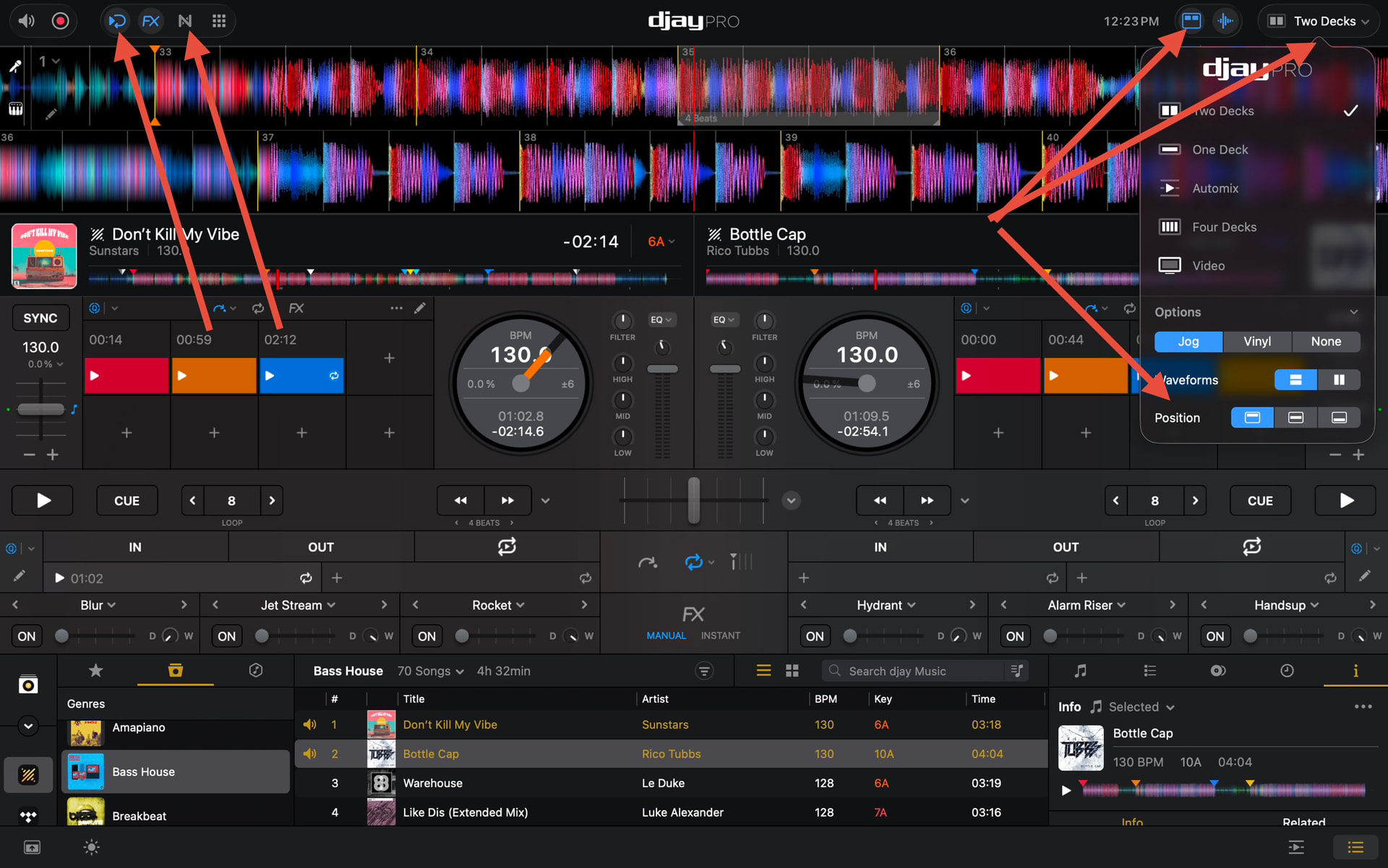
5 - Display : ok so I like DJay for many of its features, but as I said before I am a long time traktor user, for many reasons but I won’t get into this now. One thing tho about traktor is that it has a really neat layout. And I was wondering if the layout in DJay could try to ressemble a little bit more that of traktor. or at least a skin that could rearrange DJay to look like traktor ? Most important IMO would be the decks and mixer section. In traktor the knobs and fadders are bigger, easier for a quick grasp of the situation. and if such a skin was possible, then also include the wave displays like in traktor (because then the mixer section could become bigger).

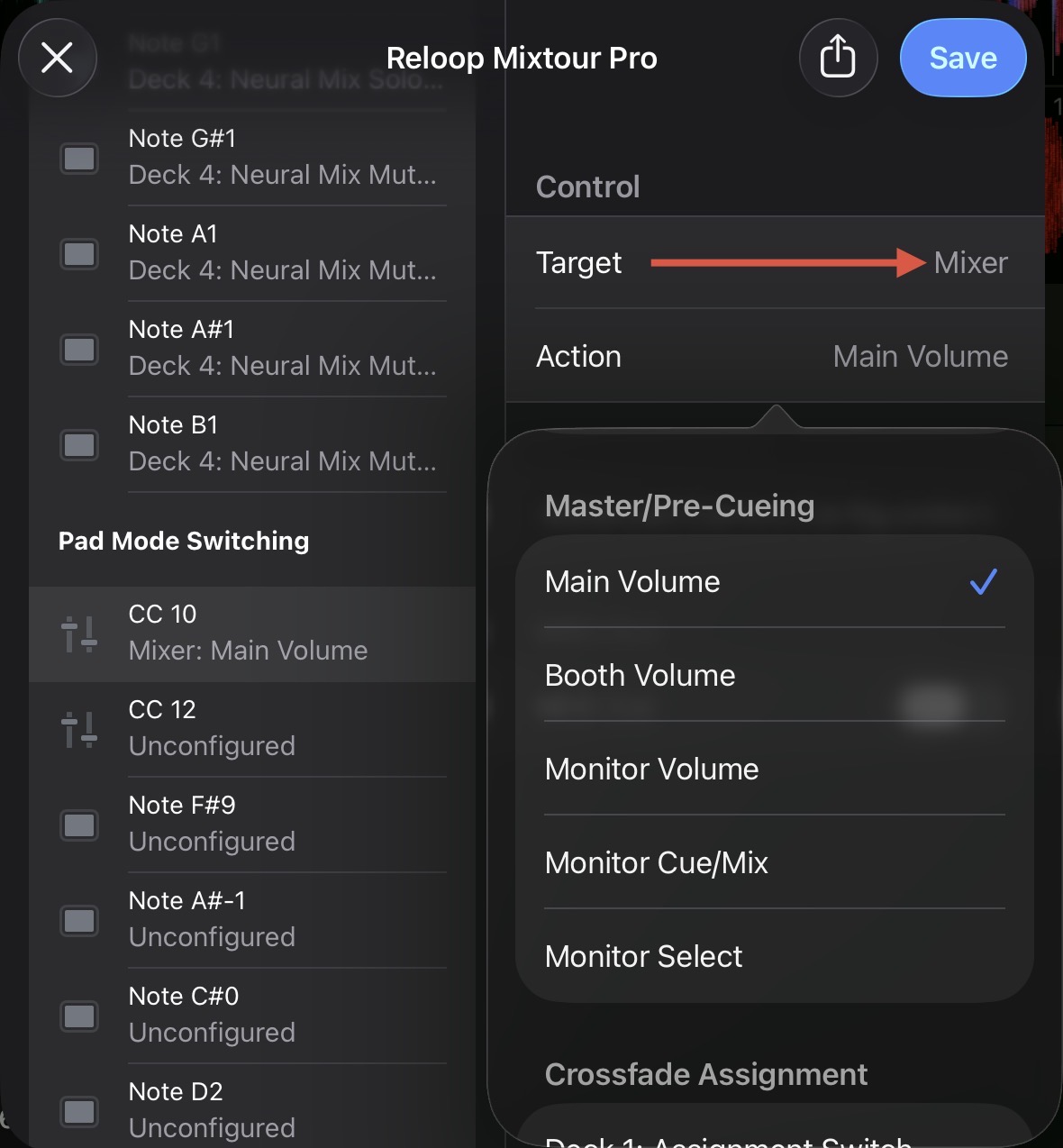
6 - It really would be better to have master volume, booth and headphones volume on the main display instead of in the settings (why the hell anyway ?) and to be able to control these from a controller.

Thank you for reading all of this, hoping that some of my thoughts will make their way into a future version of DJay.

Regards and keep up with the great work !

2 Likes

Some interesting points @aum235 but You need to make separate posts for each suggestion. Currently you are requesting “make djay pro more like Traktor”

3 Likes

I was about to say that, it sounds like Traktor is the software for you.

3 Likes

I think it’s good to get inspired by other programs and pick things that work better and apply to Djay Pro. It doesn’t say anything about not liking Djay Pro imho.

I definetely recognise the sync behaviour f.e.

And in quickly filtering on BPM or Key, Traktor still has a few usability tricks that make it work much faster…

Tnx for sharing!

2 Likes

Agreed but when you get to the point of wanting it to both look and work like other software, how far do you go?

What if people come to this software because they don’t like Traktor, where do they go if Djay suddenly became like Traktor.

First off: Welcome to the commune, @aum235
Very valuable points there! All true

  1. SYNC: We all hate that behaviour where the waveform visibly re-adjusts itself into alignment many milliseconds after hitting GO! If a dj is in the house, and listening to your transition, you know how they’re feeling the vibe. Makes you look amateur.
    Algoriddim, guys, plz, you’re increasing the “SYNC taboo” :smiley:
  2. CUE: Yup, that’s normal behaviour across djay, rekordbox and serato i think.
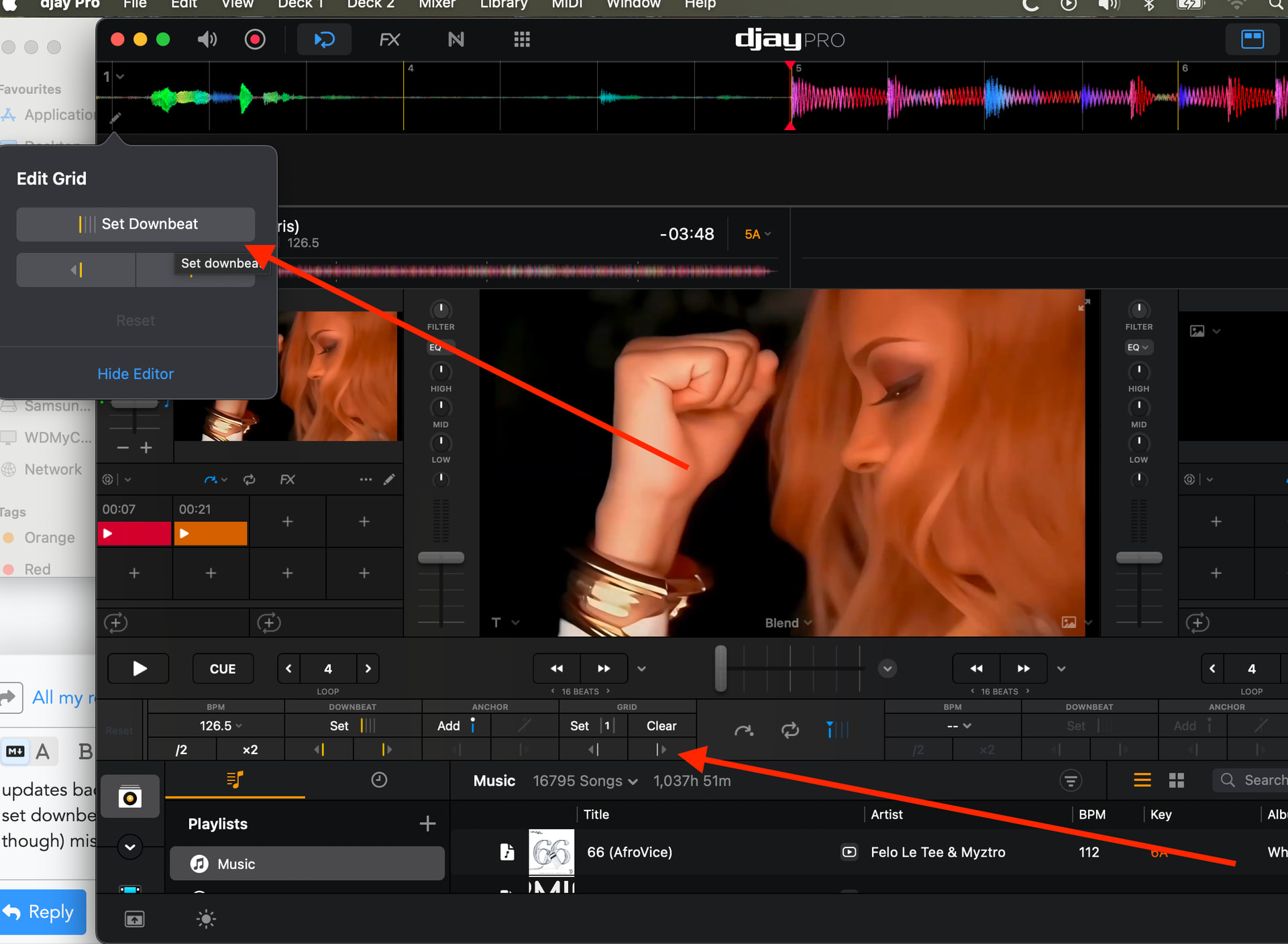
  3. FIRST BAR (Downbeat) analysis: Again, yup, true. I call this a bug because several updates back, we didn’t use to see this. Everytime I am performing I have to manually set downbeat to align with the first beat. Djay analysis frequently (not all the time though) misses the first beat and sets the bar 2 beats downhill; however, the overal grid is correct on-beat.
    Fortunately the beat correction options are plenty!
1 Like

Agreed. Look and feel is a bridge to far :wink:

1 Like

Hi @aum235, welcome to the Community! Thanks for the detailed feedback. I will share these with our devs. However, if you want any of them to gain traction, it’s best to create an individual topic for each suggestion so other users can upvote it and I can properly track it. I also recommend that you first search the existing Suggestions section to see if you can find any that are closely related to yours. If so, post your comment there and add your vote to the existing ones. I hope that helps!

Regarding #1, there’s an existing Suggestion that you can upvote below:

Regarding #2, this is normal behaviour in djay and other non-Traktor software. I experienced the same thing when I migrated from Traktor to djay many years ago. You’ll get used to the new behaviour pretty quickly.

Regarding #3, can you please share some specific example songs that we can check on our end?

Regarding #4, please submit and official support request using the link below so we can check for any djay crash reports:

Regarding #5, there are lots of UI customization options available. I recommend you experiment to find something to your liking and closer to what you are used to.

Regarding #6, these are already MIDI mappable:

2 Likes

I’ll tell you why coming from Traktor I bought into DJay : versatility with many controllers, stem treatment on the go vs Traktor where stems require song analysis and stem separation being saved into files on your computer (just imagine if you want to work on stems on all of your songs !!!), the fact that DJay is a fully iPad software solution compatible with so many controllers…to that point it starts to get the look and feel of machines like the XDJ series from pioneer, because an iPad is such a light and easy on the go solution vs a laptop.

Also one thing I really appreciate in DJay is its automatic grid alignment in songs where beats are not always perfectly even. Traktor is not so good for that IMO. Indeed you can align grid to beats, but you’ll need to do it by hand, can be long and time consuming, whereas in DJay it is automatic, which, for DJing, in about 99% of cases, is what you will want anyway, so having it done automatically is really good.

But for the look of the software, yes I still prefer Traktor. Feels more polished, well organized, more…I don’t know…steady ? than any other software out there. But that is maybe just and only my own view.
But then again, it is not necessarily a bad thing to eventually offer the possibility of an option/mod with a look a bit like Traktor…as it could also draw even more people into the DJay world.

Thanks for the additional feedback @aum235

oh word i have been using anchor for the downbeat i diddnt even know that existed there.

2 Likes

The grid adjustment arrows took me a while to discover them too. Very handy. I don’t use anchors as i think they don’t quite work with sync?