I am tweaking the native mapping for my Pioneer DDJ-RR in djay Pro 5.5.2, and I have a couple of specific questions regarding missing commands and the mapping interface.
1. Missing Target Commands (Grid & FX) I have located the buttons in the MIDI list, but when I try to re-assign them, I cannot find the specific “Target” actions I need in the dropdown menu.
Grid Adjust (Halve/Double): I want to map the hardware buttons highlighted in RED (see attached image) to “Halve BPM” (/2) and “Double BPM” (x2). I have searched for “Grid”, “BPM”, and “Halve/Double” in the target list, but I can’t find an action that effectively modifies the track’s BPM grid this way.
FX Hold/Momentary: I am also trying to map a button (like the Capture button highlighted in BLUE) to activate an Effect, but specifically with a “Hold” behavior (active only while pressed), rather than a toggle. Is there a specific command or setting to enable “Momentary” activation for FX?
2. How to Add New Buttons? This is a general interface question: If I want to map a control that isn’t already listed in the native mapping file, how do I manually add a new line? I don’t see a visible “+” or “Add Control” button in the MIDI Configuration window. Does djay Pro rely solely on the “Learn” feature (pressing the physical button) to add it, or is there a manual option I am missing?
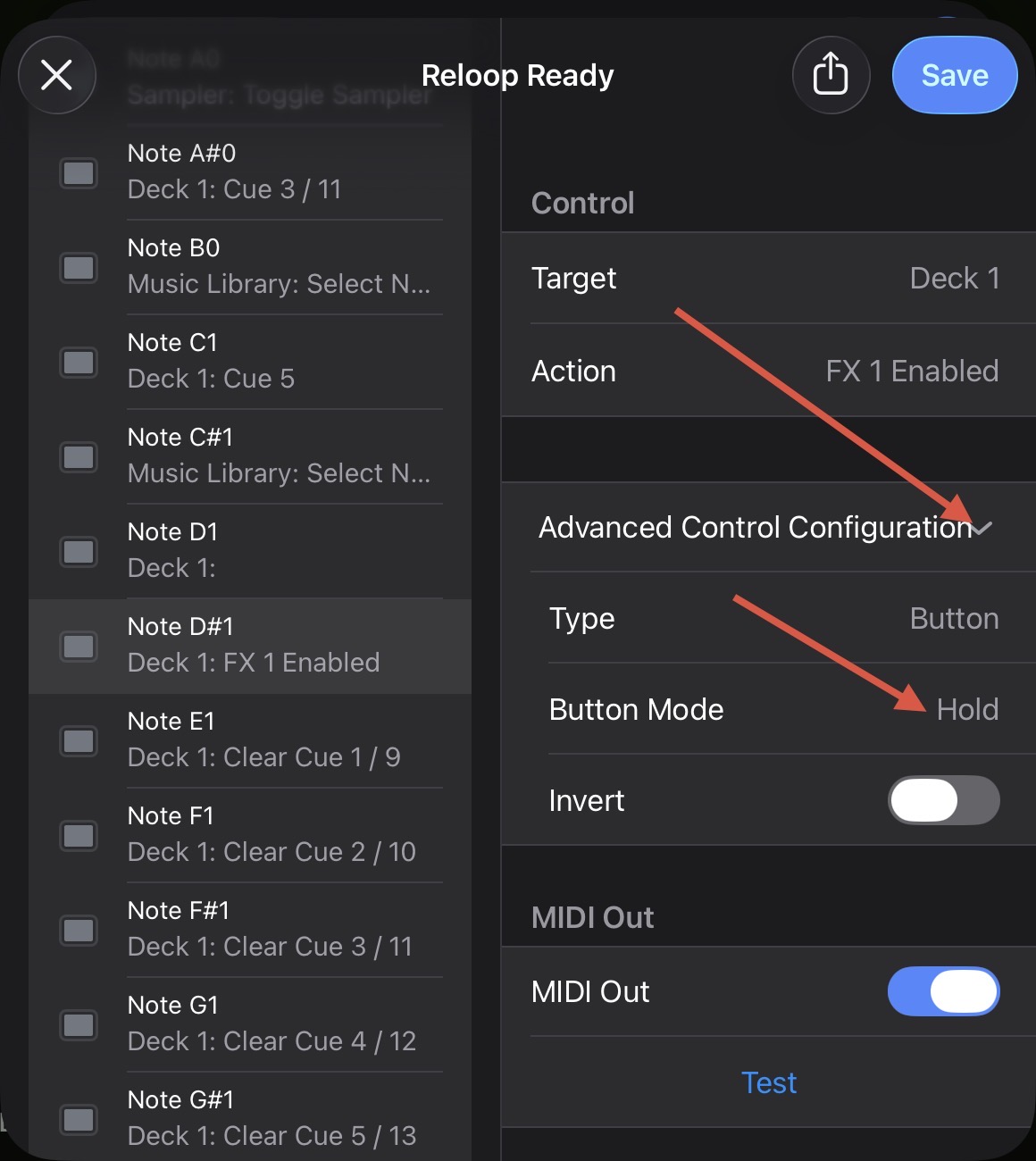
If you expand the Advance Control Configuration section, you can change the Button Mode to Hold. The screenshot is from iOS, but it’s very similar on macOS.
There is no manual add option - learn only. Just press the button on your hardware. If that button is MIDI Mappable and not currently mapped already, it will be automatically added.
However, these buttons are recognized in MIDI Scope, meaning they are mappable, but they are missing from the controller’s native mapping in Djay Pro. Specifically, the missing buttons are the pad mode selectors: HOT CUE, PAD FX, SAMPLER, and SLICER.
While these buttons are currently functional on the controller, the action isn’t reflected in the Djay interface. I mention this because there is a thread from over 2 years ago suggesting a feature where the interface view updates to match the button press (e.g., pressing PAD FX switches the UI to the FX panel).
When that feature is finally added (and I’m sure it will be! ), since users cannot manually add new button entries to the list, I likely won’t be able to configure that specific UI-switching action unless these buttons are added to the native mapping.
That is why I consider this a bug rather than a suggestion. If I look at the specs for compatible controllers, the DDJ-RR has a noted exception regarding the BOOTH output (something I believe I actually discovered myself—no worries, happy to help! ). Since these specific buttons aren’t listed as a limitation, it implies they should be supported, but as I said, the mapping lines are missing. Am I right?
You’re welcome @Albert_Maro. Thanks for the additional info. So are you saying when you press those Pad Mode buttons while in the MIDI Learn Tool, djay does not respond to them?
Thanks for confirming @Albert_Maro. Sometimes the engineering team needs to block certain MIDI commands in the backend to ensure proper functionality of the hardware with djay. It’s possible that’s what is happening here.
Perfect, I understand. Actually, you already mentioned that in another thread.
But then—and this is just a suggestion—just like you list specific limitations for supported controllers (parts that don’t work), it would be good to add this to the list as well. It could be a deciding factor for a user.
But that’s just my two cents, whatever you decide is fine. Thanks again, legend!
Following up on the DDJ-RR native mapping limitations, I wanted to share some findings after extensive testing.
I successfully managed to “revive” the buttons that are completely ignored by the native mapping (specifically the PAD FX1 button) and are not detected by the MIDI Learn feature by default.
The Findings:
The Inputs exist: Using an external MIDI Monitor, I confirmed the PAD FX1 button sends Note 30 on Channel 2.
Manual Injection works: By manually editing the .djayMidiMapping XML file and injecting the code for this specific note, Djay Pro does recognize the button. It appears in the MIDI Configuration list, allowing me to assign actions to it.
GUI Limitation Confirmed: While the functional mapping works (the pads change behavior internally), the GUI does not visually switch to the corresponding FX/Loop view. This confirms what @Slak_Jaw mentioned in this thread regarding hardware-specific UI locks.
Conclusion & Future Outlook: I have decided to leave this manual mapping active in my configuration. My reasoning is to “future-proof” the setup: if the development team eventually decides to support the feature voted on in the thread linked above (allowing MIDI commands to trigger UI changes), my mapping will already be prepared to work fully.
Regarding the other missing functions I reported in my other thread regarding the DDJ-RR (specifically the Grid Adjust /2 & x2 and FX Hold buttons, I haven’t had time to apply this fix to them yet, as I’ve been focused on solving the PAD FX issue first.
I am slowly learning the ins and outs of XML editing to bypass these limitations. Since official answers or updates can sometimes take a while and these functions are becoming essential for my workflow, I will continue testing to manually map the remaining dead buttons and will update the community with my results.
Hope this helps anyone trying to customize their DDJ-RR mapping further!


 ), since users cannot manually add new button entries to the list, I likely won’t be able to configure that specific UI-switching action unless these buttons are added to the native mapping.


