FLX10 and Djay Pro Questions/Queries

NOTE: Please use the search function above before posting to avoid creating duplicate topics

OS - Mac 32GB Macbook Air

Djay Pro 5.6.8

FLX10 Brand New - Latest Firmware

Hi All @Slak_Jaw

So my controller journey in the space of two years has gone form the Reloop Buddy, Mixon 8 Pro to Rane Four and I’ve now took the plunge to a FLX10 which was always the end game, the one constant of course has being my software, Djay Pro

I’ve had it for a week now and worked through the layout as per the Pioneer website and also read through a lot of posts on here but I’ve a few questions I’m hoping the community and fellow FLX10 users and the ever reliable @Slak_Jaw can help me with

1 - Major issue for me and my DJ Style is the looping layout. Naturally I’m trying to touch the screen as little as possible when DJ’ing. On all my previous controllers I had pads to activate a loop, unactivate a loop etc and also to add a loop. I can’t seem to get this to work/flow as it should on the FLX10. I’ve made a video of this which I’ll attach below. I think I’m right in saying I can map the ability to activate a loop to the hot cues so If correct please help me on this Slakjaw and I’ll have a go at doing this

Ultimately I want to activate a saved loop, via the controller wherever that loop is in the track, even if the loop is towards say the end of the track and the current playback is at the beginning, the “Active Loop” button SHIFT & 1-14 on the layout doesn’t skip through all saved loops

2 - Instant Doubles don’t work as they should for me currently, again tried to help with another video, see below. Instant doubles on the full track works but Stem Instant Doubles doesn’t work Shift and 1-15-17 and double tap, nothing happens in two deck mode but if you switch to four decks mode the instant double stems seems to work as it should, but not in two deck mode

3 - Jog Wheel Display - Long Press the Page Button 5-6/7 and it displays what is on the Performance Pads, nice helpful touch but if you’ve saved a loop it doesn’t show it’s a loop (with the loop icon) it just shows the colour of the hot cue, is this correct?

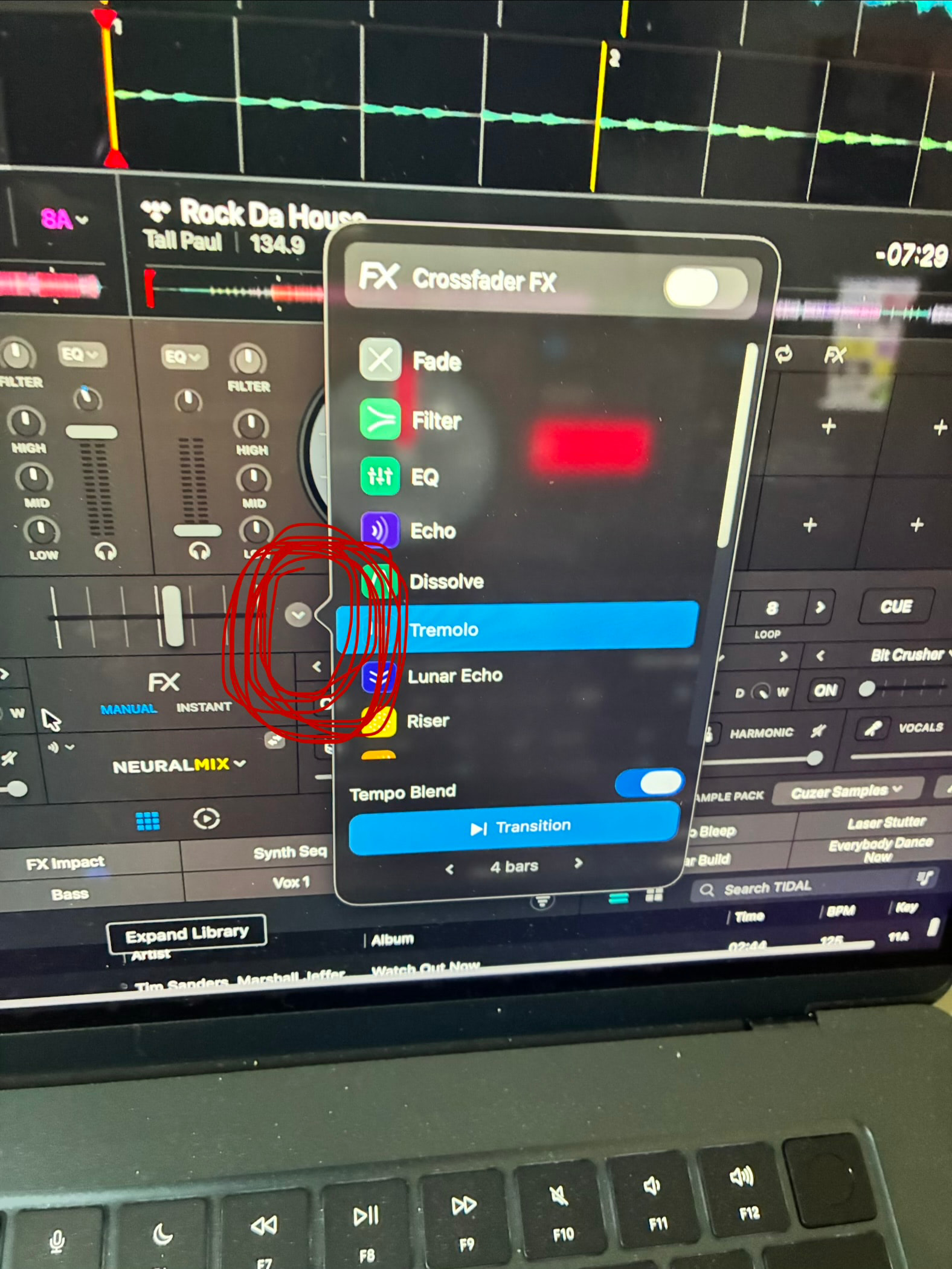
4 - Crossfader effects are mapped to the mix point controls and work fine (1-20/22) but is there a button or can you map a button to bring up the Crossfader effects in the software so you can see the different effects and choose the one you want without having to touch the laptop to open the display panel? Small downarrow next to the crossfader display in the software. Seems I still have to use the laptop to open this panel, picture below circled Red

5 - When selecting a software effect 2-2 to 2-7 the Wet Dry dial in the software defaults to maximum Wet (100%) which makes the effect overpowering, also seems you can’t change this via any of the FLX10 controls/knobs, again you need to change this by touching the laptop itself

6 - Are the 5 Software effects MIDI mappable/changeable? For example I don’t want to really use Bit Crusher or Pitch - but use Snare Gun a lot which is one of my saved software effects in Djay Pro, can I allocate this to replace either Bit Crusher or Pitch? Is there any way to activate your 3 preferred software effects in Djay Pro without having to touch the laptop again

7 - Can you change the slip roll length at all? 4 beats is the maximum on the Performance Pads or is it locked at the prefixes?

8 - When you move the Beat FX Channel Select (2-12) to the Sampler channel the visual effects screen goes blank, is it not possible to add effects to your samples?

9 - Another video added with the issue of stem effects not working as the should, think this has been reported as a bug and you’re aware of this but if you highlight Vocals only for example on the 2-8 stem (FX Part Select) and say apply an echo and cut the fader the echo dies instantly with no tail and echo sound, this only works when you highlight all parts of the track, stem effects seem not to work

Sure some of these are quick answers and as always thanks for your support and comments for those than can help. Hopefully the videos will explain a bit better some of the issue better than the wording above. The Loop issue is my biggest headache followed by the issue with the stem doubles

Thanks again

Cuzer
1 Like

Wow this is a lot to digest for a single topic @Cuzer. It might be better if you separated these and organized them into at least 3-5 different topics.

Also, please share your actual macOS version number and FLX10 firmware version number. Thanks!

Sorry @Slak_Jaw was trying to cover off my questions in one hit, it’s probably not as complicated as it first looks if you see each point, some one word answers/responses I’m sure

Believe the looping can be sorted by mapping to the pads, I just need to work out how to do this, rest should be pretty straightforward to clarify, hopefully

To answer your questions above

Mac operating system is Tahoe 26.6.2
Frimware is 1,14 for FLX10

Thanks

Cuzer

Just an update @Slak_Jaw so I’ve sorted the looping issue with the MIDI mapping, just replaced the beat jump controls on the pads to the recall saved loop so that’s sorted, can put a line through question 1

Many Thanks

Cuzer

Okay @Cuzer. Glad you sorted out the looping.

Hi @Cuzer, there is currently no MIDI command for this in djay. There are some existing, related suggestions topics for this though if you’d like to upvote them:

@Cuzer thanks for the video, that helped to clarify things. Those are the ACTIVE PART buttons on Pioneer’s djay Hardware Diagram. What you’re seeing is how the FLX10 mapping is designed, not a fault. In djay, Part Instant Doubles sends the stem to the secondary deck on the same side of the controller, not across to the other side. So SHIFT + double-press on deck 1 sends the stem to deck 3, deck 2 sends it to deck 4, and the original deck mutes that part. In the Two Decks view there’s no deck 3 or 4 for the stem to land on, so nothing seems to happen. That’s also why it works as soon as you switch to four decks. So to use Part Instant Doubles, switch to the Four Decks view. I hope that helps!

As discussed in other topics, Post-Fader FX are currently not supported when using Neural Mix parts. This is a limitation of the NM engine - Neural Mix is the last thing processed in the audio chain so post-fader FX aren’t supported.

@Cuzer yes, that’s how it currently works. When you hold PAGE in Hot Cue mode, the jog display shows each pad’s cue color. It doesn’t add a loop icon for cue loops. For now the loop icon only appears in djay itself, on the right side of the cue pad. There’s also no setting in djay to change what that jog display overlay shows.

One easy workaround is to give all your cue loops their own color, one you don’t use for regular hot cues. That way they stand out on the jog display straight away. I hope that helps!

1 Like

Yes, that’s expected. Each time you switch a Sound Color FX on, djay resets its wet/dry to a fixed level, and it doesn’t remember changes you make on screen. That’s deliberate: the effect always comes in at a predictable level, so you never press the button and find it silent because the software knob got moved at some point. On the FLX10, the COLOR knob for each channel is the hands-on control for how hard the effect hits.

If you want a wet/dry knob on the controller, there’s a handy community workaround. The Sound Color FX run on djay’s third FX slot, so you can MIDI map a spare knob to that slot’s wet/dry. Herbstblatt90 used one of the mic knobs for this. It still resets whenever you switch the effect on, but you can then dial it back without touching the laptop.

The effects built into the Sound Color FX section are fixed. You can still get your favourite effects onto the hardware in two ways.

  1. Instant FX on the pads. Press PAD FX 1 and each pad triggers one of djay’s eight Instant FX. To choose which effects sit on those pads, open the Effects section with the Tools icon, switch to Instant, and click the pencil icon to swap in the ones you use most. You only have to set this up once.

  2. Remap a button you don’t use. You could remap an unused button to switch djay’s manual effect slot #2 on and off. The Sound Color FX use slot 3 and Beat FX use slot 1, which leaves slot 2 free.

    There’s currently no MIDI command to pick a specific effect by name, so your effects need to be loaded in djay ahead of time. If you’d like that option, there’s an existing suggestion you can vote for: MIDI Mappable Instant FX Selection

Hi again @Cuzer, the pads are only set to 1/32–4 beats by default, and you can change them. djay’s MIDI Learn tool has Bounce Loop actions from 1/32 up to 32 beats, which is what Slip Roll uses under the hood.

Since you’ve already remapped your loop pads, this will feel familiar:

  1. Open the MIDI Configuration window for the FLX10.
  2. Put the pads in Slip Roll mode (SHIFT + PAD FX 1) and press the pad you want to change.
  3. Change its Action to the Bounce Loop length you want.

A tip: the SHIFT layer of the Slip Roll pads is empty by default. You can map your longer rolls to SHIFT + pad and keep the original lengths on the regular pads.

1 Like

This is expected. djay’s FX cannot currently be routed to the Sampler. There is an existing suggestion topic for this though if you’d like to upvote it:

https://community.algoriddim.com/t/looper-sampler-to-fx/21134

1 Like

Thanks @Slak_Jaw that does, seems to work differently on the demonstrations on the Pioneer website, using Recordbox, which is what threw me a little. I presume the workaround is “instant double” the whole track, then just isolate say the vocals whilst the fader is down? Guess then you would need to use the effect/isolated vocal then exit out the track altogether? Not a game changer I can work on this. Thanks for confirming

OK Cheers @Slak_Jaw, only post fader NM effect then is via the Pad setup and the Echo Out I presume which is available it he software on the little drop down menu, 1/2 3/4 or 1 bar from memory?