


Thanks @DJTimTurner. I’ve shared this with our engineering team.
Hi @Slak_Jaw
I sent you my file via DM.
Thanks @brunolima, I’ve shared this with engineering
As gigs are upcoming and resolving the issue takes some time, I tried here and there something. I noticed, that beach ball was disappearing when waiting ±2 min with track from history is playing and djay being frozen.
After beach ball is gone, also track history seems to be available again.
It isn’t really reproducible. When opening djay the next time history is gone. Same track could be played without seeing beach ball. Sometimes the history is available from start sometimes not.
I would assume some loading/fetching process takes longer or stalls.
Also what is related to this is, that the rating per track isn’t displayed in the history. The same track displays no rating in history, but displays a rating in the music browser or search. Applying another star rating in AM to the track and reloading the library will change the rating within the browser, but is not updating the rating of the track within the history.
Are there different sources being used for history and browser and it’s not just a reference to AM library within the history? Is that stored separately? Is there some maximum count of information applied djay is being able to handle?
I did now test several times with the same track and sometimes the rating is available and stored sometimes not.
Thanks for the additional testing and video @DJTimTurner. I’ve shared these, along with your questions, with our engineers.
hi @Slak_Jaw
I had a show to do tonight. I confess I was scared. But as a plan B, I installed Serato, hoping I wouldn’t need to use it, especially since my hotcues weren’t showing up.
But everything went smoothly, the app worked perfectly. 
I noticed, and here’s some feedback: When I opened the app and don’t access the history, the app worked perfectly without crashes or any strange behavior. I used it at the show for 5 hours and everything was okay.
In the end, I tested accessing the history. And then, any action I took afterward, the app crashed. So, just to maybe help, it must be something in the history that’s causing a bug in the system.
1 Like
This is very helpful @brunolima. Thanks for sharing. I’ve passed this onto our engineers.
Hi again @DJTimTurner, can you please enable sharing permissions on the Sample Process Google Drive link you sent? Thanks!
Also, can you both please confirm that you’ve tried rebooting your Macs?
Changed the permission
…and yes of course rebooted several times.
Thanks @DJTimTurner
Hi again @DJTimTurner, can you please try the following?
- Go to My Files source
- Remove all the root folders that are configured in that source
- Restart djay and try to reproduce the issue
If the issue persists, could you then capture a new Sample Process when the app beach balls again?
Hi,
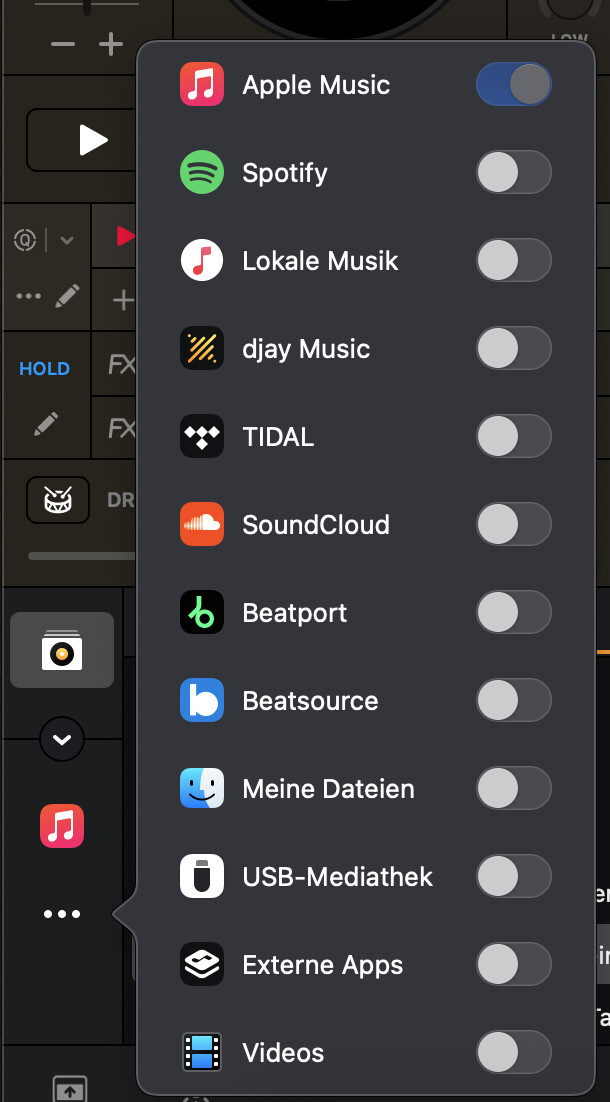
where do I find “My Files Source”?
Do you mean the menu which services should be listed as source?
I deactivated everything, and also logged out from AM (last entry could not be removed) and restarted djay. History still displays empty tracks for couple of minutes, but fills the titles then withoutt doing anything. Titles can be played from the history afterwards without any problem.
Ratings of single tracks still do not show up
hi @Slak_Jaw
Given the delay in getting a response to my problem, it’s a sign that it must be a BIG problem!

Hi @DJTimTurner, this is the My Files source:
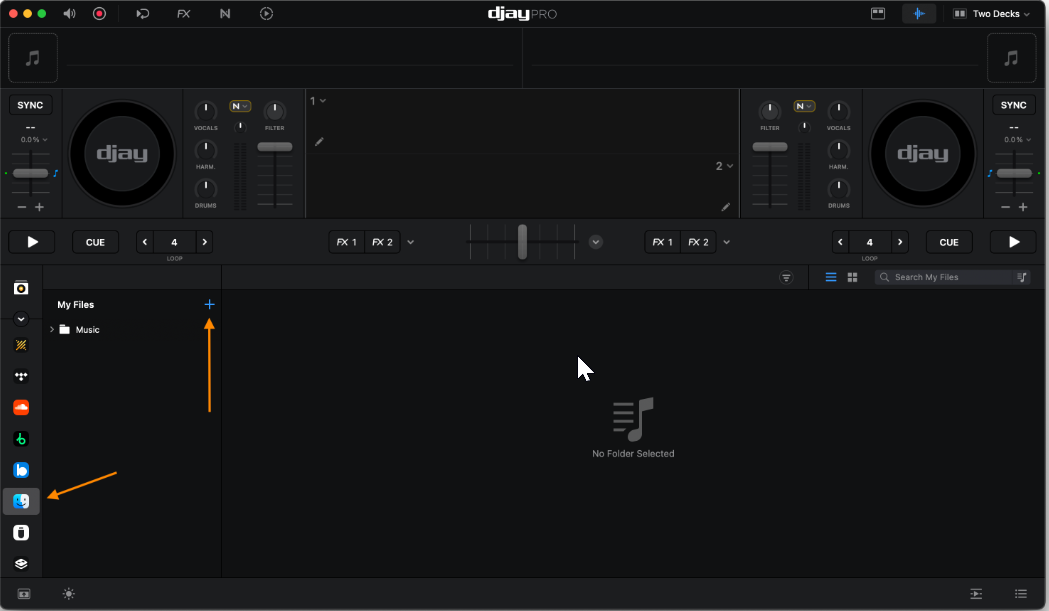
Maybe share a screenshot of this source with the Music folder at the top below My Files expanded so we have a sense of what you have here?

Thanks for confirming @DJTimTurner. I’ve shared this info with engineering…
@Slak_Jaw
Sorry to ask!
But haven’t they identified anything in the files I sent that could be my problem? We’re approaching another weekend where I have two presentations, and I’m afraid to use djay pro in case it stops working…
Hi @brunolima, our engineering team has not been able to identify the problem yet. When I have more news, I will share it here.
Hi again @DJTimTurner and @brunolima, have either of you at any point played music files that were from an external drive or an external network drive?
Not that I can remember, maybe from Apple Cloud Drive or an USB stick. But I try to avoid this and copy all files in general to MacBook local hdd.


