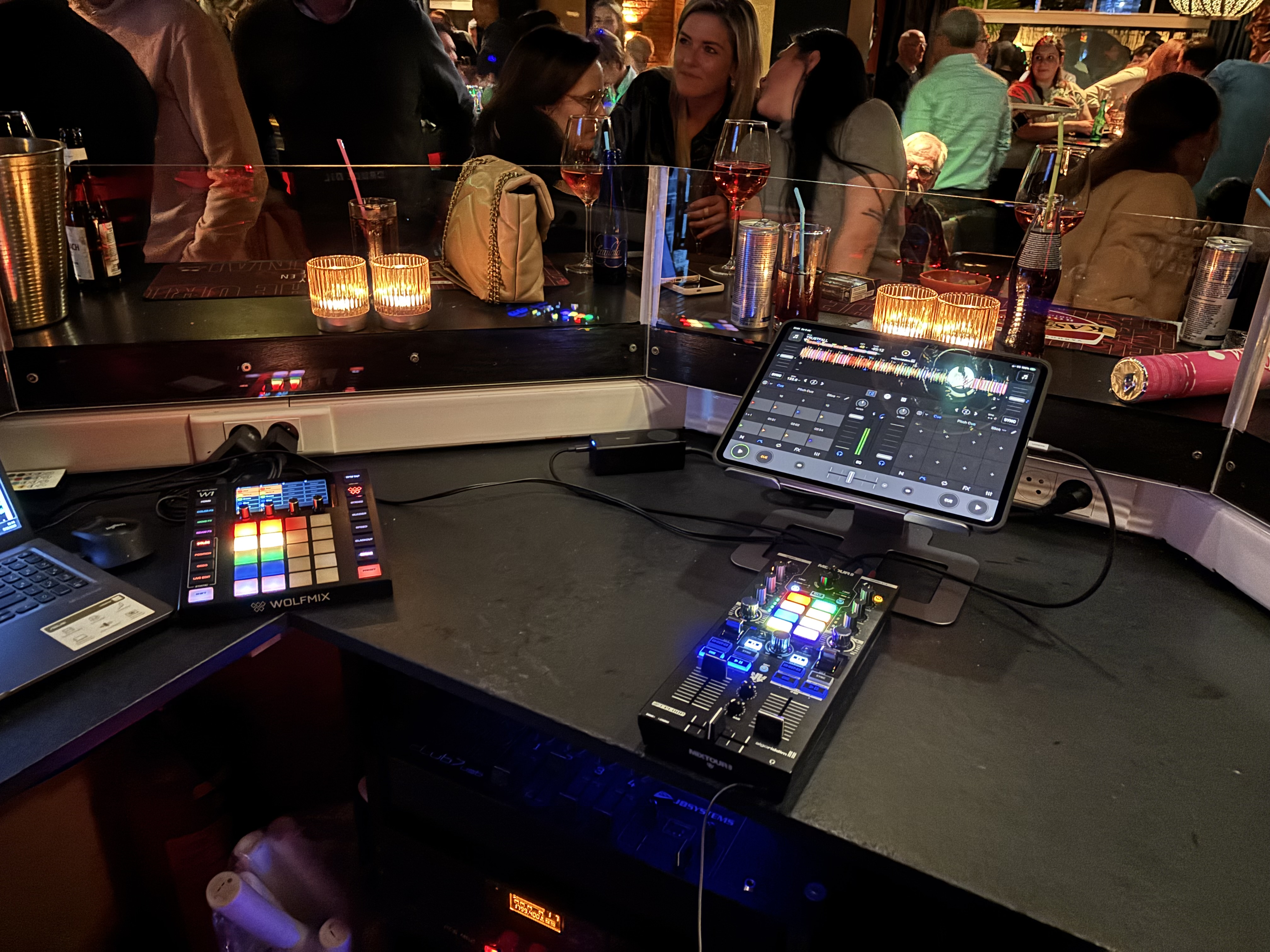
Looks like Luke has switched away from using the Mixture Pro, back to Pioneer CDJ’s. I wonder if his licensing deal has ended and now we’ll see prices drop to something reasonable ($250?). Currently it’s $50 (USD) lower than it’s ever been (edit: still $500)
I don’t want to be down on the guy, so I won’t. But from what I’ve seen of him over the years, he seems to chop and change, maybe to freshen things up with his DJ’ing.
I do agree the Mixtour Pro is a tad expensive, but it’s a genuinely quality bit of kit and if the workflow suits, I’m sure it’ll last for years. I bought one, but I bought mine 2nd hand and for what I paid for it, I’m happy, although I’ve been looking for a Mixon 8 pro 2nd hand too.
I’ve got a little side project going where I’m building MIDI Mapping Keys for hardware that I own or have access to. I know this device has been around for a while now and the silk screening does a pretty good job, but here’s my mapping key for the Default (built-in) djay mapping anyway.
Reloop Mixtour Pro — djay 5.6.7 MIDI mapping (built-in)
The Mixtour Pro is a 4-deck controller: the left side drives decks 1/3 and the right side decks 2/4, with MODE+LOAD (13) toggling which of the pair each side controls. Every deck control below is mirrored left/right.
KEY
ACTION
SHIFT or MODE (SECONDARY) ACTION
1 GAIN
Deck channel gain
—
2 HIGH // VOCALS
High EQ. Neural EQ mode: Vocals stem level.
—
3 MID // HARMONIC
Mid EQ. Neural EQ mode: Harmonics stem level.
—
4 LOW // DRUMS
Low EQ. Neural EQ mode: Drums stem level.
—
5 FILTER
Bipolar filter (LPF left / HPF right)
—
6 NEURAL (N)
Toggles the EQ knobs (2/3/4) between 3-band EQ and Neural Mix stem levels.
—
7 MAIN
Master Volume - Not mapped
—
8 CUE VOL
Headphone Volume - Not mapped
—
9 CUE MIX
Cue/Main headphone blend
—
10 LINE FADER
Deck channel volumes
—
11 CROSSFADER
—
—
12 BROWSE
Browse library; turn to scroll (also seeks the track, or moves the loop-out point while looping). Push moves between sections.
SHIFT: Library Back (push). MODE: Track Seek (turn)
13 LOAD
Load track to this deck.
MODE: Deck 3/4 Select
14 DECK
MODE+LOAD=Switches the side between decks 1/3 and 2/4.
15 MODE
Selects the pad mode: Hot Cue - Auto Loop - Bounce Loop - Sampler - Pitch Cue - Saved Loops - Instant FX - Neural Mix. Also enables other Secondary Actions.
—
16 SPLIT
Single/Split pads: all 8 pads to one deck, or 4 per deck.
MODE+SPLIT=Single, all 8 Pads for one deck
17 IN-OUT-EX
Loop In / Out / Exit.
Auto Loop on/off
18 SYNC
Sync
Key Match
19 CUE
Sets a temporary cue point when paused, or returns to it when playing.
SHIFT: Tempo Nudge (—). MODE: Key Shift (—)
20 PLAY
Play/Pause
SHIFT: Tempo Nudge (+). MODE: Key Shift (+)
21 PITCH BEND ◄►
SHIFT: Nudges tempo down/up. MODE:
Key shift down/up
22 FX PADDLE
Deck FX on/off. Push up (ON) latches; pull down (HOLD) is momentary.
SHIFT: Backspin
23 PARAM ◄►
Adjust the FX parameter.
MODE: FX Select prev/next
24 DRY/WET
FX depth (dry/wet)
—
25 DECK1 PRE-CUEING
Deck 1 Headphone Pre-Cueing
SHIFT: Crossfader FX Toggle
26 DECK2 PRE-CUEING
Deck 2 Headphone Pre-Cueing
SHIFT: Crossfader FX with tempo blend
27 PADS
HOT CUE: Set/Trigger Hot Cue 1 - 8. BOUNCE LOOP: 1/32 - 1/16 - 1/8 - 1/4 - 1/2 - 1 - 2 - 4 beats. PITCH CUE: Pitch Play from the cue point, 8 steps. INSTANT FX: Instant FX 1 - 8. AUTO LOOP: 1/4 - 1/2 - 1 - 2 - 4 - 8 - 16 - 32 beats. SAMPLER: Trigger slots 1 - 8. SAVED LOOPS: Save/recall loops 1 - 8. NEURAL MIX: pads 1-4 toggle Drums - Bass - Harmonics - Vocals; pads 5-8 solo them.
SHIFT: HOT CUE: Clear Hot Cue 1 - 8. PITCH CUE: Set the pitch-play cue points. SAMPLER: Pause slots 1 - 8. SAVED LOOPS: Reloop 1 - 8. Other modes repeat the primary layer.
28 MONO/STEREO
Switch between Mono and Stereo Audio Output. Not mapped
—
S SHIFT
Hold for secondary actions in the SHIFT column.
—
H HEADPHONES
Headphone output (3.5 mm)
—
Pad modes in full (8 modes × 8 pads, base / SHIFT)
Pad mode is chosen with MODE (15); SPLIT (16) decides whether all 8 pads drive one deck or split 4-per-deck.
HOT CUE — Pads: Set/Trigger Hot Cue 1 - 2 - 3 - 4 - 5 - 6 - 7 - 8. SHIFT: Clear Hot Cue 1 - 8.