


Yeah it’s Pad Mode #6. djay doesn’t offer entire “Pad Mode Switching” like Serato does. Each button must be MIDI mapped individually. In the case of my mapping, I mapped the top 4 pads to NM Mute and the bottom 4 pads to NM Instant FX.
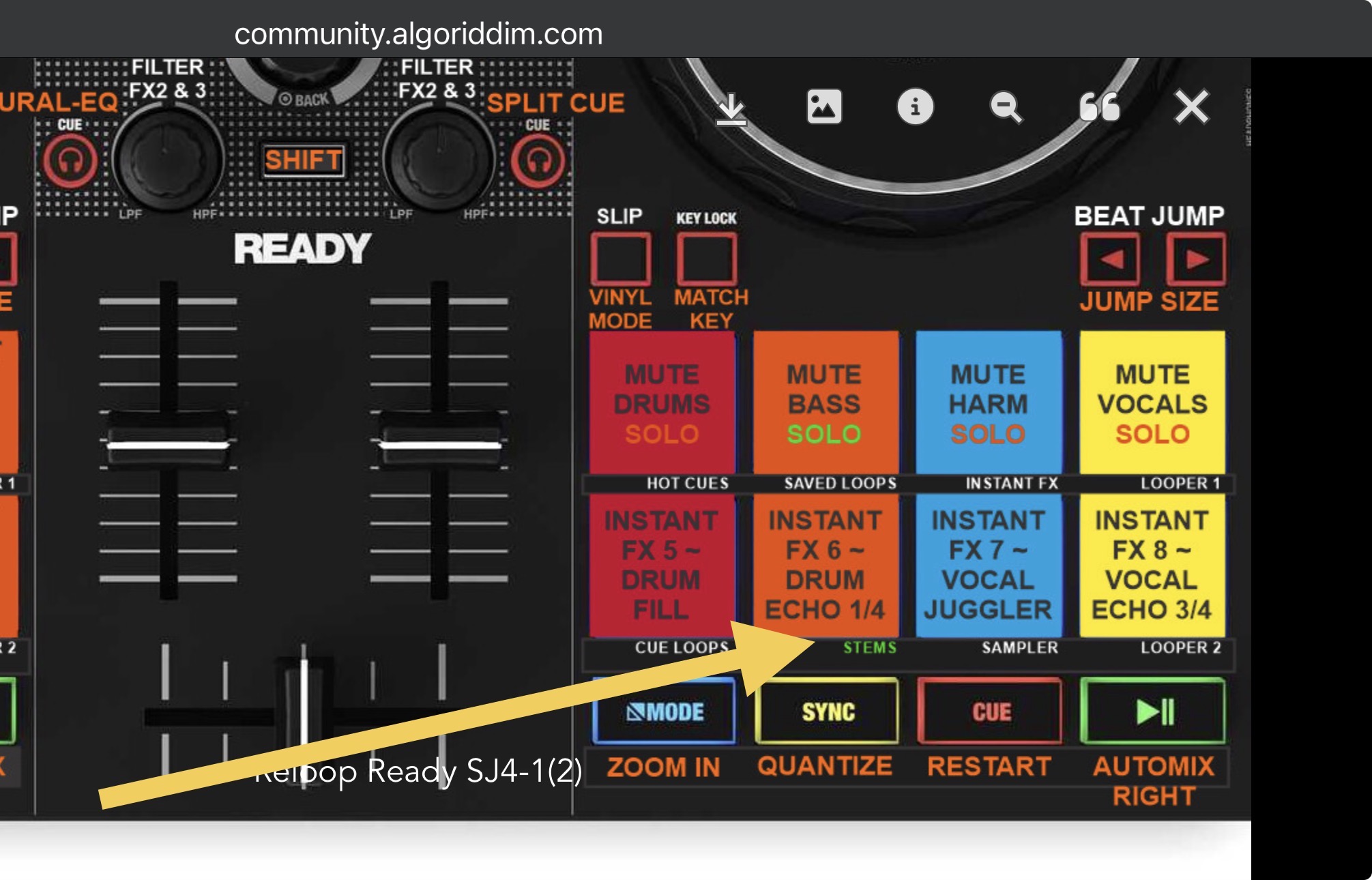
- STEMS PADS: this Performance Pad Mode provides control of all 4 STEMS in djay.
a. The Top Row controls Mute for each of the 4 STEMS.
b. SHIFT+ Mute will Solo each STEM only while the button is Held.
c. The Bottom Row is set to Instant FX 5-8. The Instant FX assignments need to be set in djay by editing the pads. Check out this discussion for more details (DJ TechTools Midi Fighter Spectra - Neural Mix / Serato STEMs Mapping).
d. I prefer Drum Fill, Drum Echo 1/4, Vocal Juggler and Vocal Echo 3/4 myself.


