


Ok. This is officially a problem. I can preview my transition in cue multiple times, but when I go live with the track (fader is up) Djay is trying to compensate for a problem that doesn’t exist. It’s slowing down and speeding up the track when the tracks are synced, but only when the tracks are both live during the transition. It’s incredibly frustrating because being back on Serato (System One) I don’t experience this. I see someone mention disabling dynamic beat grids (which I didn’t know you could do, so I’ll try that) but I hate losing that feature and don’t understand why Djay is trying to line up tracks that are already perfect. I can see the wave forms lined up and of course hear it with my own ears. Maybe Djay needs an option to ignore dynamic mode if tracks are already lined up? I dunno. But I know it causes train wrecks for transitions - but again - only when both tracks are live.
Hi @Scott1, do you have Crossfader FX enabled? If so, make sure Tempo Blend is not enabled. Try setting it to Sync only.
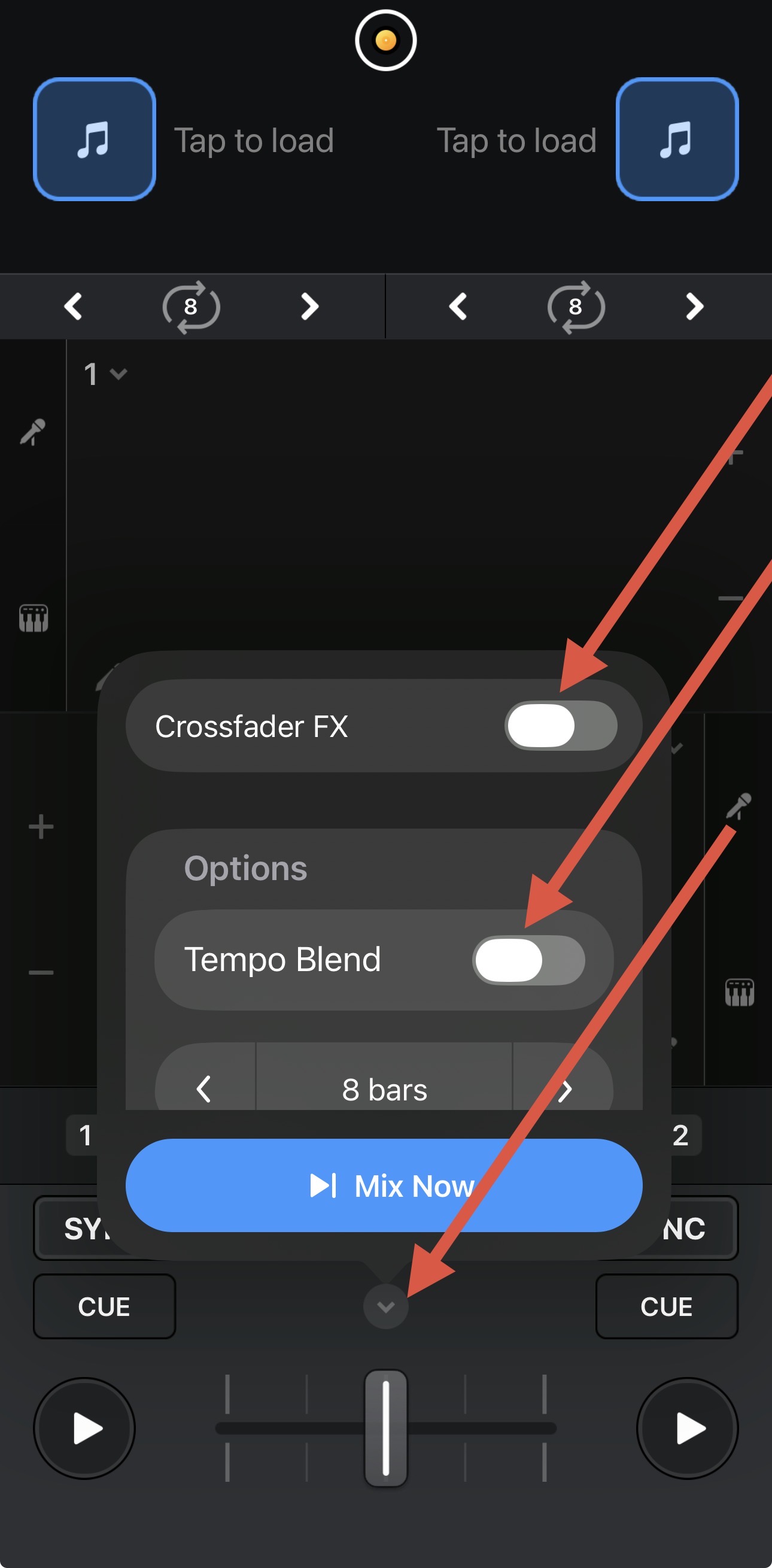
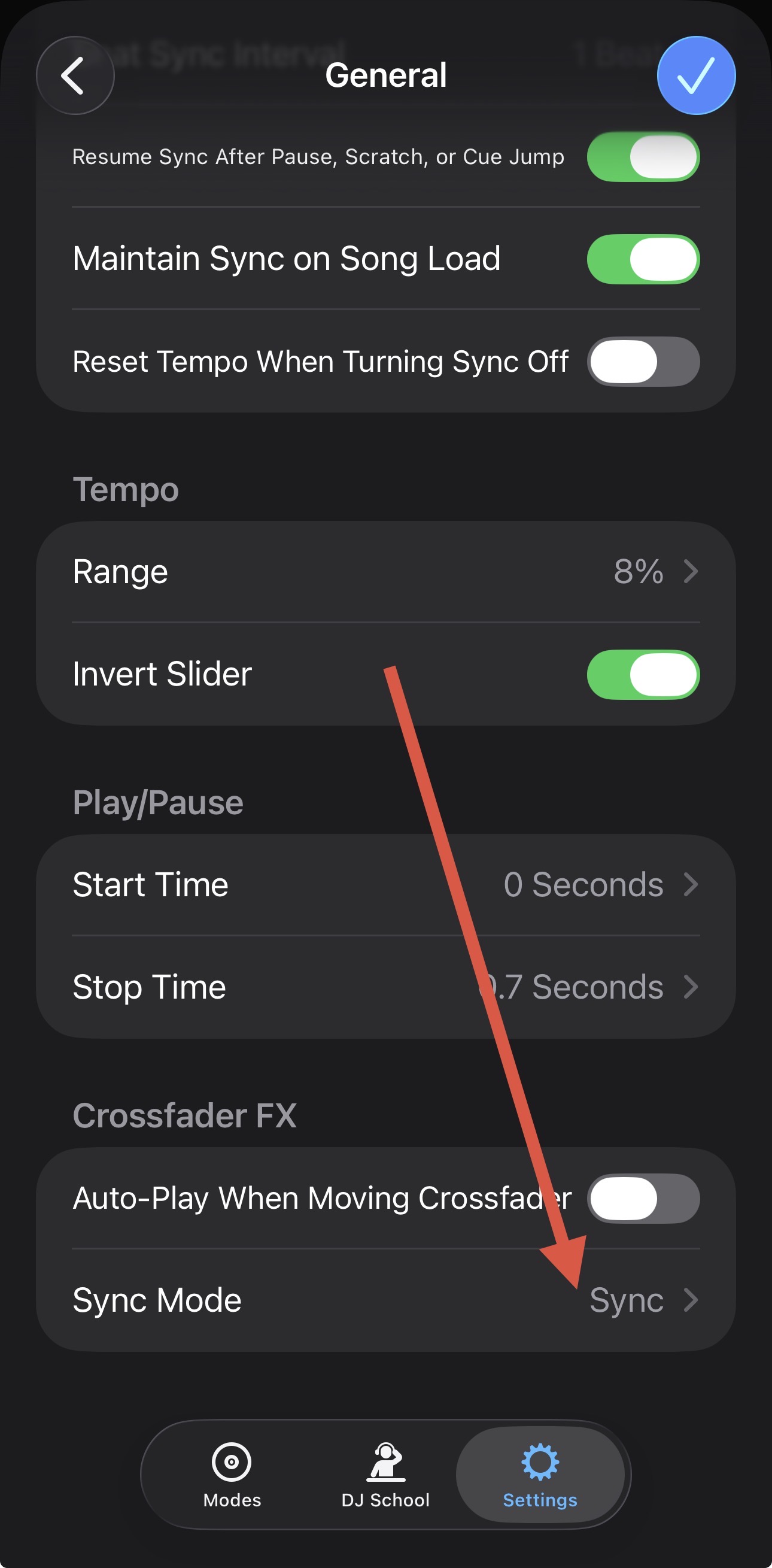
Slak, always on the job! Thanks for the response, but no. I do not use Tempo Blend so that’s not the issue. It’s disabled. Any other thoughts?
You’re welcome @Scott1. Can you please share are screen recodring to clarify what’s happening?
I will grab that tonight! Thank you!
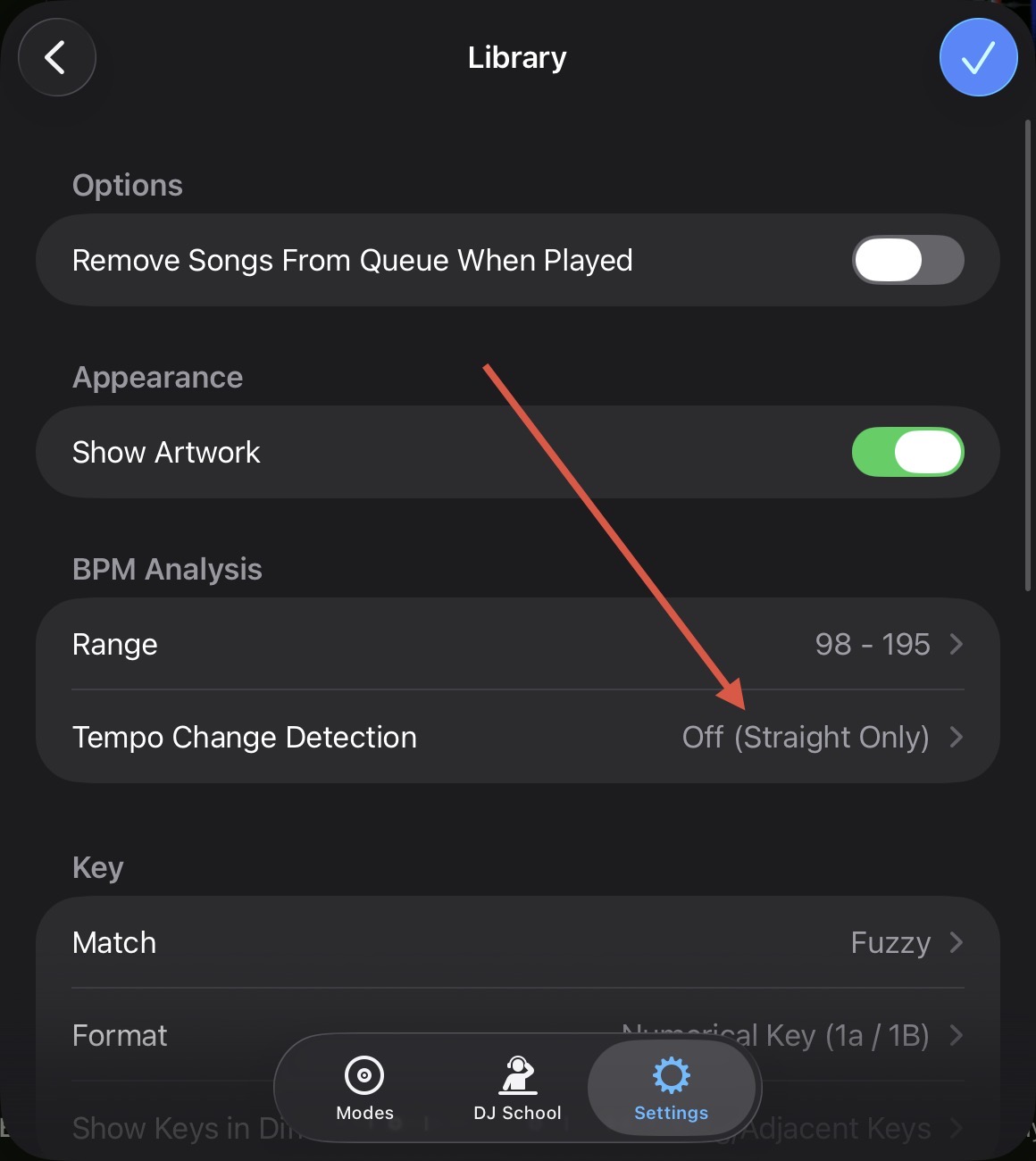
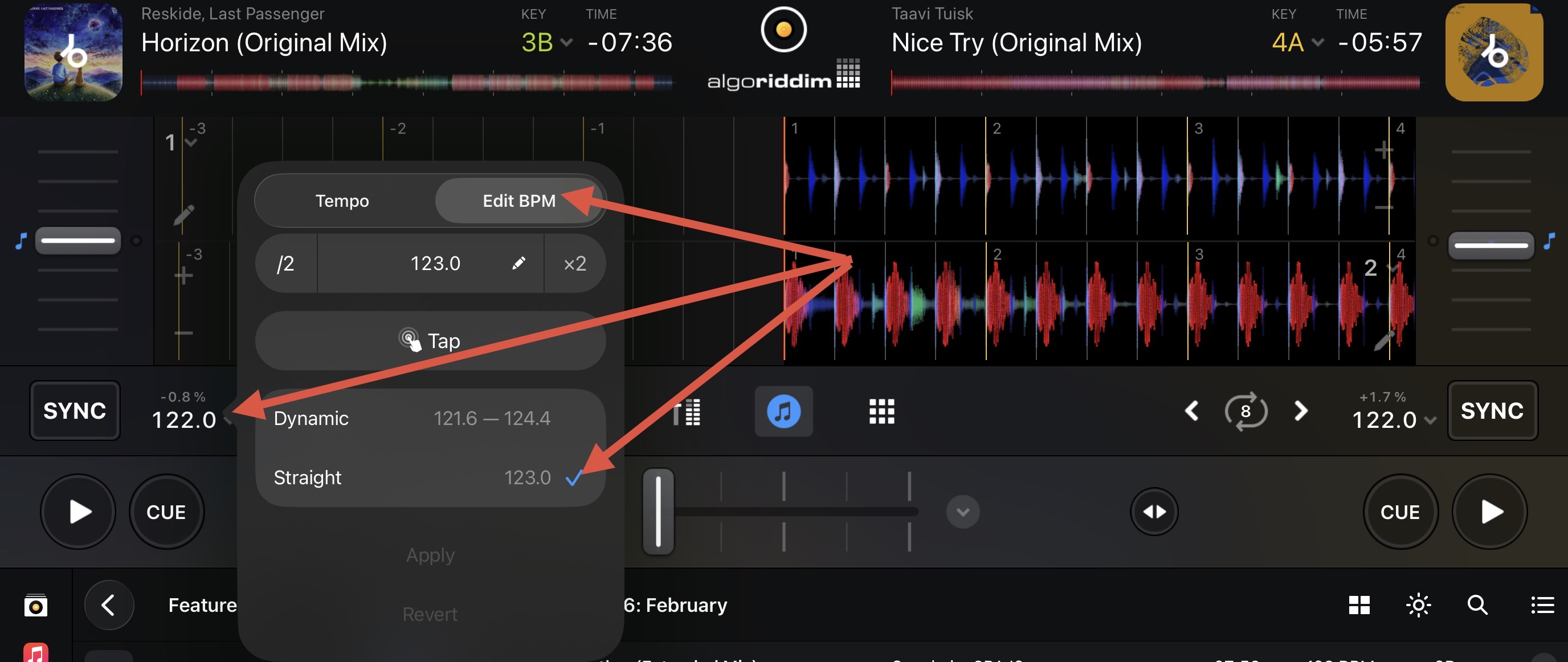
Sounds good! You’re welcome. In the meantime, you have a couple of options when it comes to Dynamic BPM settings:
- If most of your songs are straight BPM, you can force this globally in the djay Settings>Library>BPM Analysis>Tempo Change Detection>Off (Straight Only).
A. - However, if instead you only have this issue with a small number of songs and prefer to keep this set to Automatic, you can change is on a per song basis:
A.
Thanks for the tips! I will give these a go and report back! Have a great day!
You’re welcome @Scott1. Thanks!
Well, sad to report. This made zero difference during my event this morning. It still seems to snag the song (almost sounds like the song is playing from tape and the motor jerks it quickly. Literally makes the song almost sound like it’s being scratched) and again it only does it when the song is being played live. I can run it with the fader down a hundred times and it doesn’t do it, but as soon as the fader is up when I’m doing the transition, bam. Sounds terrible.
Now at the end of the day it’s no biggie because I can beat match fine without sync, but I can’t do some of the BPM changes I like to do without it. And honestly it shouldn’t be doing this. I didn’t grab a video (because during events I’m hyper focused on the show) but I’ll grab one later tonight or in the morning.
Appreciate all of the help.
Hello. I know this is an old post but if @Scott1 and @DavidScottCole are the same people i have some input about this.
I would imagine you already know this but please see at this thread first Add "Anti-Drift" option for rotating platters
So basically by the nature of spinning motors (and with another bunch of factors) that sends information to the software the timecode isn’t precise like digital. Thus this creates the minor drifts.
But here is the kicker (which is the reason i write to this topic). Op setup includes a “iPhone 14”. Well if this is still true main problem in this case is the “iPhone 14”. Because when i use my “iphone 14 pro max” i also have the bpm all over the place problem so much that it is unusuable.
In that setup i use hercules dj control ultra via bluetooth. And splitter cable for precueing. As you can see I dont have anything that can create any drift besides bluetooth lag that has nothing to with this scenario. Yet i have the same issue with iphone 14 pro max. When i switch to base model apple macbook air m1 same song same transitions, much more effect but no issue at all!
Simultaneous use of bluetooth, Wi-Fi network, limitations of lightning port, bunch of background tasks limits “iphone 14”’s processing capacity. Newer models not only have usb-c port but also a neural engine cores for AI tasks which makes more powerful.
So if you have a chance to try different computer windows desktop or laptop, apple macbook, newer ipad or iphone I would imagine most problems you have will go away besides the natural drift.
Thanks for the follow up @Scott1. Sorry to hear that didn’t help. As requested earlier, please share a short screen recording or video to clarify the issue you’re describing. Thanks!
I’m not experiencing any noticeable drifting but thanks for the info!
And as noted my problem only happens when the track is live and only happens very quickly when I start the track.
If it’s possible, Djay is doing some sort of train-wreck, over compensating to sync a track if it thinks it’s not in sync because of drifting - I guess anything is possible. But I don’t experience any other drift related problems while using it. It’s frustrating because I love my Djay experience in every other way. Worth noting.
I’m using Rane moving platter hardware. So there’s possible merit in bringing up the drifting, but I’m just not experiencing it in the traditional sense.
Now saying that, I am surprised Djay doesn’t feature an anti-drift option, so I will definitely use a vote toward that being implemented.
About to pull myself out of bed and do this! Haha I used Serato last night on the System One and while it was nice not having this problem, I still missed Djay. 
Did you try this besides “iPhone 14”? Does it happen on laptop with djay?
I don’t have an iPhone 14. I’m not the original poster.
Hey @Slak_Jaw Ok here’s a video showing exactly what’s happening. Thank you!
Thanks for the video @Scott1. This definitely looks unusual. I’ve moved this to it’s own topic as I think this could be a unique issue. Please share full details of your setup as I will need to pass this onto our engineering team to see if they can reproduce it.
Device Model (ex. 2020 iPad Air 4th Gen):
Version of operating system (ex. iOS 17.3.1):
Version of djay (ex. 5.1.3):
Hardware/controllers used (ex. Reloop Ready):
Hardware Firmware Version (ex. 2.7):
- Does this only occur when your hardware is connected? Can you please try to reproduce by running djay only with your laptop?
- How exactly are you connecting your hardware to you laptop (any USB hubs or USB adapters)?
Thank you for the help! Here’s the info…..
You’re welcome @Scott1. Thanks for the additional info.
Thanks again!! I hope something can be figured out! Have a great rest of your weekend! Appreciate the weekend assistance!


