- Device: 2024 Lenovo Legion 5
- OS: Windows 11
- Djay Version: 5.6.2.
- Controller: FLX 6 GT
- Hardware Firmware: 1.12
Experiencing “choppy” jog seek and tempo adjust features. Jog seek doesn’t work at all as a result, and I am unable to fine-adjust track tempos.
My controller works perfectly normal and proper when tested on Rekordbox. Problem began after updating Djay to 5.6.2 .
I’ve uploaded videos of the bug occuring to this folder:
Hi @slimeking446, welcome to the Community! Sorry to hear you’re experiencing this issue.
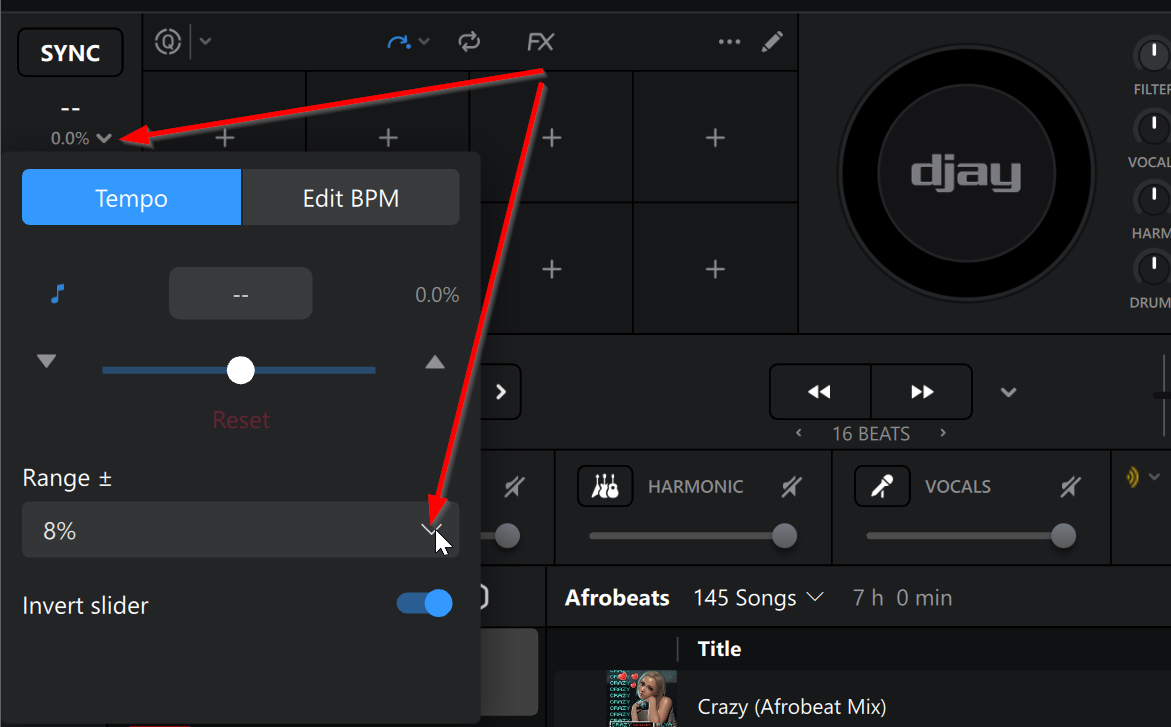
- For the Tempo Issue, please try reducing the Tempo Range to 8%, 6% or 4% to get more smooth accuracy?
- For the jogwheel seek issue, can you please confirm if you are using the (built-in) MIDI mapping for the FLX6 or a custom edit.
- Please also try connecting to your laptop with a different USB cable and to a different USB port on your laptop.
NOTE: Please use the search function above before posting to avoid creating duplicate topics.
- Device model (e.g. 2020 iPad Air 4th Gen):
- Version of operating system (e.g. macOS 14.4.1):
- Version of djay (e.g. 5.1.2):
- Hardware/controllers used (e.g. Reloop Mixon 8 Pro):
- Hardware firmware version (e.g. 1.0.1):
- Please consider sharing a short video or screenshots to help clarify your question
YOUR QUESTION:
- Hi guys,
I am having an issue today with DJ pro on PC.
If I use the shift key and jog wheel to attempt to scrub though the track it only move in tiny increments where as before it was scrubbing though bar by bar.
I have tried this on multiple controllers (FLX10 , DDJ400 and DDJ200) and it seems to be happening on all controllers.
Does anyone have an idea on how I can resolve this issue?
Kind regards
David.
2 Likes
Hi @David_Logue, I’ve merged your new topic with this existing one as they sound related. Can you please confirm if your Windows 11 is version 25H2? @slimeking446 can you please confirm yours as well?
Yes I’m using windows 11. 25h2.
Personally I have experienced none of the issues stated in slimekings post.
My issue is only when I am trying to fast search though tracks using shift and jog. I would upload a video but I do not have permission yet.
I’ve changed your permissions. You can upload a video now.
here you go.
This is what happens when I try and scrub though the track (shift and jog wheel)
Thanks @David_Logue, yeah this looks exactly like one of the videos that @slimeking446 shared above. We’ve had several reports of unexpected MIDI and audio behavior caused by 25H2. You could try rolling back to Windows 11 version 24H2 to see if that clears up the issue.
I cannot go back, the option to go back is already greyed out.
@David_Logue in that case, I recommend you contact Windows Support to get instructions on how to return to 24H2. There are some options available, but I’m not a Windows Support Technician so I can’t really instruct you there.
Alternatively, you could try restarting the “Windows MIDI Service” after connecting your controller.
Important Steps First:
- Connect your MIDI controller before restarting the service.
- Close every MIDI-using app completely:
- djay
- DAWs (Ableton, Cubase, FL Studio, Reaper, etc.)
- MIDI monitors, loopMIDI, Bome, virtual ports, etc.
- Even background tools like MIDI-OX or hardware control software.
Next Steps:
- Press Windows key + R.
- Type services.msc and press Enter.
- Scroll down the list until you find Windows MIDI Service (it’s usually near the bottom, alphabetical under “W”).
- Right-click Windows MIDI Service.
- Click Restart.
A. If “Restart” is grayed out → click Start instead (or Stop first, then Start).
- Wait 5–10 seconds until the Status column shows Running.
- Close the Services window.
@Slak_Jaw
Even when set to 4%, 6%, and 8%, the Tempo Adjusting was choppy and hard to get accurate, almost as if the tempo values were “snapping” into place in increments of .2 or .4. I think it is indeed connected to my other issue.
In my videos I was using the built-in MIDI mapping. A different cable and port were tested as well to no avail. Resetting Windows MIDI Service did nothing to fix the Tempo Adjust or Jog Seeking either. I will attempt to roll back my Windows 11 to 24H2 and report back with my findings.
1 Like
Thanks for the additional info @slimeking446. Well, this is really sounding like a 25H2 issue to me. Please report back if rolling back to 24H2 solves the issues. Thanks!
Unfortunately, I have nothing new to report at the moment as I am unable to revert to 24H2 without doing full system reset, which I have decided to pass on for right now. I may eventually follow through with this rollback in the future, but I’m gonna keep looking for other solutions/workarounds in the meantime.
Thanks for the follow up @slimeking446. I’m pretty there is a way to uninstall the latest Windows update, but I recommend you contact Windows Support or do your own research on the proper steps.
Yeah, online it says it’s possible if it’s within 10 days of installing the update. After 10 days Windows automatically deletes the recovery file for the previous version to save space. In Settings this option is called “Go Back” and as David mentioned above, it becomes greyed out once the file is deleted. Nonetheless, I will keep researching and contact Windows if it comes down to it.
I believe there is another method that works after the 10 days.
Do you have an update on this?
Is it likely to be something that will need to be addressed in the next DJ update?
I would try to reinstall DJ pro but I’m terrified of loosing my collection library again. Every time I have tried this |I have been unsuccessful in importing my old library back in.
We don’t have any updates. This is likely something that needs to be addressed with a Windows update. This is why I recommend you contact Windows Support to share the issues and get instructions on how to revert to 24H2. There have been reports of MIDI and ASIO Audio Driver issues with this update that are not isolated to djay.